1803 Creations
Members
-
Joined
-
Last visited
Everything posted by 1803 Creations
-
 I know that one of the recent GTAV updates caused Scripthookdotnet to fail and it needed an update. Not sure if this happened again, I know you already said you have the latest version, I would just double check that you do. I haven't noticed that it broke yet but I also try to avoid updating if things are running stable for me until the game forces me to update so I'm not sure if it was an update or not. My script is still working as of now.
- 87 comments
- 2 reviews
-
-
 Yes, I do not change the "assembly" version, or "assembly file version" I will look into changing the assembly name every time if you think its a big deal but I'm not going back and editing all of my current projects to match. When I upload a new version, the file/folder names/structure is how I keep track of versions. I also post comments when I upload to Github so when you look in the repository, it is clear which versions are out there.
 -
-
-
-
-
 Technically yes, the dll files for the speed limit shower can go in the root of GTAV but it makes more sense to put them in the scripts folder for organization. If it is still not working, take a look at the ragepluginhook.log and it should at least tell you it loaded/failed to load and why.
- 15 comments
- 1 review
-
-
My guess is you don't have the newtsonsoft dll file which is used to read/use JSON files. I will include it in the next update, you can find it here: https://www.nuget.org/packages/Newtonsoft.Json/
- 15 comments
- 1 review
-
-
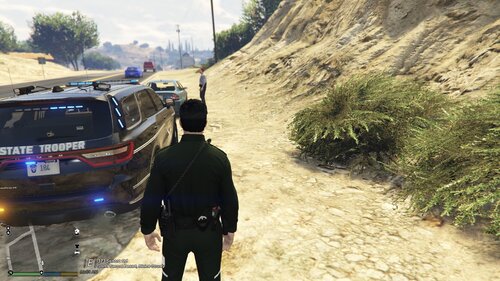 You can create a new folder called scripts at the root of your GTAV directory and place any/all script files in there. You also must have scripthookdotnet for these scripts to work.
- 84 comments
- 1 review
-
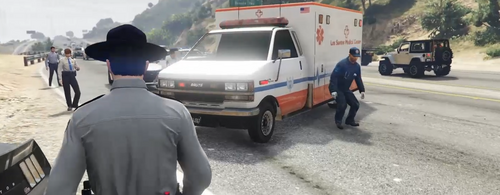 Thanks for your suggestions. Thanks for your suggestions, Usually the NPC's that are in the callout are supposed to be witnesses and/or stayed on scene when crashing into something. I will look into them being invincible as they should not be. Speed Trap: I always see lots of speeders but I also use my speeders mod that spawns speeders near the player on the highway. Try spawning on Great Ocean HWY and set the radar down? The Speed Limit is 50 mph there. Racers: I will look into ending the callout if all spawned speeders die but if only one dies, I wont end it. Suspicious Vehicle: I'll add a delay Highway Patrol Traffic Stop has four scenarios, I will look into adding the a ticket prop for the ticket scenario. I personally think using a key to end a callout is annoying, I try to use my keyboard as least as possible. I use the StopThePed menu which can be opened on my controller and it works to end every/any callout every time. If its a huge deal and many people request it, Ill look into adding it. Also: This is an open-source callout pack so if you have the time and want to make improvements/changes, I have no problems with that as long as you don't sell and give me (1803 creations) original credit if you upload. Not sure when I will get around to updating this as I am focusing/learning on how to create my own game in nReal engine but you will likely see some of your suggestions in the next update.
 -
Did you change something in the file? If you changed the file, just replace it from the download or scan it to AI, AI will fix it for you.
- 15 comments
- 1 review
-
Thank you! Ironically someone gave me a 1 star rating on my speeders script on the other site because they didn't read the description and said there was no install instructions, LOL! I appreciate the kind words and feedback! If you do use/download any of my mods, let me know what you think/if you have any ideas for improvements!
- 84 comments
- 1 review
-
-

- 1
-
-
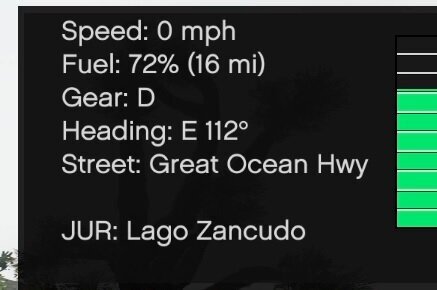
This is release V1.2 of my Car HUD. This is a scripthookdotnet script. Files go into the GTAV\Scripts folder. Showcase: https://www.youtube.com/watch?v=3bs_zvPYR5w The Car HUD Shows: Speed, Gear, Direction, Road, Fuel Levels Fuel system can be turned on or off in JSON file. Other settings are configurable in the json file. There is also a separate json file to manage refueling stations. Settings like fuel range, screen placement, and MIles/Kilometers are in the CarHUDDisplay.json file. Also included and can be turned on/off is a refueling system. Fuel System settings are in the CarHUDDisplay.json Locations for refueling has its own file: CarHUDDisplay.RefuelLocations Here is a picture of what it looks like:
-
I have not seen the Train Tracks issue, I will look into it. I think I need to change the spawn point in North Chumash, Ill take a look and test, thanks.
- 87 comments
- 2 reviews
-
-
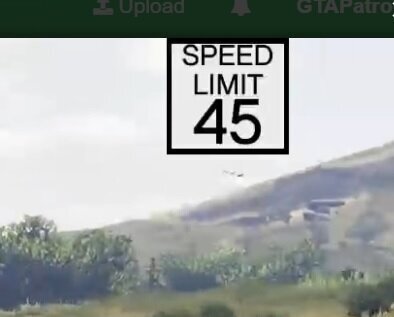
Files go into GTAV\scripts folder. Showcase: This script will display the speed limit for the road currently on as defined in the json file. This has no actual influence on AI Driving, it is just used to show speed limits. Press F10 in game to turn on/off. Default is turned on when script is loaded. The JSON file is used to configure speed limits . If a road is missing, you can add it, I added East Joshua Road to the Json file and after reloading scripts in-game, it did work. (There is a default for roads not defined in the JSON file too).
- 15 comments
- 1 review
-
-
-

- 3
-
-
-
-
-
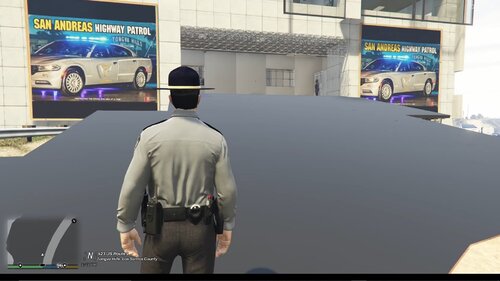 This is a map that was moved and edited to Great Ocean Hwy, Tongva Hills. I made it a Highway Patrol Station, but the texture files are included to change the signs. The original map was created by Planete's GAME and is named "Police Center Harmony" This map was edited and moved by me with the assistance of AI. I do not claim original ownership. I moved and edited props. Original map: https://www.gta5-mods.com/maps/police-center-paleto-bay-ymap-fivem Showcase: How to install: (Required) Place the 2 ymap files in Custom Maps: Grand Theft Auto V\mods\update\x64\dlcpacks\custom_maps\dlc.rpf\x64\levels\gta5\_citye\maps\custom_maps.rpf\ (Optional) The San Andreas Highway Patrol Tongva Hills graphic is included in the download. To make the sign outside the building work, you will need to replace the ydr and ytd "apa_mp_h_acc_artwallm_02" files in the location below: Grand Theft Auto V\mods\update\x64\dlcpacks\mpapartment\dlc.rpf\x64\levels\gta5\props\high\int_mp_h_props.rpf\ The apa_mp_h_acc_artwallm_02 files can be customized if you know how to use texture toolkit. You will have to replace the ydr file and ytd files to make/use your own sign. I've also included a texture. Its 512x512 (you're welcome) MAP EDITOR (Optional) If you want to load some business workers and highway patrol AI peds and if you have map editor: >Copy the tongvahillspatrolpostpeds.xml file to your GTA directory >load map editor, load map, tongvahillspatrolpostpeds.xml If you want to change your station to police or sheriff, using map editor to change the peds is easy so hopefully this allows for easy flexibility.
 -
According to another user, Scripthookdotnet has an update that resolves the issue. https://github.com/scripthookvdotnet/scripthookvdotnet-nightly/releases. Make sure that is the update that you've ran and that should fix the issue.
- 84 comments
- 1 review
-
Thanks for the update! According to another user, Scripthookdotnet has an update that resolves the issue. https://github.com/scripthookvdotnet/scripthookvdotnet-nightly/releases
- 87 comments
- 2 reviews
-
-
- 1
-

.thumb.jpg.5d87250f4558cca01dcb5407f198bdc4.jpg)
.thumb.jpg.53b34831893b714bdea2520e5d0a8595.jpg)