


1803 Creations
Members
-
Joined
-
Last visited
Everything posted by 1803 Creations
-
 The ini file will be the same name for either script, "1803 speeders.ini". Make sure you are only using one version, don't use both versions of the script files. I just realized the ini file is missing in the download for both version, my mistake, I changed my ini file for my copy to match my add-on cars and I forgot to put the default ini in the upload for V1.7. I will add it now, you should see it in the download by the time you read this.
- 87 comments
- 2 reviews
-
-

- 2
-
-
-
It should be compatible with any radar system Try the new patched version included in the new upload if you are still having issues.
- 87 comments
- 2 reviews
-
-
 Awesome! Will love to see it! I'm sure you probably already have an idea, but here are the cars I see around Ohio: Dodge Charger FPIU (14, 15, 16, 18, 20, 25) FPIS Chevy Caprice Old and New Tahoe Durango Not around anymore but cool to play: CVPI Chevy, Dodge, and Ford Trucks
- 161 comments
- 13 reviews
-
Great pack with a wide variety of models. I have changed the skin on the 21 Durango and 26 Tahoe to Ohio Sheriff Cars as I've seen those around lately. Thanks for having the newer models!
- 161 comments
- 13 reviews
-
 Looks dope!! I have been messing around with creating a callout where AI drives a helicopter and can blip/radio speeders from the sky down to the ground unit (Player). Still working on it. This probably wouldnt work for me as it looks to be for the player and not AI. I got the idea from a youtube video I saw recently where Ohio State Highway Patrol using their speed planes but I don't think they use radar, they use the lines on the road to tell the speed from the air. I may give this mod a try for player air support if I can figure out how to make an exception for planes/helicopters for my fuel mod I made. Love to see this! We need more helicopter/plane mods! Another possible idea that you could integrate with this is an Ariel map with road names while in flight. Maybe something like the 20 min or 21 min mark on this video: https://www.youtube.com/watch?v=r-0r5RTz1nw
 -
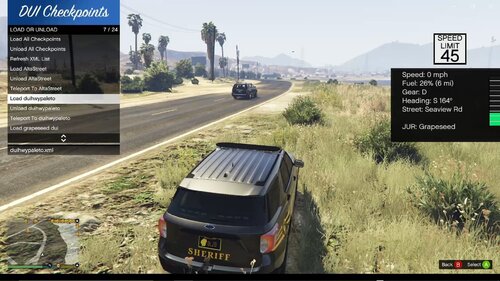 This is an idea some of you have came to me with and I have finally decided to build it. This is a map loader script that loads Map Builder xml files. The mod will open a menu and you can choose which xml files you want to load. This is a script. Files go into GTAV\scripts folder. Use F7 (or change in ini file) to open menu. Xml files will be loaded from Grand Theft Auto V\scripts\1803 Map Loader. I have included one Checkpoint on the border of Great Ocean Highway/Senora Freeway near Paleto Bay. When using map builder to load the files, you will notice peds/vehicles/siren lights can/will disappear. Using this mod, all prop, peds, and vehicles will stay on scene. The only exception is if police start a pursuit chase, then they can either get in a car and chase or will chase on foot. Video Showcase:
 -
-
-
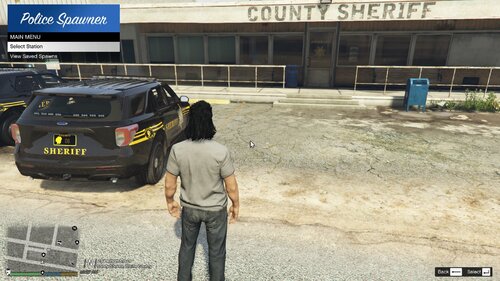
.thumb.jpg.53b34831893b714bdea2520e5d0a8595.jpg) I dont have that working at the moment, I may figure out a way to integrate it with a persistent ped model so its always the same face with he same name at the same location and always same car model. But in favor of other things, like name and plate locking, Ive allowed the game to naturally spawn cars peds and just change the info (like their name and plate) At this point, I would have to add a separate section that handles spawning of persistent peds at persistent locations with persistent cars and then tell this mod to check for those names and dont assign since the other part of the code handles the spawning of those peds. It would be cool to assign them different scenarios too like allow them to drive around and then come back home, or walk around neighborhood, smoke/drink with neighbor scenario, etc. Not sure when I will get around to any of that because for the most part I have been focusing on the patrol part (so names/plates matching cars driving on road to the database I created for this).
I dont have that working at the moment, I may figure out a way to integrate it with a persistent ped model so its always the same face with he same name at the same location and always same car model. But in favor of other things, like name and plate locking, Ive allowed the game to naturally spawn cars peds and just change the info (like their name and plate) At this point, I would have to add a separate section that handles spawning of persistent peds at persistent locations with persistent cars and then tell this mod to check for those names and dont assign since the other part of the code handles the spawning of those peds. It would be cool to assign them different scenarios too like allow them to drive around and then come back home, or walk around neighborhood, smoke/drink with neighbor scenario, etc. Not sure when I will get around to any of that because for the most part I have been focusing on the patrol part (so names/plates matching cars driving on road to the database I created for this). -
Thanks for the info, were you in legacy or enhanced? I've not seen that issue when playing in legacy.
- 87 comments
- 2 reviews
-
I can look into it, I will likely have to create a separate driving behavior section for city streets, I did try having some non-highway streets with the current driving behavior and cars were blowing through stop signs before being able to stop causing car crashes.
- 87 comments
- 2 reviews
-
 Thanks for your suggestion, I will think about it, I do have 5+ traffic stops in this callout and I'm not sure I want to separate them for another callout pack. As far as the frequency goes, I cant really control that, that is more or less the LSPDFR settings. You can use a callout manager and choose the callouts that spawn but that is not automatic.
 -
-
-
-
-
-
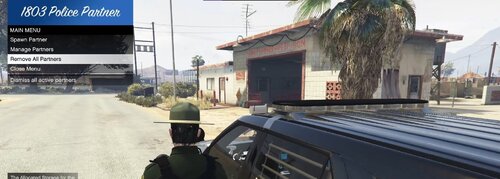 I have not tested it, I assume it works with any police mod as all it does it spawn a police ped that drives around or can be called for backup
- 12 comments
- 1 review
-
.thumb.jpg.5d87250f4558cca01dcb5407f198bdc4.jpg) Added a poaching callout, Still needs tested and refined so its not pefect but take a look and let me know how it looks. I am aware I need to fix issues with callout peds exiting the scene on callout end, but here is the testing version if you wanna give it a try, should be fixed/uploaded when I add at least one more callout (trying to add at least 2 callouts per update) https://github.com/1803creations/1803RangerCalllouts
Added a poaching callout, Still needs tested and refined so its not pefect but take a look and let me know how it looks. I am aware I need to fix issues with callout peds exiting the scene on callout end, but here is the testing version if you wanna give it a try, should be fixed/uploaded when I add at least one more callout (trying to add at least 2 callouts per update) https://github.com/1803creations/1803RangerCalllouts -
Thanks for your update/kind words. Yes, I have seen the train tracks issue you are referring to, I will have to change/mess around with the AI driving. AI driving is currently set to follow road nodes, I will have to figure out which roads nodes those are and remove them and/or try to have the AI drivers avoid train tracks that are not on a main road. I will try my best to get an update in by the weekend but I am also trying to build my own game in nReal engine so that is where alot of my time is right now.
- 87 comments
- 2 reviews
-
-
- 1
-
-
Okay, I have not updated and mine still works in legacy. Have heard it is working in enhanced last time I checked
- 87 comments
- 2 reviews
-
I am not sure if it works with any other mod, It is opensource and the database used is an open Sql Lite Database so anyone that knows how to make a mod that can read/write a SQL Lite Database will be compatible. Stop the Ped is compatible for name and plate info because this mod changes the LSPDFR Persona and also changes the license plates for matching names in the database so as long as other mods are reading the LSPDFR persona data, the names should work like they do for STP, however, any other computer system including STP's CompuLite would not be compatible because they don't know about the local database, they are reading/writing to their own databases, not the local SQL Lite database.
-
Testing a new version now, I uploaded it on Github if you wanna test it On Github: Check the persistentworld folder then the bin/debug folder and replace the files in your GTAV/plugins/lspdfr folder: PersistentWorld.dll Persistentworld.pdb Delete your vehicleattach.xml file in your persistentworld folder in plugins/lspdfr and it will re-create your vehicleattach during first boot. Let me know if this fixes your issues

.thumb.jpg.53b34831893b714bdea2520e5d0a8595.jpg)

.thumb.jpg.5d87250f4558cca01dcb5407f198bdc4.jpg)