1803 Creations
Members
-
Joined
-
Last visited
Everything posted by 1803 Creations
-
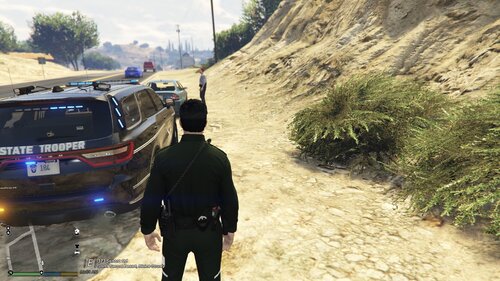 Yes, for now. I may include a .ini file in a later release. I am focusing on trying to create a mod to allow the already AI spawned units in this mod/already spawned across the map to be called as backup Check either Paleto Bay (Great Ocean HWY in Paleto Bay and on HWY in forrest) or Senora Rd near Harmony. If you see a sitting patrol car, use a clean world mod/tool and the spot will spawn a sitting unit or traffic stop 50% chance each.
- 84 comments
- 1 review
-
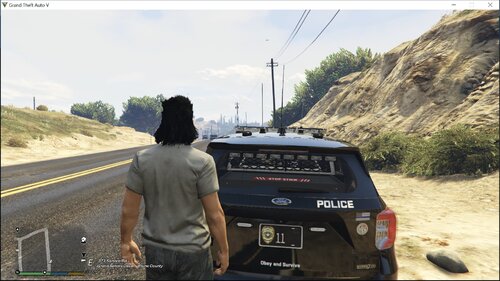 Yes, the only issue with doing something like that with this mod, it would change every plate to that call sign for the model you choose. For example, if we choose to make "sheriff" car "Adam 12", every "sheriff" car will have an Adam12 license plate. For what you are referring to/ explaining, it may be easier to just change your license plate using a trainer for your spawned vehicle. This mod may work better to customize plates per department or type of traffic unit like "GANG#" for Gang units or "AP##" (airport) for LSIA units or "BL##" for Blaine County Sheriff units.
- 11 comments
- 2 reviews
-
Yes, you can change any car (or set of cars) to any plate that follows the GTA format (a-z, 0-9 for sure works, # for random number, * for random letter) with an 8 character limit
- 11 comments
- 2 reviews
-
Did you click the overview tab? Their is a video and explanation. Long story short, this mod will spawn one of two things across various points across the map: Sitting AI Patrol police. Engine running, driver in driver seat. Will act like any other normal AI unit that drives except it is sitting. It will usually join a pursuit if you drive by and are in a pursuit. **Currently working on a plugin/script to try and call these units for backup. So far, only traffic stop backup works correctly during my testing. Ambient traffic stop. Police car with emergency lights activated, police AI will get out of car, walk to passenger side, write a ticket for 10 seconds, return to car.
- 84 comments
- 1 review
-
-

- 1
-
-
(forgot to reply directly so sending this again) Yes, you can change vehicles (including using add-on) if you open the cs file and recompile it after changing the code. It looks like some people are requesting the ability to change without code. I will try to add a .ini file in the next version. Here is where you would change the cars in the code: // ===================================================== // VEHICLES BY ZONE // ===================================================== private readonly string[] lsiaVehicles = { "police", "police2", "police3" }; private readonly string[] blaineSheriffVehicles = { "sheriff", "sheriff2" }; private readonly string[] blaineCopVehicles = { "police", "police2", "police3" }; private readonly string[] highwayCopVehicles = { "policeb"}; private readonly string[] lsCountySheriffVehicles = { "sheriff", "sheriff2" }; private readonly string[] lspdVehicles = { "police", "police2", "police3" }; private readonly string[] senoraSVPDVehicles = { "police", "police2", "police3" }; private readonly string[] senoraSheriffVehicles = { "sheriff", "sheriff2" }; private readonly string[] senoraHighwayVehicles = { "policeb"}; private readonly string[] parkRangerVehicles = { "pranger" };
- 84 comments
- 1 review
-
The license plate changer and ini files go in the GTA/Scripts folder. See here for some of my plate textures: https://www.lcpdfr.com/downloads/gta5mods/datafile/53443-plate-textures/ Showcase: (Add-on plates mod at the beginning, my mod towards the end) This is an open-source ScripthookVdotnet script that changes the license plate format (not the design but the actual number/letters on the plate) There is an included json file to change any car to any plate. The json file is already written to show examples of how to change plates of a specific car (or set of cars) V2.0 (7/16/25) The major difference between 2.0 and other versions is all emergency vehicles not in the list will automatically have their plate changed to a number of 1-60. For example, if you have the model "police2" defined in the ini file, the ini file format you listed for that vehicle(s) will be used If you DONT have the model "police2" defined in the ini file, then the plate will be a random number between 1-60. This is open source so if you want to change the format for emergency vehicles (not defined in ini file) then you can change it to whatever you want. Updated 2/11/26 Version 1.3: Small update, took out leading "zeros" in numbering scheme. So "07" is now "7", "08" is now "8" etc. Updated (1/23/26) -Now includes .ini file, no more json file .ini file can now have the ability to include a range, see syntax below: (Note: The underscore " _ " is a blank space). Here is how to Spawn Sheriff and Sheriff2 cars with license Plate " S##" with the numbers being a range from 0-50: [Sheriff] Models="sheriff,"sheriff2" PlateFormat=__S{0-50} Here is how to Spawn LSPD cars with license Plate " ##" with the numbers being a range from 0-30: [LSPD] Models="police","police2","police3" PlateFormat=__{0-30} Another example, if you want sheriff to be an LS Sheriff car and plate, and sheriff2 to be a blaine county car and plate, you can do this. Here is an example below that will spawn "LS" with two numbers for LS sheriff cars and will spawn "BL" and two numbers for BL sheriff cars. I use logos on license plates (like police badges, highway patrol badges) so I have added some extra spaces at the beginning to offset the lettering for the logo. # is used for random number, * is used for random letter. Underscore is a blank space. { "Models": ["Sheriff", "LSSD2", "LSSD3", "LSSD4", "LSSD8", "LSSD5","LSSD6", "LSSD7"], "PlateFormat": "_LS##" }, { "Models": ["sheriff2", "BCSD1", "BCSD2", "BCSD3", "BCSD4", "BCSD5","BCSD6", "BCSD7"], "PlateFormat": "_BL##" }, Here is how to change the designs of plates: Modify vehshare file, here is where the plate designs are. Change designs here. GTAV\mods\update\x64\dlcpacks\patchday27ng\dlc.rpf\x64\levels\gta5\vehicles.rpf\vehshare.ytd Then locate carcols.ymt file after remembering the plate number(s) you just modified. carcols.ymt is in update.rpf/x64/data is where plate data is, so you will see the names for the plate (like plate05=police guv plate) -also change color of text here To change license plate per car: go to carvariations.meta file for car, it will be in a different place depending on if add on car or stock car then in carvarations.meta, set plate probabilities for each car. <plateProbabilities> <Probabilities> <Item> <Name>police guv plate</Name> <Value value="100"/> </Item> </Probabilities> </plateProbabilities>
- 11 comments
- 2 reviews
-
-
- 1
-
-
The two AIAmbientPolice_DefaultCars files (dll and pbd) go in the GTAV/Scripts folder. The .cs file is the open-source code that can be opened and modified in a program that can read/compile cs files if you wish to change the script. (Visual Studio is an example of a software that can do this). Here ya go: https://www.youtube.com/watch?v=IZAp9k2m1kg
- 84 comments
- 1 review
-
Yes, you can change vehicles if you open the cs file and recompile it after changing the code. It looks like some people are requesting the ability to change without code. I will try to add a .ini file in the next version. Here is where you would change the cars in the code: // ===================================================== // VEHICLES BY ZONE // ===================================================== private readonly string[] lsiaVehicles = { "police", "police2", "police3" }; private readonly string[] blaineSheriffVehicles = { "sheriff", "sheriff2" }; private readonly string[] blaineCopVehicles = { "police", "police2", "police3" }; private readonly string[] highwayCopVehicles = { "policeb"}; private readonly string[] lsCountySheriffVehicles = { "sheriff", "sheriff2" }; private readonly string[] lspdVehicles = { "police", "police2", "police3" }; private readonly string[] senoraSVPDVehicles = { "police", "police2", "police3" }; private readonly string[] senoraSheriffVehicles = { "sheriff", "sheriff2" }; private readonly string[] senoraHighwayVehicles = { "policeb"}; private readonly string[] parkRangerVehicles = { "pranger" };
- 84 comments
- 1 review
-