


Hibblejaybob
Members
-
Joined
-
Last visited
Everything posted by Hibblejaybob
-
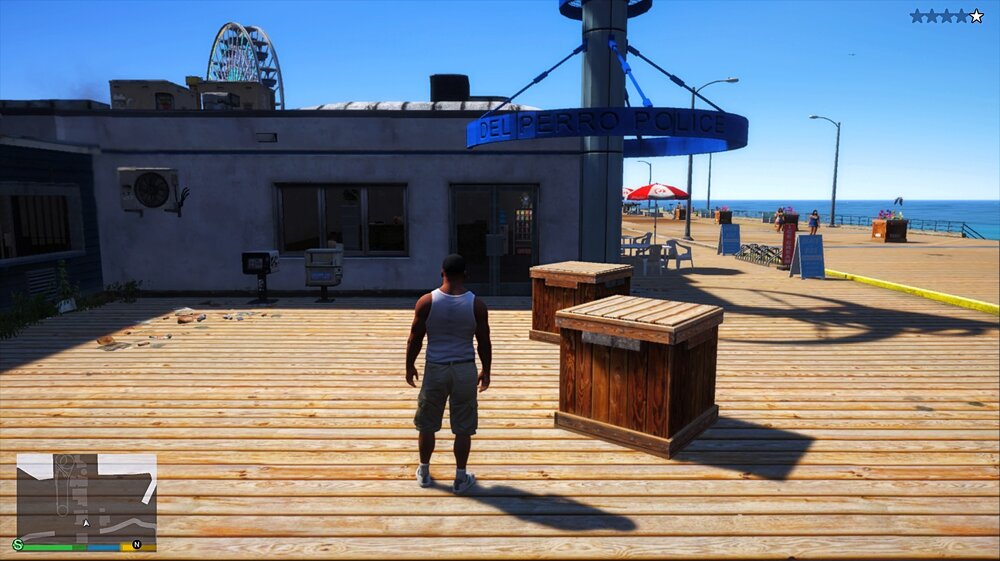
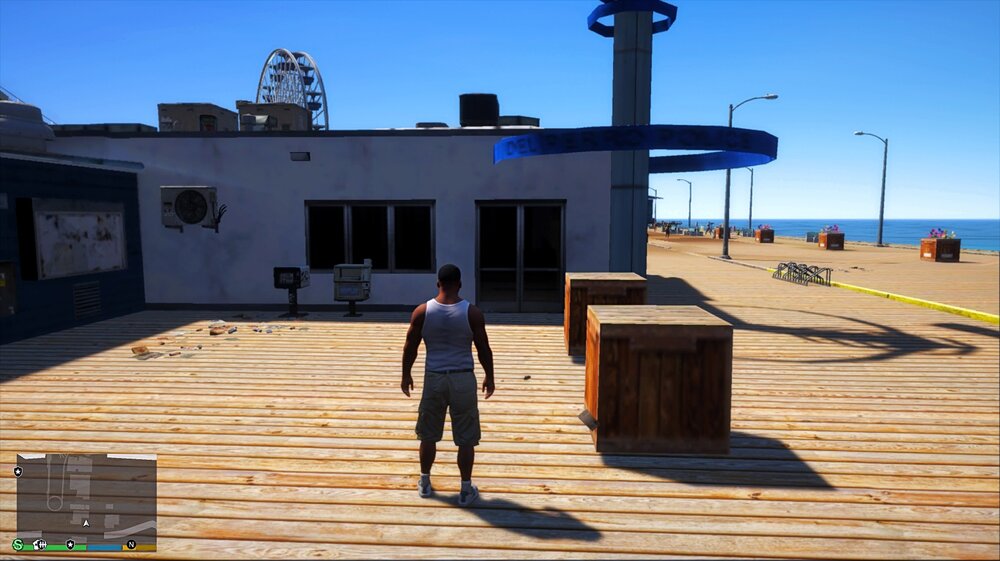
Having a problem with the Multiplayer Map. I'm running a few MLO mods that add interiors to police stations and a few other places. Problem I have, is with the MP Map enabled, the exterior textures revert to a very basic version. For example, in the screenshot below, you can see the MLO is loaded correctly (you can see into the police station), the textures are good and there's object/clutter on Del Perro Peir. Then in this screenshot, taken just a few seconds later, you can see the clutter has gone, and the textures have potatoed. Now, if I walk into the door, then I get the normal MLO interior - it ONLY affects the exterior textures - but it does this for all MLOs I have. As you may figure by having police stations, I do use these for LSPDFR - so disabling the MP isn't ideal as that shuts out the MissionRow interior, and makes some other MLOs a bit janky. Is there any way (file setting, texture to delete/override) that can tell the MLO textures to overrite the MP map ones? Feels like if I could enable only the MP locations I want (say, Mission Row Police Station) and leave the rest as SP map, it would be fine, but not sure if I can do that. Cheers in advance! Hibblejaybob
-
Hi all, When editing the Stations.xml, I know the DropOffPosition is where to bring a prisoner to drop them off in a vehicle, but is there a way of setting up a drop-off point to walk them in on foot (like there is for the Mission Row Police Station) or is that hardcoded? Cheers!
-
 Hello! Great mod, I've rotated the gun so it's on the chest rather than the back, but if I line it up for guys, it doesn't work for female peds, and if I line it up for female peds, it doesn't work for guys. Would it be possible to have a version where we can set the position separately for male and female peds?
- 266 comments
- 22 reviews
-
Turns out the problem was simple and noob-ish. Zmoddler wont import a node with the same name as one already in scene - not that it tells you that. Anyway, problem resolved!
-
Hi everyone, I am pretty new to the modding scene, but I've ran into a problem that's left me stumped. I have an unlocked lightbar (that I've edited to my needs) and I have an unlocked car, which I have not changed at all. The problem is, when I "Merge" them in Zmoddler, no matter what way round I do it, something is always missing. Basically, if I merge the lightbar to the car the glass of the lightbar won't merge with it. It will be there when I select the nodes to merge, it just won't show up once the merge has been done. If I try it the other way round (Merge the car to the lightbar) then everything on the lightbar works fine, but the car is missing a wheel, the headlights and indicators don't work. If I don't import anything, the car works perfectly, so it's something in the process of merging that is going wrong. I can either have a glassless lightbar or a wheelless, lightless car. Any help would be very much appreciated! Thanks in advance, Hibblejaybob
-
 Hello folks, has anyone got an update on the bug where you cannot speak to someone after asking them to step out of the vehicle? I've seen a few people have this issue, but noone with a concrete fix except uninstalling the LSPDFR+ traffic stop function. I've got a workaround by having the vanilla traffic stop key set to "E" and the the LSPDFR+ stop key set to "X", so I can question the driver and issue traffic offence reports using LSPDFR+, but I can still ask them out and search them using the vanilla stop menu. It'll do for now, but hopefully there's a proper fix on the cards - LSPDFR+ is brilliant! EDIT - I actually didn't read that Stop The Ped integrates quite well with Albo's mods, I've now disabled the vanilla menu and I'm just using stop the ped to set things right - works like a charm so far!
- 1,178 comments
- 137 reviews
-
Thank you so much for this, it worked! I always though it was the other way around: that the vehicles.meta of any patchday or addon file overwrites the meta files of update.rpc, but I'm obviously mistaken! Thanks for your help.
-
Hello everyone, I'm having an interesting problem in GTA with a modded car. I currently have it in an addon slot and everything works perfectly. I've now copied over so it replaces the POLICET slot. The model in POLICET has the problem that the lightbar and rear lights (but not windows and windscreen) are black (AKA the window tint bug). The model in the addon slot does not, and has never had this problem. I'm using identical vehicle.meta, carvariations, and ELS files for both. So if it works for one, it should work for the other? In the vehicles.meta, the diffusetint setting is already set to 0x00FFFFFF (which is the common fix to this problem), yet the problem is still occurring, and yet, if I go into the Simple Native Trainer and change the tint, I can get it back to normal. It's set to "none" by default, but if I change the setting then change it back, everything works perfectly. So my question is this. The window tint is obviously the problem, but the diffusetint setting is already set to 0x00FFFFFF, so how can I fix this problem? Hope someone can help! Cheers, Hibblejaybob This is the vehicles.meta for the PoliceT slot: <Item> <modelName>policet</modelName> <txdName>policet</txdName> <handlingId>POLICET</handlingId> <gameName>POLICET</gameName> <vehicleMakeName /> <expressionDictName>null</expressionDictName> <expressionName>null</expressionName> <animConvRoofDictName>null</animConvRoofDictName> <animConvRoofName>null</animConvRoofName> <animConvRoofWindowsAffected /> <ptfxAssetName>null</ptfxAssetName> <audioNameHash>POLICET</audioNameHash> <layout>LAYOUT_VAN_POLICE</layout> <coverBoundOffsets>POLICET_COVER_OFFSET_INFO</coverBoundOffsets> <explosionInfo>EXPLOSION_INFO_DEFAULT</explosionInfo> <scenarioLayout /> <cameraName>DEFAULT_FOLLOW_VEHICLE_CAMERA</cameraName> <aimCameraName>DEFAULT_THIRD_PERSON_VEHICLE_AIM_CAMERA</aimCameraName> <bonnetCameraName>DEFAULT_VEHICLE_BONNET_CAMERA</bonnetCameraName> <povCameraName>DEFAULT_POV_CAMERA_NO_REVERSE</povCameraName> <FirstPersonDriveByIKOffset x="0.000000" y="-0.070000" z="0.003000" /> <FirstPersonDriveByUnarmedIKOffset x="0.000000" y="0.000000" z="0.000000" /> <FirstPersonProjectileDriveByIKOffset x="0.000000" y="0.000000" z="0.000000" /> <FirstPersonProjectileDriveByPassengerIKOffset x="0.000000" y="0.000000" z="0.000000" /> <FirstPersonProjectileDriveByRearLeftIKOffset x="0.095000" y="0.025000" z="-0.075000" /> <FirstPersonProjectileDriveByRearRightIKOffset x="0.095000" y="0.025000" z="-0.075000" /> <FirstPersonDriveByLeftPassengerIKOffset x="0.000000" y="0.015000" z="-0.080000" /> <FirstPersonDriveByRightPassengerIKOffset x="0.000000" y="-0.063000" z="0.000000" /> <FirstPersonDriveByRightRearPassengerIKOffset x="0.000000" y="0.015000" z="-0.080000" /> <FirstPersonDriveByLeftPassengerUnarmedIKOffset x="0.000000" y="0.000000" z="0.000000" /> <FirstPersonDriveByRightPassengerUnarmedIKOffset x="0.000000" y="0.000000" z="0.000000" /> <FirstPersonMobilePhoneOffset x="0.173000" y="0.315000" z="0.596000" /> <FirstPersonPassengerMobilePhoneOffset x="0.171000" y="0.356000" z="0.483000" /> <FirstPersonMobilePhoneSeatIKOffset> <Item> <Offset x="0.281000" y="0.491000" z="0.538000" /> <SeatIndex value="2" /> </Item> <Item> <Offset x="0.156000" y="0.533000" z="0.538000" /> <SeatIndex value="3" /> </Item> </FirstPersonMobilePhoneSeatIKOffset> <PovCameraOffset x="0.000000" y="-0.100000" z="0.730000" /> <PovCameraVerticalAdjustmentForRollCage value="0.000000" /> <PovPassengerCameraOffset x="0.000000" y="0.100000" z="0.000000" /> <PovRearPassengerCameraOffset x="0.000000" y="0.100000" z="0.000000" /> <vfxInfoName>VFXVEHICLEINFO_CAR_GENERIC</vfxInfoName> <shouldUseCinematicViewMode value="true" /> <shouldCameraTransitionOnClimbUpDown value="false" /> <shouldCameraIgnoreExiting value="false" /> <AllowPretendOccupants value="true" /> <AllowJoyriding value="false" /> <AllowSundayDriving value="false" /> <AllowBodyColorMapping value="true" /> <wheelScale value="0.252600" /> <wheelScaleRear value="0.252600" /> <dirtLevelMin value="0.000000" /> <dirtLevelMax value="0.300000" /> <envEffScaleMin value="0.000000" /> <envEffScaleMax value="1.000000" /> <envEffScaleMin2 value="0.000000" /> <envEffScaleMax2 value="1.000000" /> <damageMapScale value="0.300000" /> <damageOffsetScale value="1.000000" /> <diffuseTint value="0x00FFFFFF" /> <steerWheelMult value="1.000000" /> <HDTextureDist value="5.000000" /> <lodDistances content="float_array"> 15.000000 30.000000 70.000000 140.000000 500.000000 500.000000 </lodDistances> <minSeatHeight value="1.014" /> <identicalModelSpawnDistance value="20" /> <maxNumOfSameColor value="10" /> <defaultBodyHealth value="1000.000000" /> <pretendOccupantsScale value="1.000000" /> <visibleSpawnDistScale value="1.000000" /> <trackerPathWidth value="2.000000" /> <weaponForceMult value="1.000000" /> <frequency value="100" /> <swankness>SWANKNESS_1</swankness> <maxNum value="2" /> <flags>FLAG_LAW_ENFORCEMENT FLAG_EMERGENCY_SERVICE FLAG_NO_RESPRAY FLAG_DONT_SPAWN_IN_CARGEN FLAG_REPORT_CRIME_IF_STANDING_ON</flags> <type>VEHICLE_TYPE_CAR</type> <plateType>VPT_FRONT_AND_BACK_PLATES</plateType> <dashboardType>VDT_SPEEDO</dashboardType> <vehicleClass>VC_EMERGENCY</vehicleClass> <wheelType>VWT_MUSCLE</wheelType> <trailers /> <additionalTrailers /> <drivers> <Item> <driverName>S_M_Y_Cop_01</driverName> <npcName /> </Item> </drivers> <extraIncludes /> <doorsWithCollisionWhenClosed /> <driveableDoors /> <bumpersNeedToCollideWithMap value="false" /> <needsRopeTexture value="false" /> <requiredExtras /> <rewards> <Item>REWARD_WEAPON_SMG</Item> <Item>REWARD_AMMO_SMG</Item> <Item>REWARD_STAT_WEAPON</Item> </rewards> <cinematicPartCamera> <Item>WHEEL_WIDE_REAR_RIGHT_CAMERA</Item> <Item>WHEEL_WIDE_REAR_LEFT_CAMERA</Item> </cinematicPartCamera> <NmBraceOverrideSet>Truck</NmBraceOverrideSet> <buoyancySphereOffset x="0.000000" y="0.000000" z="0.000000" /> <buoyancySphereSizeScale value="1.000000" /> <pOverrideRagdollThreshold type="NULL" /> <firstPersonDrivebyData> <Item>VAN_POLICET_FRONT_LEFT</Item> <Item>VAN_POLICET_FRONT_RIGHT</Item> <Item>VAN_REAR_LEFT</Item> <Item>VAN_REAR_RIGHT</Item> </firstPersonDrivebyData> </Item>
-
 Hey, Albo. I spent ages getting Siren Mastery working. Everything worked for about 3 days, but today when I started up GTA V Siren Mastery wouldn't load up, giving an error (cannot check Ragepluginhook dependencies". All your other mods work fine. Disregard.... it is now working again, but I've got no idea why lol
- 853 comments
- 108 reviews
-
-
It's early days yet, but does anyone know if Alexander has any plans to update his Scripthook?
-
Might need to, I have a LCMP video to record tomorrow night lol
-
Removing ScriptHook alone worked for me. I pray to the giddy goose that ScriptHook gets patched! My GTA IV videos are my flagship series on YouTube!
-
Update: I've tried adding in a mod pack that acts as a new DLC, but replaces default cars (This one: https://www.gta5-mods.com/vehicles/realcars03-dlc-from-gtav-mods-as-new-addon) and now I've noticed something interesting. If I try to spawn the vehicle using the Rage Hook console, the cars no long appear in the list of what it can suggest: only vanilla ones. If I go another spawner with fixed spawn menus, the cars are there, but when you try to spawn them, nothing happens: no errors, just nothing spawns. It seems like the game is loading the DLC, but it can't understand anything from it. Still looking for assistance, if someone knows!
-
Hi Everyone! In order to have all my modded files in one place, I wanted to group them together in one custom DLC. I don't know if all the guides I've read have been invalidated by recent updates, but I've followed 3 guides (including just using the files supplied), but I can't get the cars to appear in game. Looking through the list of the loaded files in-game, it appears the DLC simply isn't getting loaded, despite being included in the dlclist.xml and extratitleupdate.meta. I don't understand why it's not working. Can anyone give me some advice on how to get the DLC loading in game? Cheers, Hibblejaybob
-
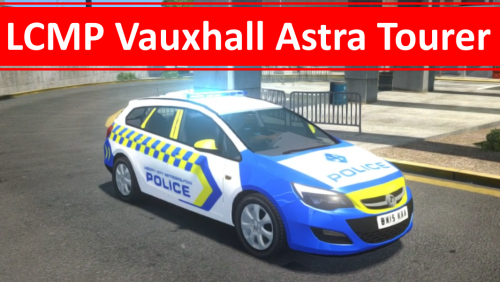 Thank you so much for the kind feedback! :) I've got the rest of my cars for GTA IV to come, then I'll be working on V ahead of recording stuff for YouTube again (I've not done V in some time)
 -
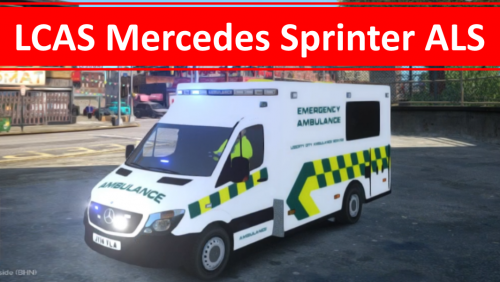 The Liberty City Metropolitan Police (LCMP) is my fictional police force for GTA IV. I'm releasing my skins for all the vehicles I use! This is the Mercedes Sprinter ALS ambulance used by the LCAS. The original car mod was made by BritishGamer88 (and other authors), and is released here with permission! If you make any videos on the LCMP, let me know on Twitter or Facebook! www.facebook.com/hibblejaybob www.twitter.com/hibblejaybob
 -
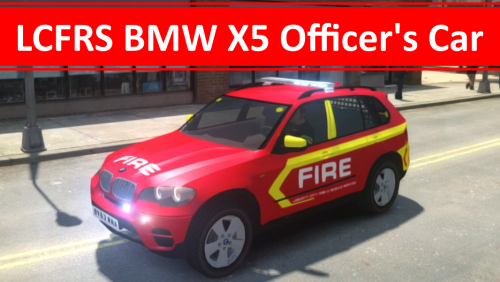 The Liberty City Metropolitan Police (LCMP) is my fictional police force for GTA IV. I'm releasing my skins for all the vehicles I use! This is the BMW X5 used by the fire (LCFRS) and ambulance (LCAS) services - both are included in the same file! The original car mod was made by ObsidianGames (and other authors), and is released here with permission! If you make any videos on the LCMP, let me know on Twitter or Facebook! www.facebook.com/hibblejaybob www.twitter.com/hibblejaybob
 -
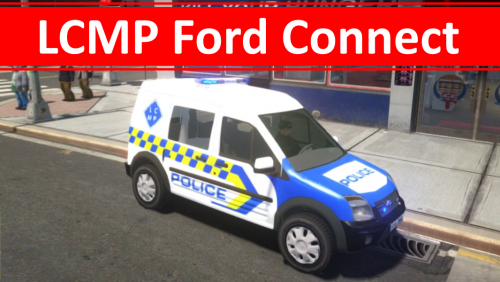 I don't have an up-to-date template, no. One will be released when the modder puts out his version. That's his channel: https://www.youtube.com/channel/UChXiaoUNbEprHrdAGvW1oUg
 -
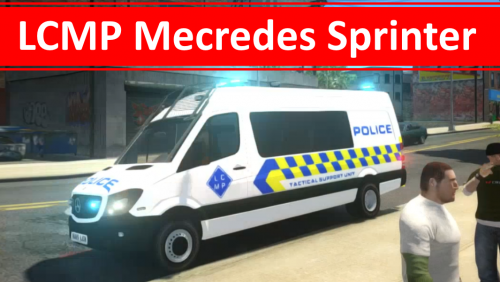 The Liberty City Metropolitan Police (LCMP) is my fictional police force for GTA IV. I'm releasing my skins for all the vehicles I use. The original car mod was made by ObsidianGames (and other authors), and is released here with permission! If you make any videos on the LCMP, let me know on Twitter or Facebook! www.facebook.com/hibblejaybob www.twitter.com/hibblejaybob
 -
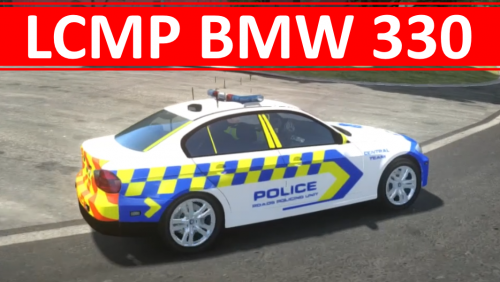 The Liberty City Metropolitan Police (LCMP) is my fictional police force for GTA IV. I'm releasing my skins for all the vehicles I use. The original car mod was made by BritishGamer88 (and other authors), and is released here with permission! If you make any videos on the LCMP, let me know on Twitter or Facebook! www.facebook.com/hibblejaybob www.twitter.com/hibblejaybob
 -
Thanks, means a lot! The LCMP was my second proper attempt at skinning in GTA IV. Spent a lot of time trying to get all the vehicle done!
-
The Liberty City Metropolitan Police (LCMP) is my fictional police force for GTA IV. I'm releasing my skins for all the vehicles I use. The original car mod was made by Bleep999 Modifications (and other authors), and is released here with permission! If you make any videos on the LCMP, let me know on Twitter or Facebook! www.facebook.com/hibblejaybob www.twitter.com/hibblejaybob
-
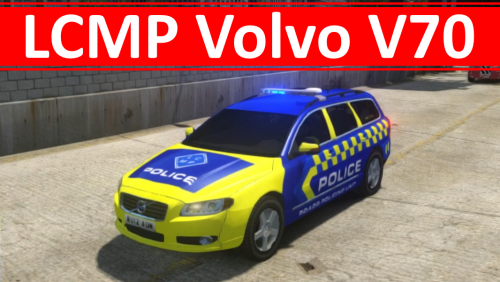 The Liberty City Metropolitan Police (LCMP) is my fictional police force for GTA IV. I'm releasing my skins for all the vehicles I use. The original car mod was made by Bleep999 Modifications (and other authors), and is released here with permission! If you make any videos on the LCMP, let me know on Twitter or Facebook! www.facebook.com/hibblejaybob www.twitter.com/hibblejaybob
 -
The Liberty City Metropolitan Police (LCMP) is my fictional police force for GTA IV. I'm releasing my skins for all the vehicles I use. The original car mod was made by ObsidianGames (and other authors), and is released here with permission! If you make any videos on the LCMP, let me know on Twitter or Facebook! www.facebook.com/hibblejaybob www.twitter.com/hibblejaybob



