mahamlyrics
Members
-
Joined
-
Last visited
Everything posted by mahamlyrics
-
 Yess Finally I can get rid of Stop the Ped all together now. It works perfect man! Thanks Alot!
- 5 comments
- 3 reviews
-
-

- 1
-
-
 I don't know what it is , But It's been an Amazing year for LSPDFR. This mod is sick. Works Flawlessly.
- 11 comments
- 2 reviews
-
 🤩PERFECTION. Now I have 123 vehicles in the pool. Working like a Charm Man. Thank You Thank You!!!
- 51 comments
- 3 reviews
-
-
- 1
-
-
I absolutely LOVE IT dude. My game time in LSPDFR has increase at least an hour or 2 because of this mod. lol After learning my way around the .ini it was easy to config it to the way I play. Job well Done my Friend. Can't wait for the next update lol.
- 51 comments
- 3 reviews
-
-
- 1
-
-
Thanks for the Update, Wondering what pool cars are spawned in from, Is it a hard coded list ? if so can we get an .ini in a future update that allows us to pick which cars get spawned in ? Sometimes I find myself pulling over the same type of vehicle lol. Or Maybe hard code it to spawn vehicles from current model sets like VEH_POOR, VEH_MID ,VEH_RICH that way we can get a more variety of speeders. That way we can always edited those model sets in OpenIV to add add-on vehicles if we wanted. Hope that makes sense.
- 51 comments
- 3 reviews
-
-

-
- 2
-
-
I've tried all on this site and this was the only one to work for me !!! Bravo
- 51 comments
- 3 reviews
-
-
- 1
-
-
OMG, FINALLY. One that actually works for me. Man I was sooo Sick of the 78 mph crap. Thank You Thank You!!!
- 51 comments
- 3 reviews
-
-
-
- 2
-
-
-
 Dude so Glad You did this after More Radio Chatter was depreciated . Works Perfectly!
- 23 comments
- 3 reviews
-
 Dudeeee I'm a huge fan of The Rookie, That disturbance Call brought tears of joy to my eyes. Literally felt like I was on an episode.!!!!
- 199 comments
- 15 reviews
-
-
- 1
-
-
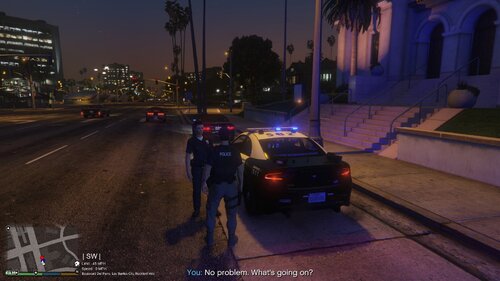 My first callout There was no officer on the scene. I decide to proceed anyway. After I code 4 it. I got a wanted level ! after reading your requirements , I'm assuming this means it's not Compatible with PR???
- 20 comments
- 1 review
-
-
-
 @bigroy36 Make sure you added the Correct tow truck version, One has a Static bed and one has a Movable bed. To @Hexus - Love that the idea came up and it does add immersion to the game. I prefer this kind of tow over the others for sure. But the issues I see , is that the tow truck spawns with sirens(unrealistic) and also It glitches a bit everytime the tow parks. Also an option to remove Notifications would be great. @originalgamester It doesn't overide PR tow services, you can use both if you want.
 -
-
-
-
-
You're killing it, I love these Callouts, Some of the best I've ever played. Cheers
- 199 comments
- 15 reviews
-
-
- 1
-
-
 This Callout pack is currently my favorite. I love everything about it , not a single complaint or recommendation. I only ask please don't abandon this project. 5 out of 5 stars!!!!!
- 49 comments
- 8 reviews
-
-
- 1
-
-
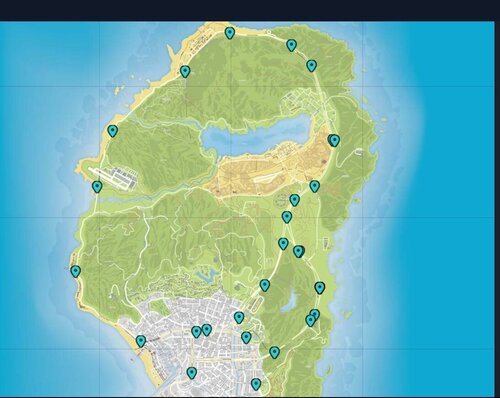 For some reason, It doesn't spawn any of the replace vehicles I have, For example, The Infernus Is replaced in game and every spawn outside of this mod shows the replaced version, but the speeders that spawn in the Infernus is the Vanilla version of the vehicle. Also , even with multiple Models defined in the .ini . It's only spawning the infernus and nothing else, Not even the pigalle. Is there anything That I can do to fix this? -edit, Im an idiot. I was using a game folder that didn't have Infernus replaced. But the rest does still stand as far as an issue goes. -edit, So It appears after I changed the 10 second spawn to a larger number , It tends to spawn more the variety now. Weird. but works as intended now.
- 90 comments
- 2 reviews
-
 Thank You ! Great Job.
 -
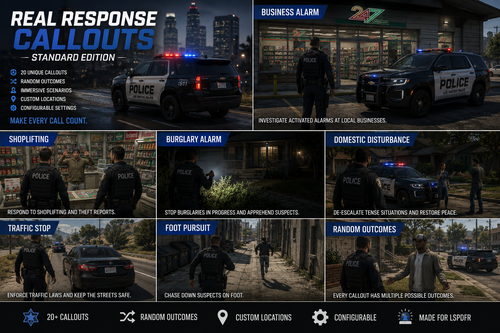
Quick Question, Are the callouts generated at complete random locations(making it infinity possibilities) or is each callout created specifically by you? meaning the callouts will eventually repeat themselves?
-
-



.thumb.png.1e07332e56d0003390a27509978e6af3.png)