


PhillBellic
Members
-
Joined
-
Last visited
Everything posted by PhillBellic
-
Get back into your Safety Vault, you! :P
-
I found a funny mod. Here's the link http://www.gta4-mods.com/player/santa-hat-f25227. Now you can be like the MODS. Enjoy.
-
Psst, reptilians is takin' over, pass it on! Psst, reptilians is takin' over, pass it on! Psst, reptilians is takin' over, pass it on!
-
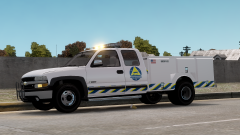 When is this due for release? Looks great. ;)
 -
-
I have been using this Tahoe for a while now and it looks great. Furthermore, do you plan on adding some antennas on this sexy beast?
- 41 comments
- 29 reviews
-
Now the LCPDFR logo says "The Twelve Days Of LCPDFR 11 Days" now. Cool the hallucinogens must be kicking in now.
-
I kanuck make any Canadian jokes at all? Get it? Kanuck = Cannot, Eh, Eh!
-
The early days of teh Interwebs?
-
Annnnnnnnnnd you died. Rest In Pieces. Hmm, may have gone a bit morbid there.
-
These cars look great. For any future versions do you plan on making livery/texture mapping?
- 27 comments
- 22 reviews
-
-

- 1
-
-
-
Damn you, you naughty boy. You will go on Satan's naughty list this year!
-
Hmm, I think Yard1 would like this.
-
Y'all lost your damn minds!
-
Gobble Gobble Gobble Gobble Gobble Gobble.
-
Any one made Mongolian lamb yet. Yummy.
-
WTF!
-
I'll throw you a flea infested blanket then. I'll also get Sam to give you a big big cuddle.
-
I guess I'll have to chain you up now Mister. This is a fun topic.
-
Back to the Safety Vault with you, Mister.
-
Download a program called Hola Unblocker. It is one way I get around the bullshit called Geo-Blocking.
-
Most episodes are on YouTube I believe.
-
You're welcome. By the way it is "CURSE YOU NETFLIX".
-
Season Six I believe. Anyway here's the link

