


NicolaiB
Members
-
Joined
Everything posted by NicolaiB
-
-
We've already covered this topic a few time, please search before creating new threads.
-
I remember posting something like this in another thread: There's already a Holden Commodore Aussie Cop car, all that would be needed would be to get the model from the creator in its unlocked form, and adapt it to the Caprice version, I.E. Changing badging on the vehicle, as well as making it the "Police Package" version.
-
That's the root admin account, it's the first user ever registered on the site.
-
Nothing to see here! This topic has been closed by G17 Media staff. If you feel that this topic has been closed in error, please report this post.
-
If you had taken the time to check the stickies in the LCPDFR discussion area, you'd have seen the new stickie called "LCPDFR 0.95 RC2-R2 Keys", furthermore this isn't really a support problem, so I'm closing this thread.
-
The reps were given out after the video were posted. There's no need to ever "even it out".
-
You'd also need to adapt the scripts for new locations for each individual event.
-
You've posted in the wrong section, it is not caused by LCPDFR, but is caused by something other than LCPDFR, moving to GTA IV discussion, this topic has been asked and answered several times already.
-
You can also alleviate the problem somewhat by disabling ground reflections: Range_LightsF = 0 // Range of headlight environment lights Intens_LightsF = 0 // Intensity headlight environment lights Range_LightsP = 0 // Range of primary environment lights Intens_LightsP = 0 // Intensity of primary environment lights I recently played a session with the in-game time set to night, and ground reflections set to a realistic level, and it crashed every 7-10 minutes, whereas I can play for 20+ minutes with the above listed settings.
-
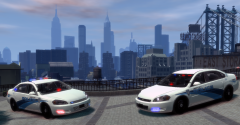
From the album: NB's in-game action
The LCPD held a promotional photography tour of Liberty City, featuring the LCPD's officers and vehicles, the LCPD aims to create a more favourable public image following the last few years PR disasters. Click for larger image. CONTENT USED: 2012 Chevrolet Impala Slicktop/unmarked by EVI: 2012 Chevrolet Impala Whelen Justice by EVI: NOPD style livery pack by myself: Fraps for taking the screenshot Photoshop for retouching -
-
They aren't meant to go on any specific model, although I can include links for my preferred vehicles in the future.
-
Nothing to see here! This topic has been closed by G17 Media staff. If you feel that this topic has been closed in error, please report this post.
-
This isn't related to LCPDFR support in any way, you've continuously managed to double post and post in the wrong section, you need to think more before you post.
-
Nothing to see here! This topic has been closed by G17 Media staff. If you feel that this topic has been closed in error, please report this post.
-
You've managed to resurrect a topic from two years ago, we do not allow necroposting.
-
You might want to also aim this at Lil-rich, that guy is amazing, his work pretty much enabled the massive advancement we will have with 0.95. In short, he's God.
-
LCPD WHITE SKIN PACK: LCPD white skin livery by NicolaiB. EXCLUSIVE TO LCPDFR.COM. All rights reserved, do not redistribute in any way without the explicit permission by NicolaiB on LCPDFR.com ###################### CONTENTS ###################### Two skins. COMPATIBILITY: CVPI SKINS: Any CVPI currently released. CHARGER SKINS: Any Charger currently released. LINK: On MF until the LCPDFR.com uploader works for me. SCREENSHOTS:
-
LCPD white skin livery by NicolaiB. EXCLUSIVE TO LCPDFR.COM. All rights reserved, do not redistribute in any way without the explicit permission by NicolaiB on LCPDFR.com ###################### CONTENTS ###################### Two skins. COMPATIBILITY: CVPI SKINS: Any CVPI currently released. CHARGER SKINS: Any Charger currently released. ###################### INSTALLATION ###################### 1. Install a skin by opening your vehicles.img file using SparkIV or OpenIV. 2. Navigate to the vehicle in question, open the .wtd file. 3. Find the vehicle skins in the wtd file, usually named "police_sign_x" X being a number from 1 to 4. 4. Import/replace the desired liveries, remember to save and rebuild. 5. If using multiple liveries: 5.1 Open vehicles.ide. 5.2 Navigate to the corresponding vehicle line. 5.3 Add "+livery" to the end of the line, save and exit the file. 6. If the base colour of the vehicle isn't white: 6.1 Open carcols.dat 6.2 Find the line corresponding to the vehicle in question 6.3 Replace the line with the following values: "175,177,177," 6.4 Save and exit the file.
- 5 comments
- 6 reviews
-
I think this takes the top spot for awkward police names:
-
-
-
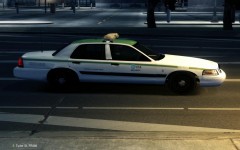 That's the name used by Rockstar.
 -
Nothing to see here! This topic has been closed by G17 Media staff. If you feel that this topic has been closed in error, please report this post.


