
Officer Swampy
Members
-
Joined
-
Last visited
Everything posted by Officer Swampy
-
I've been trying to solve this exact issue for days now. I've read a lot of people are having the same issue. No one has the ultimate answer. The truth is that the launcher has broken this game for some of us and not much we can really do about it right now. Seems to have gone bad for me right after the 1909 windows 10 update which doesn't surprise me because I had issue right after the last Microsoft major update but always seem able to fix it. You can't find any real specifics on "slow system or inefficient permissions" dealing with windows 10, or at least I haven't found anything on it exactly. How a game could work flawlessly for months on end and then one day suddenly not work at all is frustrating to say the least. Good luck to all.
-
I'm at my wits end. Been trying for five straight days in a row to get LSPDFR to load properly. Ragepluginhook will not hook GTAV. I've Been playing LSPDFR 4.4 for awhile with zero problems and just recently get the SSIP error. Everything I've tried does not work. I've reinstalled GTAV/LSPDFR/Rage/Script/MyGirlfriend/Mods in/Mods out/No Anti-Virus/Disabled Defender. Installed to a different drive. Makes no difference. It will randomly play perfectly with all mods if I do a reboot and start it directly after the boot but the percentage of the reboot tries it l just give me the &%$#$@# SSIP error. I'm beginning to believe this is either the GTAV Launcher or a windows service that starts on a delay. Maybe because of the 1909 windows update? Anyone else find this happening? I have the retail version, one directory with mods folder which I've used flawlessly for months until this week. Thanks for letting me vent. I'm uninstalling now and trying again Thank you.
-
Does anyone have a file named index.bin or index. whatever in their GTAV folder? Been trying to get LSPDFR to work after a fresh install of GTAV but it will not work at all. Never seen the file index.bin before but can't say for sure. I've deleted it and each time I run GTAV the file returns so I'm guessing it belongs? As I said I've never seen it before and it isn't there on a fresh install of GTAV, only after I run the game first time again after the fresh install.
-
Can't wait to use it.
-
-
2020 Ford Explorer.
-
 Any word on if this vehicle will be available? Wish I could make one myself, I would defiantly do the 2020 FPIU. This looks amazing.
 -
All my plugins seem to be fine. I'm still using last version of Stop The Ped 4.8.1.0 LSPDFR, RagePlugInHook and Scripthook have all updated for the GTA5 Launcher. LSPDFR 4.4 RagePluginHook 1_69_1254_16006 ScraiptHook 1.0.1737.6
-
Newest version available.
-
When the Rockstar Games Launcher appeared earlier this week the Steam version of Grand Theft Auto 5 suddenly stopped being playable in offline mode. Rockstar were quick to announce that this was a bug, and they hadn't made any changes to GTA 5's DRM. The bug has now been fixed, and there's a ticket for it on Rockstar's support site. Here's the full text of it. Question: Why can’t I set GTAV for PC to Offline Mode now that I have updated to the Rockstar Games Launcher? Answer: In order to Play GTAV in Offline Mode, players will need to: Run the Rockstar Games Launcher and update it to the latest version Sign in to the Rockstar Games Launcher Update GTAV to the latest version Launch GTAV via the Rockstar Games Launcher while online
-
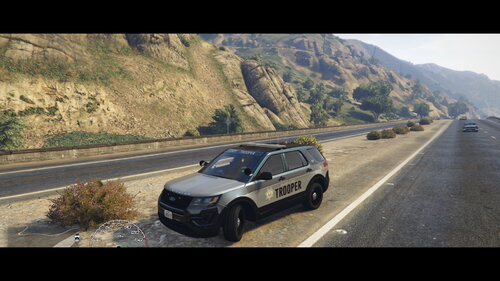 Thanks. Much appreciated. Hope to do more.
 -
-
Considering the idea. Just finding the time to do it. I'll see what I can do. Thanks.
-
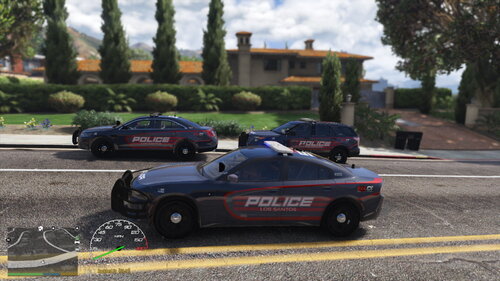
Los Santos Police Texture Pac.
-
-
-
Figured this out some time ago. Addon vehicle and spawn it by vehicle name. Like Police6 or sompin, sompin vehicle name.
-
Nice. The reflections are cool. Just my opinion on the lights, maybe they should strobe more. Great job though.
-
I'm not an expert. But I just had this same thing happen to me. It was right after a small accumulative update for windows 10. The only thing I did was just over write the Ragepluginhook files back into the GTAv folder. Recheck for windows updates again and rebooted. That's all I can think that I did. Working fine now. Also check file properties for main ragehook files and click "unblock".
-
Yes. Actually I did happen to figured it out last night before seeing your post today. I just pasted the url at the end of my sentence in the "About This File" box and the image box showed up right below. Crazy stuff, it works and thank you for the reply.
-
Searching. When after I upload a texture and go to add the link of the vehicle I'm showcasing, the link appears as underlined text and not the image. Using "link" box. I add the link to the Link box and leave the Text box blank. I tried searching for info but not hitting anything so here I am. Thanks in advanced.
-
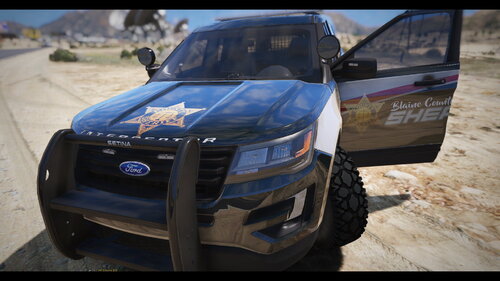
(4K) Texture for 2016 Ford Police Interceptor Utility. Only tested on vehicle model in link below.
-
LSPDFR 4.3 update did the trick. Guess there was issues with 4.2 and ragehook so part of my problem might have been that. Running great now. Thanks again for your help. Once again I'm not disappointed with the quality of support put forth on this site.
-
It's really giving me a hard time. Keeps flagging LMS.PorttbleExecutable.dll as containing a virus. Very frustrating to say the least. I have to keep virus protection shut off to install and then LSPDFR ends up crashing.
-
Thanks for your reply sir. I'm heading for the firewall as we speak. Also appreciate your YouTube channel. Keep up the great work.