


Medicmojo
Members
-
Joined
-
Last visited
Everything posted by Medicmojo
-
 Hey - how was your vacation?? I downloaded and tried out your update to this pack from the other week, in game. Still getting those "golden highlights" on the 2014 Tahoes. Any ideas on what is causing that? By the way, I just uploaded a livery pack, made for your Chargers and Tahoes in this pack...........check it out if you like!
- 200 comments
- 16 reviews
-
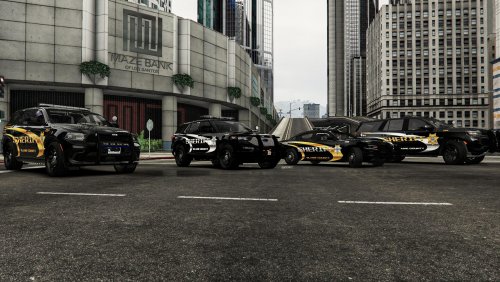
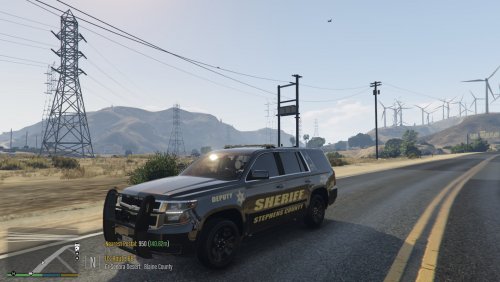 Hey there - any Georgia Sheriff fans out there? If so, you might be interested in this texture pack....... I created this livery mega-pack from a personal request recently, and was then encouraged to release it. We chose to use Emotional Shawtys 2001's "ELS BCSO pack" (link below) as the vehicle models to work the liveries on. It is an excellent vehicle model pack, with outstanding lighting and great details! Optional components include ALPRs, lower pushbar wraparound, and upper pushbar wraparounds. The spotlights also move, apparently! It is a combined replacement/add-on DLC pack - with 2 vehicles replacing the SHERIFF and SHERIFF2 slots, while the others function as addons. The only hiccup I have noticed with this pack is that all 3 of the 2014 Tahoes have some odd "golden" highlights (from certain angles, on the running boards/bumpers/dash/etc). I have asked Emotional Shawtys, and it is being looked into. Certainly not a deal breaker for this awesome pack! I am sure the liveries will fit other vehicle models out there - but, this pack is the one I worked with and will give perfect results! Stephens County Sheriff's Office is in the area of Toccoa, Georgia. To the best of my knowledge, the Office only runs with Chargers and Tahoes - to stay true to that, I only worked with those models from this pack. That still gives a total of 10 vehicles to choose! 4 Chargers, and 6 Tahoes - lightbar, slicktops, and K9 Tahoes. I strove for accuracy on the liveries, and included a few pictures above of their actual vehicles for comparison. I had to take a few liberties with the Tahoe, as I couldn't find many pictures - assumed the back end would be the same as the Charger, and placed the Georgia Law Enforcement Commision decal where it made sense. While the design of the livery may look fairly simple, I did put a lot of effort and details into it. Pretty much made the Sheriff's star door decal from scratch, different K9 names on each variant, etc. Also, on the zoomed in pictures, you can see a hexagon shape overlay pattern.........I like how it looks on liveries, as it gives the impression of what a real reflective decaling looks like up close. However, this is for looks only......it does NOTHING in game, lol! The vehicle pack from Emotional Shawtys comes with red/blue lighting. Stephens County SO uses all blue lighting. If you want that accuracy as well, I have included the files to change the lighting textures to be all blue, along with an all blue VCF file for each of the vehicles I made liveries for. In the download file, you should find a total of 10 folders. Each is clearly marked for which one of Emotional Shawtys's vehicle models it to be used with. Within the vehicle folder, there are 2k and 4k versions of the livery, and then a subfolder for the "all blue lighting" option (textures and VCF). All the png and xml files are named as they need to be, in order to be easily dragged/dropped in OpenIV - into the appropriate vehicle's .ytd file, as well the game's ELS pack_default folder if you are going with the all-blue option (if not, just use Emotional Shawtys' VCF file). I do plan on making a "lore-friendly" version of this livery in the near future - thinking maybe..........Blaine County? Would probably flush out the rest of the vehicles offered in the pack. Keep an eye out for that, if you are interested! As always: - feel free to use these liveries on any other vehicles in your game that they happen to fit/work with - if there is another vehicle/pack that you want the livery to work with, please let me know in the comments or by a DM - I am sure we can work something out. Or, if you are able, go ahead and rework the livery to another template yourself. - feel free to share photos or use in videos (would love to see some of those!)........just give credit back to me - please do not repost/upload or claim the liveries and work as your own, on this or any other site - I would appreciate and look forward to any feedback.......still pretty new at this - I am not responsible for "breaking" your game........none of these files will do that, if installed properly. If you are not sure on how to do so, YouTube and Google are your friends!
 -
Amazing vehicles you made here! I was working on some liveries for a guy that wanted some to match one of his local Sheriffs - they only run with Chargers and Tahoes. Love the lighting on the vehicles - was thinking I would use these in my game as well.......definitely will now, since you added the FPIU!! One thing I noticed while working on that livery project......been meaning to ask you about this. Not sure if this is something with the build you made, or from the original model dev? But, with the 2014 Tahoe series - they all seem to have a strange "golden" glow to them. Affects the bumpers, running boards, front/rear windows mostly. Thought it might have been something I did with the livery, but then I checked and it happens with one of your original liveries as well. Any ideas? Anyone else have this issue? I went through all the comments and didn't see anything similar...... EDIT - I did see there were some texture issues when you first released the pack.....could this be related?
- 200 comments
- 16 reviews
-
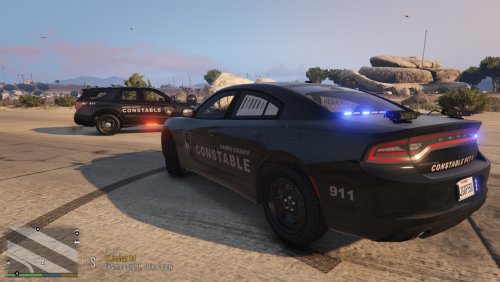 Hey there! Well, after about a year of reaping the benefits of everyone else's work and creativity, I figure it was time to return the favour. I started working with liveries earlier this year - mostly modifying those in my game only. Once I got used to the graphics program, I began working on a few projects I picked up from requests posted on one of the Facebook groups. Have definitely learned a lot along the way (still learning!), and found I enjoyed the process (most of the time, lol)! They were happy with what I produced, and encouraged me to upload my work. So, this one is my first public livery release. I know it is a relatively simple one, but I spent my time working on it. This is a subdued-style livery, for Harris County Constable Precinct 4, outside of Houston, Texas. I do not know the actual operational usage of this livery by Pct 4 - it may be speed or traffic enforcement, but could also be for gang/drug/special operations. If anyone knows, please let me know in a comment or PM, and I can update the info here! The original request was for the skin to be used on Emergency Distributors FPIU (****NEW LINK**** below, as of end Dec 22), which is an excellent vehicle in game. But, I make no promises that the model is accurate to what Pct 4 uses for their FPIUs - as far as equipment, light bar, lighting pattern, etc. Also, just for fun - I thought I would make the same livery for an unmarked Charger, and went with the recent release (link below) from Emergency Distributors for some consistency. But, I have no idea if Pct 4 uses Chargers with this subdued livery - it looks good, though! Thought I would do a lore-friendly Blaine County version as well - that might work well with the fully marked Blaine County Constable Precinct 4 texture pack from UltraSwift (link below), if you are interested. I tried to be as accurate as possible, but I only had 2 photos (as seen above) and some written information from the requestor to work with. Despite a lot of searching, I could not find any other photos of this subdued livery online. With that in mind, the font/colouring/sizing/placement of the livery might be a bit off. I also took some liberties with a couple of the smaller elements - the "911" on the rear quarter panels, and the "CONSTABLE PCT 4" across the rear. Those are based on what is typical on the Pct 4 fully marked units, as well as the info I got. Seem to fit in well, though. If I am missing any other livery elements, please let me know........would be happy to modify these for accuracy. For the FPIU livery specifically, I spent a lot of time going back and forth on the positioning of the main side logo. The newer model FPIUs have a distinct forward slant to the body lines, and I was trying to decide whether to have the lettering follow that slant, or stay horizontal. Slanted looked great on the template........but looked too severe in game. My online searching showed that some agencies go with the slant, while others don't. Not much help finding a standard, lol. Eventually, I went with the "straight" or horizontal layout. If anyone would prefer the slanted livery to match the body lines, please let me know - I still have it saved, and could send it to you directly. In the download file itself, you will find a number of folders and options. I believe I have labelled those well enough to easily figure out which one to use, and where it goes. I have included 4k and 2k versions of each. The individual png files are named as they need to be for a drag/drop in OpenIV into Emergency Distributors model's .ytd file. As an FYI, these 2 models from Emergency Distributors are set up to be replacements, and will go into the fbi (Charger) and fbi2 (FPIU) slots. If you have other specific vehicles or packs you would like this livery on, feel free to do so yourself. My liveries will likely fit a number of other newer model FPIU or Charger models out there. Or, leave a comment or send me a PM.........we can work something out to get these on a different model/template. Please enjoy, and I appreciate any constructive feedback! **** USUAL DISCLAIMER **** I am not responsible for any damage or malfunction to your game *** NEW *** FPIU link from Emergency Distributors
 -
Sorry about that.........but, I don't know anything about using the PS4 controller. With the keyboard - the "TAB" key is the default way to bring up the weapon wheel, then you mouse scroll around to select the weapon you want. But, the number row keys 1, 2, 3, 4, etc, can be used as "speed" shortcuts to bring up a weapon straightaway, without having to use the wheel itself. For me, it seemed that if I happened to use one of these shortcut keys to get at a weapon, it deactivated the ability to bring up the weapon wheel. Any idea if maybe there is a similar "speed" function when using the PS4 controller? If there is, maybe check and see if the same happens when you use it. I have just had to "teach" myself to avoid using the number row keys for weapon selection! If not, forcing my character "off duty", and then back "on duty" would work to get the weapon wheel back. Not ideal, but........take what you get! Good luck with it!
-
And that is why it seems to be so important to post the solution to a problem! Whether a bunch of other players made suggestions to try out, and one of those worked......or, you figure something out yourself just by chance. You just never know when someone else, months later, runs into the same problem and goes looking for the answer. I know it is has helped me out a few times in the past - glad I was able to pay it forward!
-
 For the background radio chatter, you can use a scanner app like Broadcastify to run in the background. Sounds great in game, get to pick what location you want, etc. Won't (usually) match what is going on in game, of course - but certainly adds to the realism effect. Or, before I checked out Broadcastify, I found some MP4s posted online that were basically radio chatter sound loop files - specifically for games like this, or Patrol Officers, etc.
 -
 Nice work! Seems to be working great! Just played a bit to test it in a few spots on the map - city streets, county roads/highway, and the freeway. When responding, pretty much all AI vehicles seem to move over to either side of the road when/if they are able. My favourite feature (again, just based on a quick test) is the new AI action where they will move around your vehicle when on a traffic stop. I experimented a bit with this - feels like you can now actually create a "safety lane" for your character - park your vehicle half on the shoulder or side of the road, and halfway into the driving lane. Instead of stacking up honking traffic, cars will move around and carry on past! I also seemed to notice that all traffic heading in the same direction will slow down significantly, starting a fair distance behind the t-stop, then will either move completely into the next lane if they can, or at least squeeze over a half lane to move past, then speed back up. Great feature - very realistic feeling! Some vehicles (motorcycles) didn't, tho - not sure if intended.......but, this would be great to act on as well - pull them over for "Move Over Law" violations! Looking forward to seeing how this update plays out when I have time for my next patrol!
- 530 comments
- 42 reviews
-
-

- 2
-
-
-
 Alright, thanks for getting back to me. Maybe I will give it a try again and see what happens. Thanks for your work!
- 403 comments
- 24 reviews
-
-
- 1
-
-
Hey there! Great "sounding" mod (pun intended! 😉) - installed it yesterday. No crashes, but.........I noticed a hit to my FPS. Any ideas why - maybe just from the extra audio files or something like that? I don't have a high-end system......probably more in the midrange - typically am happy with mid 30 to mid 40 FPS when I go on duty in the city (usually about 10 FPS or so higher in the county). After installing your mod, I was getting consistent FPS under 30, sometimes down to 23 or 24. Uninstalled it just now, and back to the mid 30 to 40 FPS again. Any ideas?
- 403 comments
- 24 reviews
-
 Nice update - thanks! Simple things like adding the "spooling" sound for the seatbelt itself......cool! Hope you are able to figure out adding the icon soon, that would be a great addition! (the icon itself is probablly the easy part, right? Getting it show or flash on the screen as part of your script is the harder part.......)
- 44 comments
- 68 reviews
-
-

- 1
-
-
 HOLY SMOKES!!! Yes, you certainly did......that is awesome! I will send you a msg.....
- 24 comments
- 2 reviews
-
Cool - glad you got the icon thing figured......hope it works well for you. Thanks for the "driveby marksman pistol" link - I will definitely be checking that out. Might be worth looking at, in order to not have to mess around with the realistic weapons setting in STP.
- 24 comments
- 2 reviews
-
OK....well, that is why I included the individual icons for anyone to use as the needed. It should be realitvely easy to paste those overtop of whichever HUD weapon slot you are using for the LIDAR gun. Do you have any experience with editing the .ytd texture files out of OpenIV? Uniform items? Vehicle skins? I think you could probably even use the basic Paint program - might work better with Photoshop or GIMP or whatever. If not, let me know......I could probably throw something together for you. Regarding using the "marksman pistol" though........didn't I read something somewhere about that one being a problem? Or, was that simply breaking the vehicle window everytime you drew that pistol - which Opus has worked around by having the roll down feature?
- 24 comments
- 2 reviews
-
-
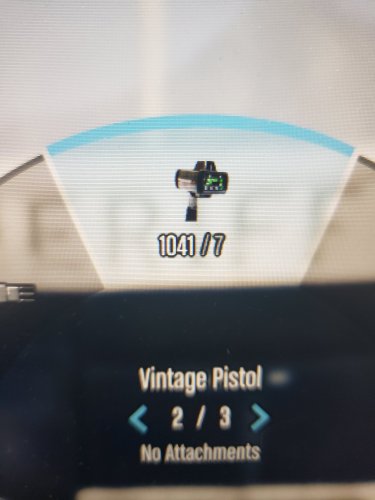
Hey folks! I am fairly new to the LSPDFR game and community, and one of my favourite (and most frustrating, sometimes!) parts of the game is all the mods/scripts/plug-ins/etc that you can add, to build the game into what you want it to be. I know I have benifited a lot from so many of the mods out there, figured it was about time for me to contribute back.......at least in some small way. Over the past few weeks, I have been working with GIMP a bit - getting more comfortable with making my own changes to put into my game. One change I made was coming up with an actual ProLaser 4 LIDAR icon to put into the vanilla GTAV weapon wheel HUD - replacing the "Vintage Pistol" icon. This is meant to go along with Opus49's amazing Lidar gun script. I created 3 variants to choose from - see the photos for what they look like on the in-game HUD. The first is a "realistic" coloured icon - basically a stock photo of a ProLaser 4, that I scaled down and then pasted into the hud.ytd file. Not completely happy with that one - looks great in GIMP and on the OpenIV file, but maybe the game itself can't render photo-quality well?? The second is "semi-realistic" - a side view of the PL4, made into grey-scale line drawing. The final option is a GTAV "cartoon" style - matching the style of the other vanilla icons. I am happy with how both of those turned out. Pick whichever one works best for you! If you have followed the suggested install for the Lidar gun script, and are using it in the "Vintage Pistol" slot, then you can just drop into OpenIV the "weapons_dlc_bb" I have included for each variant (install path below). If you chose to replace a different weapon slot, I have also included the individual icon versions - but you are on your own for editing the file to where you need it to go! My first upload, so go easy on me, lol. Any problems, please let me know. This is pretty basic stuff, I know......but it was a pain the arse to do! Honestly not sure if anyone else is even interested, but I figured if I could save someone else the effort, why not? By the way, if anyone knows how to edit the actual text that comes up with the Weapon Wheel, please let me know! Would love to change "Vintage Pistol" to "LIDAR"...... *** INSTALLATION *** Download this ZIP folder, and open with program of your choice - save where you can find it again easily. 1. Using OpenIV, and ensure "Edit Mode" is on - navigate to the following location --> mods / update / update.rpf / x64 / data / cdimages 2. Open up "scaleform_generic.rpf" 3. Once inside that .rpf, scroll down to the texture dictionary section and find "hud.ytd" 4. Double click "hud.ytd" to open it; scroll down to find "weapons_dlc_bb" 5. Right click on that, choose "replace", then find the "weapons_dlc_bb.dds" file from this download that you want to use 6. Pick the file you want by left clicking, then "open" - that will put you back into OpenIV, then click on "save". 7. Exit/close out of OpenIV If you haven't seen it already, here is a link to the Lidar Gun script by Opus49 and BenH6021......
- 24 comments
- 2 reviews
-
-
-
- 5
-
-
Hey there! Just wanted to ask.....is there a (reasonably easy) way to edit the text/weapon names that comes up with the Weapon Wheel in game? I know you can edit the actual icons through OpenIV, but could "Pistol" be changed to "Glock 17" for example, or maybe "Stungun" to "Taser X26"........that sort of thing. Or, is that be hard-coded and buried in the game files somewhere? I certainly not a programmer, but if there is a file somewhere that could be edited, that would be pretty cool!
-
So.......lol, after all this time, I have figured out it is even easier than all the other ways. The "trick" those YouTubers use?? Yeah......just the delete button on your keyboard! Yep, while in game and in CompuLite, just click on the name so it is highlighted, and then the "delete" button. If your keyboard has a NumPad........not sure if that one works. I use the one on the main part of the keyboard.
-
 WOW - very nice!
 -
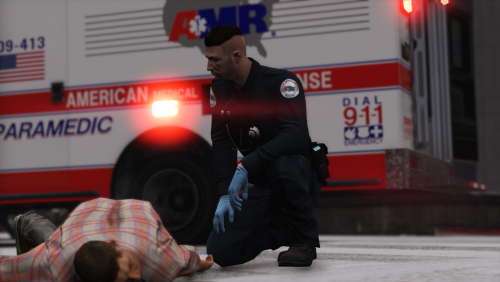 These look great - looking forward to putting them in my game!! Awesome that you broke down the EUP menu numbers for us!!
 -
Ahhh, ok, fair enough - sorry, I missed that part. I thought he was starting over completely.
-
@Jeffdadawg - DUDE!!!!!! YOU GOT IT, MAN!!! Without making this sound too weird.......love you buddy! * happy dance * Your "phone notification" clue was the one. Googled that a bit, and linked on to a few other support posts in here about notifications for STP, callouts, and such, not coming through. All mentioned the "phone notifications" setting being turned off. So, yeah - loaded into my game, confirmed my issue was still happening. Then, went to the in-game pause menu / settings / notifications --> there are 10 or so to choose from, and sure enough, the "phone" option in mine was toggled "off". Toggled it back "on", and went back into game........BINGO! All the notifications started coming up like usual again - ped checks, search results, breathalyzer/drug swabs, the "force duty" vomit-load of info spilling up the left side. I tell you, a beautiful sight to behold, lol! Have no idea when/why/how that ever got toggled off. I don't recall ever seeing that menu before, so I can't imagine I actually toggled it off myself last week. And, then so weird that it would stay that way through game save reloads and even fresh installs. You wouldn't think that would be a default option. Apparently, in the regular GTA V, those phone notifications happen a lot - players want an options to turn it off. Anyhow, whatever, however. Thanks again, man. Now.............back to work rebuilding my game! *sigh*
-
Ummmmm.......sorry to butt in here, but I as far as I know, you most definitely need to have the "lspdfr" folder copied over into you GTA main game directory. That folder has all the vanilla audio, character, and data files, along with the "keys.ini" and "lspdfr.ini". I think the only 2 things you can ignore from that LSPDFR 0.4.9 manual download is the "licenses" folder, and there is an "RPH_Readme.txt" file. I remember from previous installs that there was an SDK folder/file of some sort, that you didn't need either.....but that one doesn't seem to be in the new download material.
-
LOL........gotta admit, you got my hopes up when I saw another reply had been made!

