


Medicmojo
Members
-
Joined
-
Last visited
Everything posted by Medicmojo
-
 Is it just me, or is a bit confusing that the mod title is "9.3", but the content OIV file name is still 8.3?
- 2,349 comments
- 238 reviews
-
That clearly looks like the livery is based on the wrong template for that car model. You say that the texture matches the model year of the car - but, you still have to make sure the bse template matches the base model that you are using. Different devs may use different base model cars for their final product release - there are a few 2018 Charger base models out there - Matt, GM, for example. Anyhow - I did check out the Clayton County livery and the South Fulton model pack you linked above. I figured out your issue. Was looking the pic you posted, and the unit number (782......6, I think) that shows up on the trunk lid instead of the roof? Once I saw how the livery dev organized his pack - I had a look at the 2023 Charger liveries............and, there isn't one with 782anything in it. The 2023 list only has 7842, 7844, and 7897. However - I had a look at the other model year Chargers in the livery pack. And, in the 2014 list...........there is a 7825, and a 7826. And, obviously it is a completely different template. Tried it out on the 2023 Charger model - same look as you have. However, if you install one of the liveries from the 2023 Charger folder on the 2023 Charger model.............works fine Alright? I assume it would the same with the other model pack you linked, since it is also from Scorpionfam. Should be an easy fix for you.........just make sure you are installing a livery from the right model year folder, onto the same model year car.
.thumb.png.0722dbf38b7da974dce3debfdb9d6806.png)
.thumb.png.7c0f4ec53d6a90d8968184bcef2595af.png)
.thumb.png.cede6558b7be7c95ceb5e3ee08696af8.png)
.thumb.png.976adba0346750775d2ce7fef176cbd7.png)
-
Don't want to be "that guy"...........but, the error is pretty much telling you what is wrong and what do to. Looks like EUP can't find and/or use those specific DLC updates within you main game. Those are the DLC packs where many EUP items need to go. As it pretty much says - I would think you have either a faulty/incomplete game install; or a faulty/incomplete EUP install; or your dlclist.xml doesn't have those entries. Try confirming that your GTAV is up to date - "verify integrity of game files" (on Steam). Check if that fixed the issue. In OpenIV, check the dlclist.xml for those specific DLC pack entries. If not, I guess you could try and manually enter those lines - just like you do when adding a DLC car pack. Maybe try resinstalling EUP completely?
-
I remember seeing something on the Discord a year or more ago.......about the main dev having some significant medical issues come up.
-
hey.........nah, man - that looks great! Nice work!
-
OK, nevermind.......I figured it out. The model in the pic you provided is the vanilla base model for the "Maverick" helicopter. I was looking at models that are the "polmav" - Police Maverick - version of it. My understanding is that base vanilla models are not "mapped" to be able to take new liveries, the way we usually do things. That is why the "sign" texture files in vanilla ytds looks so strange, compared to most liveries/templates. So - we could easily do up a livery for the "polmav" version of this helicopter, using the replacement model I linked above. There is also a "Maverick2" addon model model out there, which gives a news helo version, and then the police version as well. However, if you truly want to use the vanilla Maverick helicopter - there is a way to do that. A dev by the name of Thero (SoCalThero?) created a pack of stock vehicle templates, that covers the vast majority of vanilla vehicles in GTAV that would even need a livery. As part of that, he actually had to tweak the model files a bit, so that the livery template would work. Basically.......that means you have to install his model files as well. The Maverick helicopter is part of that pack. Here is the link, on GTA5 mods (sorry, lol.....) https://www.gta5-mods.com/vehicles/air-port-service-and-service-vehicles-template-pack Send me a PM here, and let me know what you think.........
-
can you confirm what helicopter model you want that done for? I happen to be working on a Maverick livery right now for another commission project.......but the window/door layout seems different? Was this maybe a pic from a GTA4 model? Is it this one? https://www.lcpdfr.com/downloads/gta5mods/vehiclemodels/8545-police-maverick-mapped/
-
 wow! Very nice work - thanks for sharing!
 -
 Thanks CJ - really appreciate the nod! Thanks for taking the time to comment on a small mod that is 4 years old! And......thanks for all your tutorial work for the LSPDFR community over the years! Definitely one of the go-to-guys for any install help.
- 24 comments
- 3 reviews
-
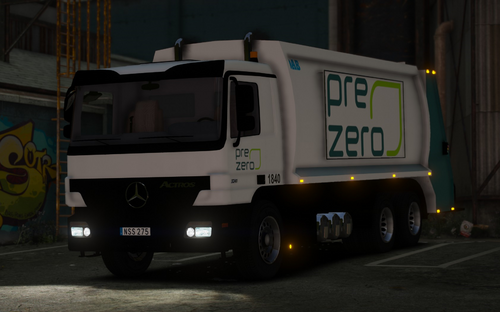 thanks for the reply! Too bad about the actual template.....definitely makes things easier, lol. But, I've done the same in the past, with mapping out a new livery based on the existing one. Trial and error process, but doable! I'll still keep this model in mind. Might be fun to "upgrade" the garbage truck model in game to something more modern at some time, but keeping the GTAV base liveries (or variations of them - always enjoy the humour behind some of the logos!).
 -
Hey.....this is an interesting garbage truck replacment model - thanks, would not have discovered it, if you hadn't provided the link! Would you be able to share the template for it? I did get the download, from the link you provided - but the template does not seem to be part of the included files anymore. I saw a couple other comments asking for the template as well. But........when you click on the devs name, "user does not exist comes up". did you have a template to work with........or just guess the layout, using the included liveries as a baseline?
-
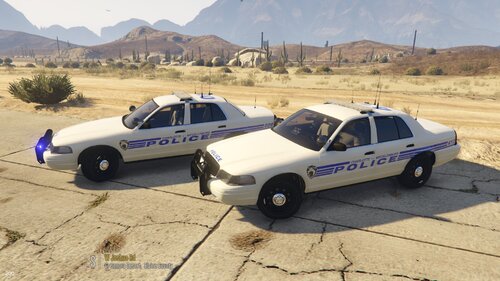 As noted in the "What's New" section - here are the body liveries for the 2020 FPIU in Torz' LSPD Legacy pack..........sorry! Not sure what file name will be generated if you "right click/save image as" straight from here - for drag/drop install into that model's YTD file, the livery textures need to be named "20explorer_sign_1", sign_2, etc.
 -
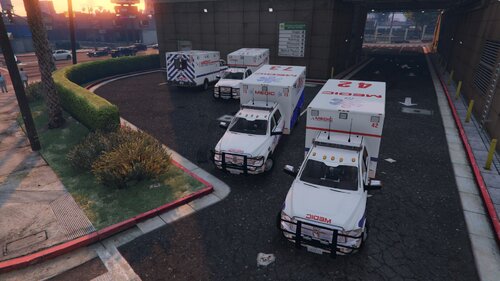 Hello again! Over the past week and a bit, I have released 2 other parts of a livery commission project I did over the past couple years - for a customer in the Charlotte, NC area. He has graciously allowed these all to be released publicly. This is the final part, and is for the ambulance service in the city of Charlotte and surrounding area - MEDIC, or Mecklenburg EMS Agency. Check out my other recent livery releases for a small pack of North Carolina State Highway Patrol liveries, and a larger pack of liveries for Charlotte-Mecklenburg PD. MEDIC uses a unique ambulance vehicle for the majority of its fleet - Dodge RAM Quad Cabs - and, my customer wanted to recreate that look in his game. While there are number of great choices for more common ambulance models to use in LSDPFR.........there is only one Quad Cab that we could find. Thank goodness Candice released the DOdge 3500 Mega Cab ambulance back in 2017!! It is based on a 2008 chassis, so certainly has the slightly older style look to it, along with older style lighting modules/lightbar. It has great details in the ambulance patient care compartment as well. It is offered with both replacement files, and a DLC addon option. And, I believe it comes with some lighting colour choices (MEDIC seems to use red/white). Another great feature with the download, is that it comes with a number of livery options........you could use this same model throughout your game! Set the MEDIC livery for the city........and then maybe the Blaine County, or other private ambulance livery, for the rest of the map! As always with my livery projects, I can make no guarantees that the model we chose is an accurate representation of the vehicle model used by the actual agency - in terms of model years, lighting packages, external/internal attachments, etc. I can only guarantee that the livery itself is as accurate as I can make it, and applied as needed to best fit the model used. Here is the link.... https://www.lcpdfr.com/downloads/gta5mods/vehiclemodels/17628-dodge-3500-mega-cab-ambulance-els-addonreplace/ One thing both my customer and I noticed, was that the model would always spawn "dirty"........and, weirdly dirty - with it not seeming to match where dirt should be. Yes, it would respond to cleaning via a trainer......but, that is a pain. Unsure if that was a problem from the original base model, or with the mod layers that Candice did. With a bit of trial and error, I was able to determine that issue was related to the "vehicle_genericmud_car" texture. If you choose, as part of my download, I am including a "blank" replacement png file to drop into the YTD for that texture. This eliminates the wierd dirty spawning issue. I did not test it long enough to see if the vehicle will still "get dirty" when used - as there is another "3500_dirt" texture in the YTD. While I had the regular and well known liveries already completed for some time, I only realized this week that MEDIC is switching to a new livery design scheme - I believe as of the end of 2025 or early this year. My customer tells me it is still pretty rare to see the new livery. Spent a few days working that livery up as well, to include with this release. In the download folder, you will find 4 livery files - named as needed for drag/drop install into the model YTD. They each have unique unit numbers, and match actual numbers I saw in the reference photos I used. 3 are with the older/common livery, and one is with the new livery. The blank "dirt" texture file is also included, and named for drag/drop install - please use it if you choose. NOTE - no AI was used producing these liveries I hope you enjoy! As always: - please let me know if you have any issues with the liveries - feel free to use these liveries on any other vehicles in your game that they happen to fit/work with, but I can only guarantee that they will work with the vehicle models I suggested - if there is another vehicle/pack that you want the liveries to work with, please let me know in the comments or by a DM - I am sure we can work something out. Or, if you are able, go ahead and rework the livery to another template yourself to use - but, for use in your game only.........please don't repost and claim the work as your own - feel free to share photos or use in videos (would love to see some of those!)........just give credit back to me - please do not repost/upload or claim the liveries and work as your own, on this or any other site - I would appreciate and look forward to any feedback, comments, or reviews - I am not responsible for "breaking" your game........none of these files will do that, if installed properly. If you are not sure on how to do so, YouTube and Google are your friends! Do you have a specific livery request? Maybe your hometown or local area Police/Fire/Ambulance/Tow/whatever service? Please contact me via DM here, or on Discord (Medicmojo#3955 or Medicmojo16717) to discuss further.........
 -
Last week, I uploaded some North Carolina State Highway Patrol liveries that were part of a commission project from a few years ago - where the customer has allowed me to release everything publicly. Here are the liveries from another part of the project - this time, for the Charlotte-Mecklenburg Police Department. This pack is truly a "variety" pack - of both liveries and models.......including some unique model choices. He wanted specific vehicles in his game, that seemed to best fit the actual CMPD units he sees in his area every day........or, what he would wish to see!! (lol.......Mustang!!) While we chose the models with those reasons in mind - once again, no promises are made that these vehicles are truly what CMPD uses...........as far as model years, equipment/lighting options, etc. I can, however, promise that the livery design is as close to 100% accurate as I can make it. I take a lot of time when making liveries to ensue accuracy, often redoing logos and badges completely from scratch - in order to get the best quality in game. For example, with this CMPD livery, I redrew the "hornets nest" logo from scratch. I'll admit the "Speed Enforcment" markings on the Mustang is a bit of creative liberty! In this pack, all models - except for the CSI truck - come with multiple liveries, from 2 to 5 per model. All liveries are themselves unique - with all callsigns being different, and some variations in the decals or placement........as I saw in the reference photos I used. As much as possible, I matched all those details (unit numbers, chevrons, etc) from photos to the same models here. Be mindful that all my liveries are in 4k quality. Depending on your PC specs, you may notice performance/texture loss if you have too many liveries loaded at once. While the game allows and can handle multiple liveries loaded at once onto a model.......your PC may not! All liveries are named as needed to be for simple drag/drop installation into that model's YTD. I am also providing the BB lighting conversion files for almost all of the models - again, named as needed for drag/drop install into the model YTD and your ELS VCF folder. I am linking the models used below, but have also included a text doc with a list of the model links in the download package for easy reference. For the more standard patrol units, we went with Torz's LSPD Legacy pack. It is a great pack from a couple years ago. Please note - it does come as a DLC addon pack.........but it was set up using the regular vanilla police vehicle names, so IT WILL REPLACE those models as part of the regular game spawning process. You may need to rename some models, or adjust your default region and/or agency .xml files, to better fit your game setup. The models we went with from this pack were the 2011 CVPI ("police"), 2014 Tahoe ("fbi" - with patrol and K9 liveries), 2016 FPIU ("sheriff" - used for the CSI liveries), 2018 Charger ("police2"), and the 2020 FPIU ("sheriff2"). https://www.lcpdfr.com/downloads/gta5mods/vehiclemodels/45287-els-legacy-los-santos-police-dept-pack/ For the 2024 Dark Horse Mustang, we went with Rabbit's model again. It is a great model, and I have used it in a number of other livery projects. It has a reflective livery layer as a bonus! This model comes as a DLC addon. The free release on LSPDFR comes with R/B lighting, and a full rambar. Rabbit does have the official B/B lighting option, and a no ram-bar version available on his Patreon. However Rabbit has mentioned in the past to "convert to all blue yourself, if you want". I went ahead and did that, and have included those files here. Even though this model has a full rambar, I made up a ghosted livery to match. I've included the fully marked and ghosted primary livery versions, along with their respective "reflective" layers. However, while the model could have both the fully marked and ghosted primary livery files installed at once - there can only be one reflective layer. Soooo......you have to decide how to run this model DLC in your game. If you want to run with only the fully marked model, or only the ghosted model, at a time - then go ahead and install both the livery and reflective texture files for that option. Or, if you want to have both fully marked and ghosted liveries installed, and then choose in game between those two as needed.......you have to be willing to sacrifice the reflective layer. In that case, install the "blank reflective texture" file, along with ony the primary fully marked and ghosted liveries. https://www.lcpdfr.com/downloads/gta5mods/vehiclemodels/46515-els-2024-ford-mustang-dark-horse/ For the 2023 Ford Ranger, we went with a model release from GlitchCraft. I haven't used it personally in my game, but it looks great in my screenshot tests.........might be a fun vehicle to have in game! It does come as a FiveM ready/DLC addon, and is avaiable in both ELS and Non-ELS versions. Includes the R/B and B/B files. He does make a note that there is no internal police-style equipment in the model - no laptop/MDT, patrol rifle, etc). https://www.lcpdfr.com/downloads/gta5mods/vehiclemodels/45328-els-2023-ford-ranger-off-road-fivem-ready/ For a full-sized pickup truck, we decided to go with a 2023 GMC Sierra.........but, couldn't decide between 2 models we found online! Made up liveries for both. BlueGhost has a Denali in his amazing Unmarked pack (look for the model "sierp"). For a "heftier", more aggressive look - we went with a 3500 HD AT4 model. Please note - the AT4 model in the screenshots here, is from a paid model my customer already had. However, I have verified (in OpenIV) that the livery will fit this model I found today, from Adams Development. https://www.lcpdfr.com/downloads/gta5mods/vehiclemodels/26123-els-blueghosts-unmarked-pack/ https://www.lcpdfr.com/downloads/gta5mods/vehiclemodels/46343-slicktop-2021-gmc-sierra-3500-at4/ Finally, for the most unique livery and model, my customer really wanted to have the CMPD Crime Scene Investigations truck and livery in his game. We considered a couple of the large "Command" truck models out there, but those seemed a bit too much. I searched around, and found this older model release from 2017. Maybe a bit smaller than the real thing, but worked out great! This model comes set to be a replacment for the "pranger". https://www.lcpdfr.com/downloads/gta5mods/vehiclemodels/15367-1999-ford-f-450-super-duty-sheriff-rescue/ When you download my livery pack - the main "Char-Meck PD" will break down into 5 subfolders, and the model link text file. Hopefully, you will find everything self-explanatory - well organized and named appropriately. Each of the sub-folders is clearly named. Inside those, you will find either the livery files - or further subfolders for the specific models. If needed, the folders will contain the B/B lighting conversion files as well - except for the Ranger (model download comes with that) and the Sierra AT4 (new model found today.....didn't make them, sorry!). If you have any other questions or concerns - don't hesitate to leave a comment, or send me a DM here. OK, thanks for reading.....that should be it! Keep an eye out for a MEDIC EMS ambulance livery upload shortly NOTE - no AI was used producing these liveries I hope you enjoy! As always: - please let me know if you have any issues with the liveries - feel free to use these liveries on any other vehicles in your game that they happen to fit/work with, but I can only guarantee that they will work with the vehicle models I suggested - if there is another vehicle/pack that you want the liveries to work with, please let me know in the comments or by a DM - I am sure we can work something out. Or, if you are able, go ahead and rework the livery to another template yourself to use - but, for use in your game only.........please don't repost and claim the work as your own - feel free to share photos or use in videos (would love to see some of those!)........just give credit back to me - please do not repost/upload or claim the liveries and work as your own, on this or any other site - I would appreciate and look forward to any feedback, comments, or reviews - I am not responsible for "breaking" your game........none of these files will do that, if installed properly. If you are not sure on how to do so, YouTube and Google are your friends! Do you have a specific livery request? Maybe your hometown or local area Police/Fire/Ambulance/Tow/whatever service? Please contact me via DM here, or on Discord (Medicmojo#3955 or Medicmojo16717) to discuss further.........
-
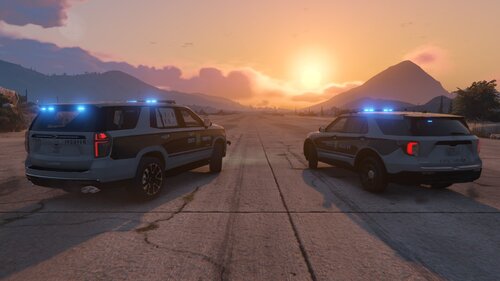 These liveries were part of a commission project I finished up just over a year ago, and the customer has graciously allowed me to release it now. He is from the Charlotte, NC area - so, naturally, wanted liveries from his area. This part of the project was for a few North Carolina State Highway Patrol liveries - but, for specific vehicle models.......to tie together with other parts of the project. Models used are linked below......with no claims that they truly representative of whay NCSHP uses - in the way of vehicle models, lighting, rambars, etc. The only part I can guarantee as nearly 100% accurate are the liveries themselves. I spend a lot of time on my livery work, and strive to be as accurate as possible - with the colour choices, font styles, and logos. I often end up making logos/badges/etc up from scratch, as I find using the images availalbe online..........just don't turn out as crisp as they could be in game. It takes more time, for sure - but worth the effort for the crisper lines and cleaner colours. For the NCSHP door logo, I know the only part I used (from the best online image I could find), was the center seal. I redid all the circle layers and text. I always do up my livery work in 4k - but, have included 2k versions as well to make it easier on mid/lower end PCs. The 2020 FPIU is from RangerZ - the Paleto Bay Police pack he released in February 2024. This pack comes as "replacement" models. The download comes with the all blue lighting files, and some window tint options as well. The 2021 Tahoe is from Kollin M - the Blaine County (Orange County based), released in August 2020. This model comes as a "replacement", and is only offered in R/B lighting. I've included the all blue lighitng conversion files in this download. This particular model link is for a full lightbar Tahoe. However, Kollin M also has a slicktop 2021 Tahoe model available for download here on LSPDFR - I believe (have not tested myself) that the livery should fit on it as well. I don't know about my all blue conversion files - probably not needed, as that slicktop model is offered with B/W lighting. The 2024 Dark Horse Mustang is from Rabbit - his release from January 2024. It is a great model, and I have used it in a number of other livery projects. It has a reflective livery layer as a bonus! This model comes as a DLC addon. The free release on LSPDFR comes with R/B lighting, and a full rambar. Rabbit does have the official B/B lighting option, and a no ram-bar version available on his Patreon. However Rabbit has mentioned in the past to "convert to all blue yourself, if you want". I went ahead and did that, and have included those files here. Even though this model has a full rambar, I made up a ghosted livery to match. I've included the fully marked and ghosted livery versions, along with their respective "reflective" layers. However, while the model could have both the fully marked and ghosted main livery files installed at once - there can only be one reflective layer. Soooo......you have to decide how to run this model DLC in your game. If you want to run with only the fully marked model, or only the ghosted model, at a time - then go ahead and install both the livery and reflective texture files for that option. Or, if you want to have both fully marked and ghosted liveries installed, and then choose in game between those two as needed.......you have to be willing to sacrifice the reflective layer. In that case, install the "blank reflective texture" file, along with ony the main fully marked and ghosted liveries. Otherwise - I think my dowload folder here should be well organized and self-explanatory. If there are any questions, please don't hesitate to leave a comment or send me a DM. ** NOTE - no AI was used producing these liveries ** Here are the model links........ https://www.lcpdfr.com/downloads/gta5mods/vehiclemodels/46610-els-paleto-bay-police-pack/ https://www.lcpdfr.com/downloads/gta5mods/vehiclemodels/29365-els-2021-tahoe-blaine-county-orange-county-based/ https://www.lcpdfr.com/downloads/gta5mods/vehiclemodels/46515-els-2024-ford-mustang-dark-horse/ I hope you enjoy! As always: - please let me know if you have any issues with the liveries - feel free to use these liveries on any other vehicles in your game that they happen to fit/work with, but I can only guarantee that they will work with the vehicle models I suggested - if there is another vehicle/pack that you want the liveries to work with, please let me know in the comments or by a DM - I am sure we can work something out. Or, if you are able, go ahead and rework the livery to another template yourself to use - but, for use in your game only.........please don't repost and claim the work as your own - feel free to share photos or use in videos (would love to see some of those!)........just give credit back to me - please do not repost/upload or claim the liveries and work as your own, on this or any other site - I would appreciate and look forward to any feedback, comments, or reviews - I am not responsible for "breaking" your game........none of these files will do that, if installed properly. If you are not sure on how to do so, YouTube and Google are your friends! Do you have a specific livery request? Maybe your hometown or local area Police/Fire/Ambulance/Tow/whatever service? Please contact me via DM here, or on Discord (Medicmojo#3955 or Medicmojo16717) to discuss further.........
- 1 review
-
-

- 1
-
-
I'll send you a PM......
-
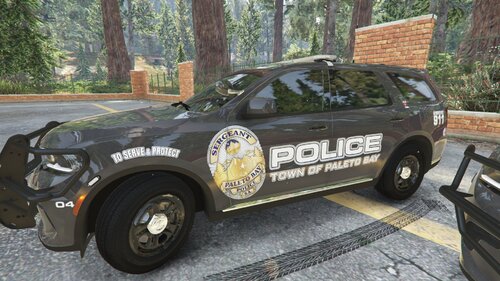 appreciate it, thanks!
 -
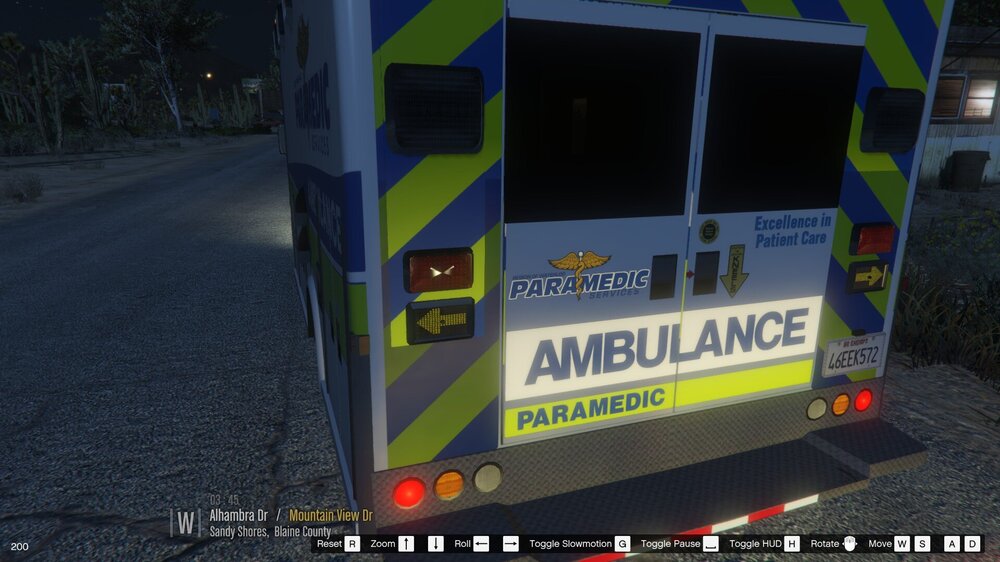
What do you mean by "patches" on the car, when you spawn in game? Are you able to post some pics? Also, post screenshots of what the YTD list for that model looks like in OpenIV - showing what the main livery layer looks like, as well as the reflective layer. And, maybe a screenshot of what the model looks like in OpenIV. In general, though.......... - just to confirm - when you make your reflect layer, you are essentially just "turning off" the main base body colour layer, and only leaving the decal design layer/s (the striping, text, door badge, etc) visible, right? - do you have multiple liveries (sign_1, sign_2, etc) loaded onto a single model? Maybe, with different unit callsign numbers.......or the same livery, but maybe Supervisor markings or whatever? Any chance you might be trying to then install multiple reflective layers? Wonder if that might be causing a bit of a conflict? You can only have a single reflective layer installed - even if you have multiple primary liveries. - obviously......the model is designed to have a reflective layer? Probably a dumb question, sorry - but, setting up a reflective layer is something the model dev actually has to do. We, as livery devs, can't just go ahead and add a reflective layer to any model we want. - also.........if it is the same patchiness I am thinking of - might just be the way it is. I worked on a livery for a model a few months ago, and ran into a (maybe) similar sounding issue. Here are a few screenshots....... You can really see how on the rear chevrons, the reflective layer is kinda........patchy? Some parts do reflect, and some don't. Some parts of the rear door decals don't seem to reflect either. And, even on the sides of the model, some parts don't seem to be reflective. Not sure if this is similar to what you are experiencing? Initially - I thought it was something I had done wrong on my livery, and setting up my reflective layer. But, I did the same stuff as I have done in the past. I then check the original livery/reflective layer on the model provided by the dev. And, sure enough.......the same issues. That led me to decide that it was most likely a problem on the dev side of things - that they didn't set up the reflective layer correctly. Anyhow - maybe this answers your question? Post some pics........maybe we can figure it out.
-
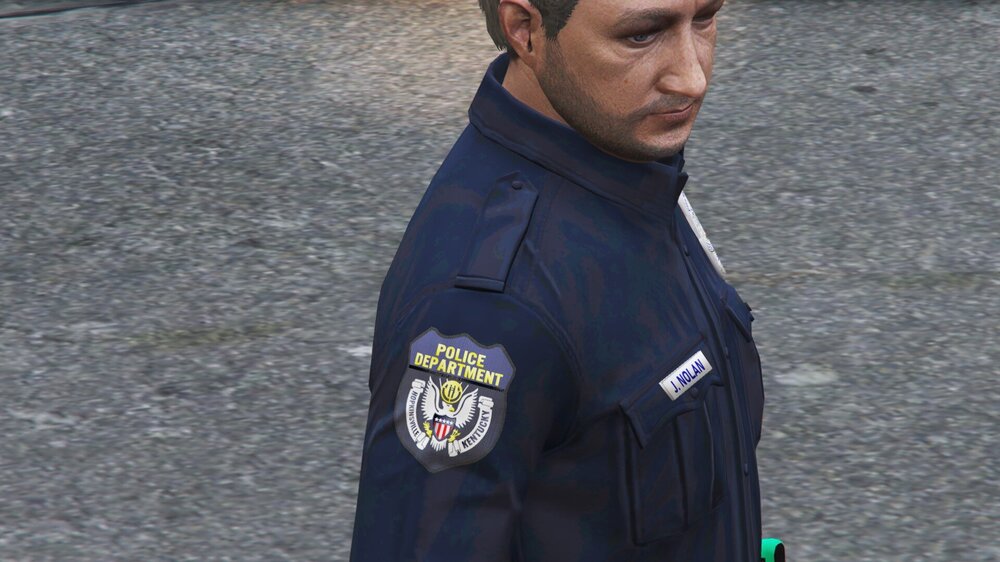
I know it has been about 6 weeks now......did someone get back to you with a PM, or have you figured this out otherwise? I don't know all that much about EUP and sorting through all the files, but I know a bit...... To be honest - you have your answer right there in your question! I think so, anyways........because, it looks like you know the path to get down to the EUP components you want. If not, here it is....... mods\update\x64\dlcpacks\eup\dlc.rpf\x64\eup_componentpeds.rpf\mp_m_freemode_01_mp_m_importexport_01 Once in there, you should see a list of ydd and ytd files, right? Looks like this 👇 The ydd files are the "models", and the ytd files are the "textures" that go on those models. From what I understand, the "jbib" files (no matter where they are) are (usually) upper body clothing - shirts, jackets, whatever. In this path, the jbib_04_u_ydd is the short sleeve uniform shirt model, the jbib_07 is the long sleeve uniform shirt with open neck model, and the jbib_014 is the long sleeve uniform shirt with tie/tie bar. Like this 👇 Then, in the ytd section, you will see that all three of those same numbered models have ytds named with letters "a" through "z". Some may show as blank, but most will show the agency patches when you double click on them to open up the texture viewer in OpenIV. (remember, the model file will often only show the "a" texture in the list). Like this ... You say you have 9 patches? .......well, those lettered files are the ones you need alter - letters "a" through "i". Or, whichever ones you don't want to keep. Export one of those ytd files into your working folder on your computer (** ALWAYS KEEP A BACKUP COPY **) - then, open it up in your graphics program. Open up your own patch design file - then copy/paste it as a new layer on the ytd project. Now - scale it down to fit the same overall size as the patches that are part of the vanilla EUP (or whatever EUP pack you are using). Should end up looking like this....... (I've erased the the original patches - sorry, no reference scale wise) I've only done this a couple times - and, it seemed to me that the vertical sizing was more important.........I had to match that exactly, or it cut off the excess parts of my patch, when I imported it back onto the shirt model. Width-wise, it seemed to have a bit more leeway....... Once you are done with it in your graphics program, save/export it with the exact same name ("jbib_diff_004_a_uni.ytd" for example) to another working folder on your computer. You can save it as a dds file, if you want - but png or jpeg should work fine as well. Then, with OpenIV open to that same pathway, open up the specific ytd you are changing, and drag/drop your png directly into that (or use the "Replace" button that OpenIV gives you - whichever method you usually use for changing textures). Click save. Should go from something like this ......to something like this (please note, the EUP project I worked with here, changed a few other things - no white undershirt, etc. But, gives you the idea) If you replaced the "a" texture of either 004, 007, or 014 - you should now be able to click on the model viewer ydd file, and see your patch on the uniform shirt. And, hopefully.......it looks like this You follow the same process for all the patches you want to change out. When you are done, go into game and look to see the changes!! Probably have to "force duty" at a Police Station, so you can change it on your character. Might have to cycle through uniform options to find the changes. Hopefully, it looks like this for you....... As for the AI or NPC police/sheriff that respond as your backup.........that is probably a bit byeond my scope. But, I would assume.......that if you replaced the letter code for each agency you want to change out (find and change the LSPD for yours, Blaine County for yours, etc) - then, it should work with the exisitng EUP and backup response agency files.........mabye? right? lol Anyhow - long answer. Hope it helps you, or somebody else down the road.
.thumb.png.83bc8f25fef7d80b9bd93c152104a60d.png)
.thumb.png.1cf126f427bee40b0834be5ee183105e.png)
.thumb.png.4e7b1739c49bcea23f057ad5504ffadf.png)
.thumb.png.402407307e89d0306e76a02d4a167e53.png)
.thumb.png.56ddff0a1a542252ca4aa00c4c977dd0.png)
.thumb.png.2dc5e5759101f0f12b14870987f48d0d.png)
.thumb.png.f0607f6a76732e08f7e14b69d42f9758.png)
-
sent you a PM
-
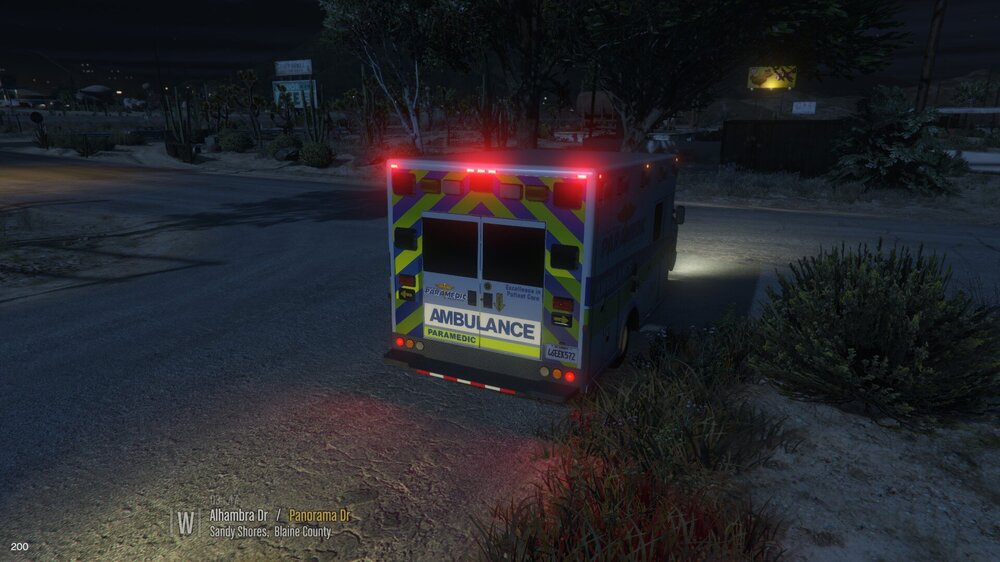
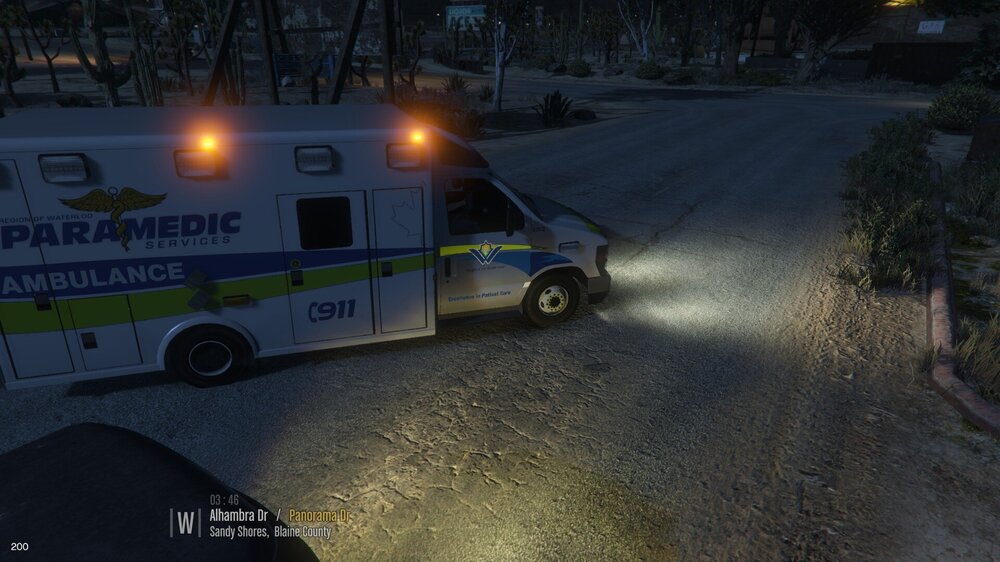
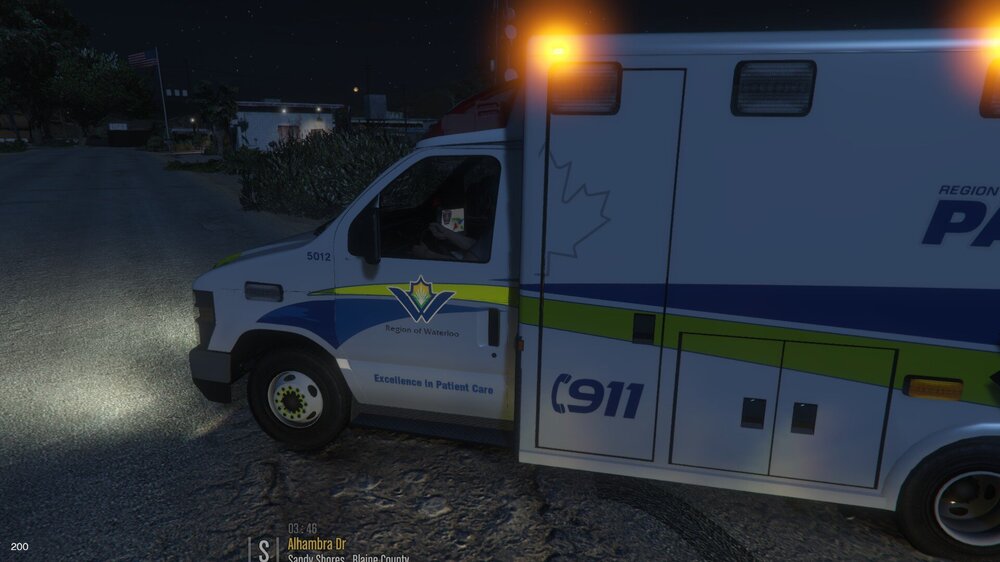
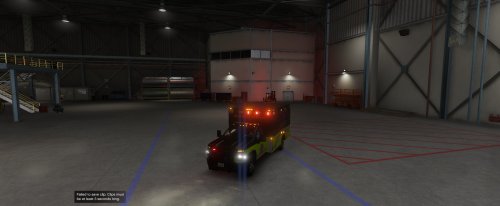 Hey! Lol, nice to see that people still scroll through files from over 3 yrs ago! As for the livery in the pictures, that I made for this ambulance model......that was a private commission project. I can't give it away now. If you would like something similar done up, send me a PM here - maybe we can figure something out for a new project.
- 24 comments
- 1 review
-
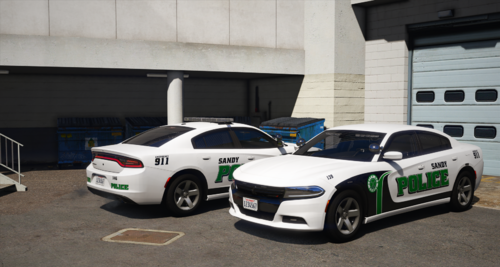 Nice work on these! Great idea to go with the Sandy Shores area for a lore-friendly version...... I did up the Dublin versions last year for commission project, with the customer wanting to use a Charger pack from Gump. I found it interesting how the Dublin in Georgia, and the Dublin in California had so similar designs. Made up a K9 and ghosted version as well, to match the models in the pack. Took me a bit to nail down the font style name.......ended up using one of the "font forums" - took a few days, but somebody gave me the answer!
 -
Definitely great information to have available in here. I am certain you will help someone down the road with the same issue. Thanks again for posting it!
-
wow.........not 100% sure that I understood all this. Will have to reread after another cup of coffee or something this morning. Nonetheless - thank you so much for posting such a detailed explanation. Typing that up alone probably took over an hour or more!! Not sure that I have ever run into the problem that started off your project. I know I have reinstalled the YTD a couple times to fix things...........but, certainly would not have gone into such depth to fix an issue. Honestly.....I would have just picked another model/pack to use, lol.
-
yeah, for sure. Send me a PM here, and we can figure things out. Did you ever get the ISP Durango livery worked out?

.png.d47f837efa112a4b5fa9709db0337020.png)
.png.7e4ba038636000de5b22a439ede01fe4.png)
.png.dd55cafe912266b1517e69ad6dbf73da.png)
.png.ef90374c7ee75aed04c4805e7870826a.png)



.png.63c89ab7e28acd2f2d33ed754fb71b1d.png)
.png.ace432edab1cf7d2aa32360f53af678d.png)
.png.80d9b7d6b514436e9374de269644d29a.png)
.png.9f6a392a30b4148c5fe6027a32b30bb8.png)
.png.8499a585a4f81a43a717461916ebf452.png)
.png.84070cda31b026406578d56c53d2556b.png)
.png.bad59f73f0dd55aedaace02ed417400d.png)


