


Echooo
Members
-
Joined
-
Last visited
Everything posted by Echooo
-
 It likely is. I have seen this issue first hand when developing. It seems to happen when too many blips are on the minimap. I suggest double checking and making sure you're not accidentally spawning blips in a loop or something like that.
- 156 comments
- 8 reviews
-
 Just a note for anyone that wants more locations to be added, I suggest joining my discord (link in description) and making a suggestion in the proper channel with screenshots of the location you want added. I do have plans to update this plugin, but they are currently on hold while I work on some new plugins.
 -
 For an initial release, this looks really good! That patrol request callout looks very unique
- 184 comments
- 34 reviews
-
-

- 4
-
-
 It shouldn't, they're meta files, not plugins. Meta files never have any affect on fps.
- 61 comments
- 8 reviews
-
-
- 1
-
-
Little update on this, turns out the guy that made the mod you linked actually has the code for the mod public, so I should be able to use a similar but more optimized method to fix barrier gates. My next update is already awaiting approval so it will be included in the 2nd update that comes after this pending one. The current update that's pending approval uses a slightly unreliable method for the barrier gates.
-
Thats pretty much it, the mod makes pursuit ai more tame and realistic. If you want ai to pit the suspect, you enable tactics in the menu, otherwise you leave it as disabled.
- 61 comments
- 8 reviews
-
-
-
-
Note: If the plugin does not seem to work, load it again after youve spawned into the game, sometimes loading it on startup may cause inconsistent results (I say load it again because the plugin automatically unloads itself after running through the few lines of code)
-
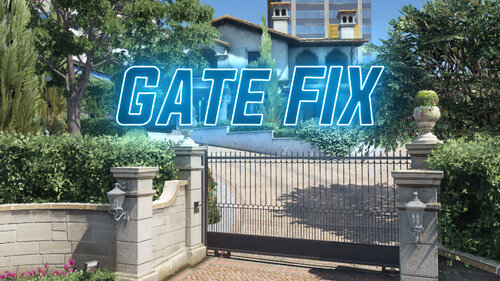
This is a very simple plugin I made in about an hour, when its loaded it fixes the prison gate and Michaels gate and makes them open properly again. If you have another annoying gate in your game that doesn't open let me know and I may add it into a future update. The plugin is very lightweight too, literally 5 lines of code. Note: If the plugin does not seem to work, load it again after you've spawned into the game, sometimes loading it on startup may cause inconsistent results (I say load it again because the plugin automatically unloads itself after running through the few lines of code) If you have any issues, or wanna see WIPs of future plugins, join my Discord! https://discord.gg/xerjdGeTA7
-
 "NOT actually record some form of footage as a video file or in-game replay (duh...)" Honestly I think it could maybe be added as an experimental feature, I know theres NativeFunctions that might be able to allow you to start recording. It would make for a really nice feature tbh. I feel like its a major missed opportunity if its not added as an optional feature.
- 287 comments
- 27 reviews
-
-
- 1
-
-
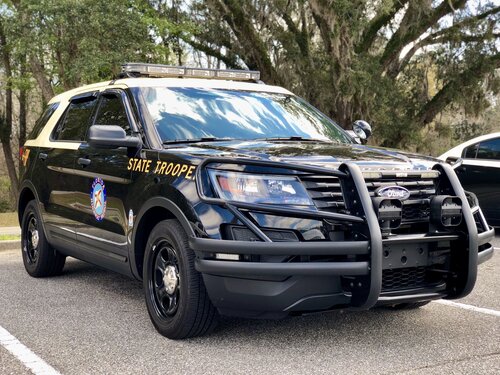 I got tired of searching endlessly for an accurate Pathfinder siren for my FHP fleet in my game, so I found some high quality audio files and decided to make one. The wail might be just a little quieter compared to the other sounds, but that's as loud as I could make the wail without distorting the sound. Depending on feedback I might also make a rumbler version in the future. This is my first siren mod so feedback is appreciated 🙂 Preview of the siren in game: Comparison to actual FHP car: (timestamp 16:00)
- 5 comments
- 2 reviews
-
-
- 3
-
-
 it was indeed something else, Menyoo decided to randomly change a setting that caused it.
- 105 comments
- 33 reviews
-
-
- 1
-
-
So while everything works, I am noticing something a little weird. Birds and other ambient animals seem to die when I get near them. I know some of what this script does is similar to what fivem does, and fivem (from what I remember) used to have an issue with birds falling out of the sky or dying in general, so im thinking it might be related to this script. I also notice if I play base GTA SP and get the cops on me, they seem to die if they get too close to me as well. Not completely sure if its caused by this script but its the only real change ive made to my game recently.
- 105 comments
- 33 reviews
-
Just go into your game directory (outside your mods folder) and find the default gta ped personality file, extract it, and replace the one in the mods folder with it.
- 61 comments
- 8 reviews
-
-

- 1
-
-
-
I have been waiting for someone to make something like the extended texture settings fivem has for a Long time. Ive been having to play on "normal" texture settings for months due to texture loss with NVE, now I can finally play on max texture settings with LSPDFR. My game looks so damn good now
- 105 comments
- 33 reviews
-
-
- 1
-
-
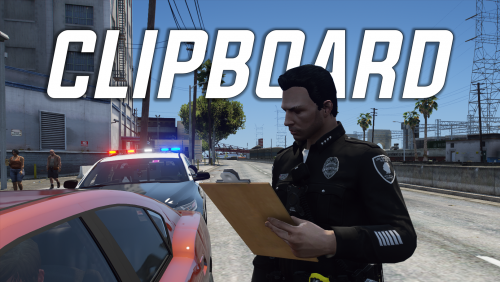 There are multiple ways to stop the animations created by this plugin, in terms of other plugins, I doubt I could, and even if I could I wouldn't want to interfere with other plugins.
 -
Right now I am currently working on a new plugin, however I will consider this for a future update, it should be pretty simple to add in.
-
Sadly there isn't much I can do about this at the moment. It requires lspdfr 0.4 to fix certain bugs associated with walkstyle.
-
 A suggestion I have is to add a peds history (previous charges/arrests, previous tickets, etc) to the computer system. Maybe add an API as well in case a callout dev wants to create specific arrest history for a suspect
- 707 comments
- 33 reviews
-
-
- 4
-
-
I wouldn't say complicated, id say it's more time consuming than anything personally. But I do have a callout pack in development that will be detailed, unique, and realistic. It's just going to take time to make.
-
Ever wanted to start a clipboard or notepad animation for more immersion without having to go through menus? Now you can! Features: - Pull out a clipboard or notepad with the push of a button! - Two options for what prop you want to use (which is changed via the ini file) a clipboard, or a notepad. - If you press and hold the same keybind after the prop is pulled out and the animation starts, you put it away using the same animation, however, if you press the same keybind instead of holding it, it drops the props on the ground and instantly stops the animation. This is perfect for when suspects decide they want to pull out a weapon or start running, because you can quickly react. - If you drop the props by quickly cancelling the animation, you can pick the prop back up by starting the animation again. - Vehicle friendly keybinds! If you are inside any vehicle, the keybinds are temporarily disabled until you exit the vehicle. So you can overlap the keybinds with ones used for vehicles without issues. Known issues: - During testing, there were times where I noticed the props would not spawn when I try to pull out a clipboard. To fix this, I made the plugin check to make sure the prop is spawned whenever you start an animation, so if you ever notice that the prop does not appear, simply stop and restart the animation, that should fix it. - I advise that if you need to use the quick cancellation feature, to make sure your character is stopped, if your character is running/walking when you use the feature, it makes your character stop running/walking for a second, as of right now I do not have a fix for this. I now have a Discord server! Join it if you need support, want to see future projects I am working on, and more! https://discord.gg/VZuCC3f83W
-
this pack with different vehicle textures, forgot the name of the texture pack sadly.
- 61 comments
- 8 reviews
-
-
-
- 2
-

