

Code Master
Members
-
Joined
-
Last visited
Everything posted by Code Master
-
The only time it crashed was then I deactivated ANPR Or whatever it's called, and in loving typical callouts more than UK Callouts Just trying to work out how to use it especially Speed Trap
-
RagePluginHook.log
-
I DID WHAT YOU SAID RagePluginHook.log
-
I CANT FIND UPDATE
-
RagePluginHook.log
-
can you give me a link for stop the ped and anpr?
-
How do I increase plugin
-
Rage is crashing whilst playing game HELP! RagePluginHook.log
-
thank you
-
-
I got it to work had to unclick direct x 11, force windowed mode and bordless mode and ignore video card in rage, but get a few crashes here and there
-
Had a crash but was playing game before it crashed as i was pulling over a car. RagePluginHook.log
-
Thank you so much with the MK7 Thames valley it says in description Patchday 21 the files on the car are Area 1 can i change that to police 3 and put it in 22
-
mainly thames valley police, what links have you got This is Patchday22 files there is a Patchday23 file
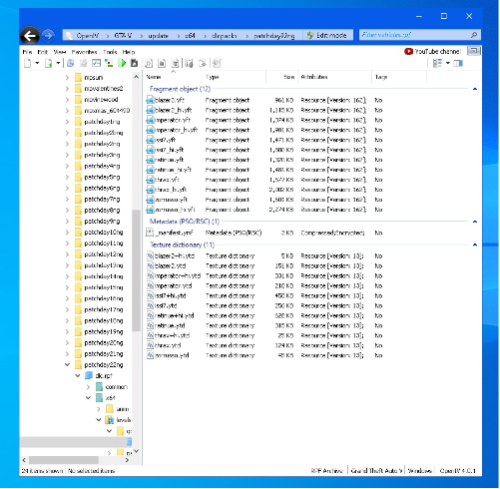
-
can you tell me where to put police vehicles in i want british ones
-
i reinstalled it again, works now. i put all mods in a crashed i found in ELS.Log. VCF file and said (A crash before all clear indicates faulty VCF) FIRETRUK so i deleted the els file for it and all works now
-
I reinstall gtav clean with nothing on and still crash, so I'm deciding to sell pc
-
I have the old visualsetting.dat still could it be that, they are not addon cars they are replace also I am using 1,5x peds and 1,5x traffic I haven't changed any meta file
-
I downloaded another mod pack dlc not oiv, I was able to play with 3 police vehicle but when i add more the game still crashes before it loads into game Gameconfig, Packlimiter and heap is all on there.. I'm slowly giving up the log says nothing about the crash. I've had this now about 30 times where I have to delete the folder and then put back up one. I'm thinking of giving up gta and sell pc All these mods were working months back but because no one explain where vehicle files have to go I decided to download a file that sorts it for you since then its giving up and crashing PC Specs Intel i7 MSI R9 380 4GB graphics card only had for 2 weeks and works amazing. 22GB RAM GPU
-
It wouldnt load with or without rage, so I deleted gta and copied my back up to disk C and work amazing now I found it was Modding DLC causing game to mess up
-
game still crashes just as soon as story mode stops to go into game
-
I do have a game config but only used the stock peds and traffic, I will put other on later
-
.
-
I will try later, and yeah I see 0.4.8 has more features but I'll stick to 0.4.7 for now. But I will let you know if it fixes the problem. Am I right in the log file I sent nothing is showing that's causing the crash All I did was delete modding folder from dlcpacks in open IV, everything was working until I added the modding dlc pack oiv. I will try later
-
Ive Only downloaded Albo1125 Modding DLC OIV and police vehicles to go inside it Scripthook V Trainer ELS Game Config 2060.1 LSPDFR 47 Met Radio Tones i think thats about it RagePluginHook.log ive deleted the oiv and still doing it