
Code Master
Members
-
Joined
-
Last visited
Everything posted by Code Master
-
This can’t be for just online tho, because I don’t have Cayo on SP
-
all those files look ok to me, another thing you could do is find all (SYSTEM.RUNTIME) files in you C:/Windows/Microsoft.NET/Framework/v4.0.30319 and screenshot all of them that's another thing i can only think of. But ill try and help you the best i can!
-
Send me a screenshot of your C:\Windows\Microsoft.NET\Framework folder? this is from someone i know and my brother had the same problem and he fixed it for him.
-
I've been trying to figure out why when I have ELS lights activated it turns off my headlights. On some cars it both headlights or just one, or the tail lights or just one tail light. When ELS lights are off all the head lights and tail lights work fine. PLEASE HELP its been happening a while sometimes i restart the game it works fine but that's rare that it works. If there is no solutions then I give up!
-
That is strange, because normally if it says that on rage i use steam to update it, I'm sure Charlie can help you on this one as ive never experienced this before.
-
Strange as that's when the new update came out 15/12/2020, Send screenshot of GTA V itself on steam.
-
You're game needs to be updated hence why you are getting the (Unsupported Game Patch) error
-
Charlie I’m having same problem did you find a fix?
-
have you tired verifying your game data, also Clear your commandline a text document found in your main directory
-
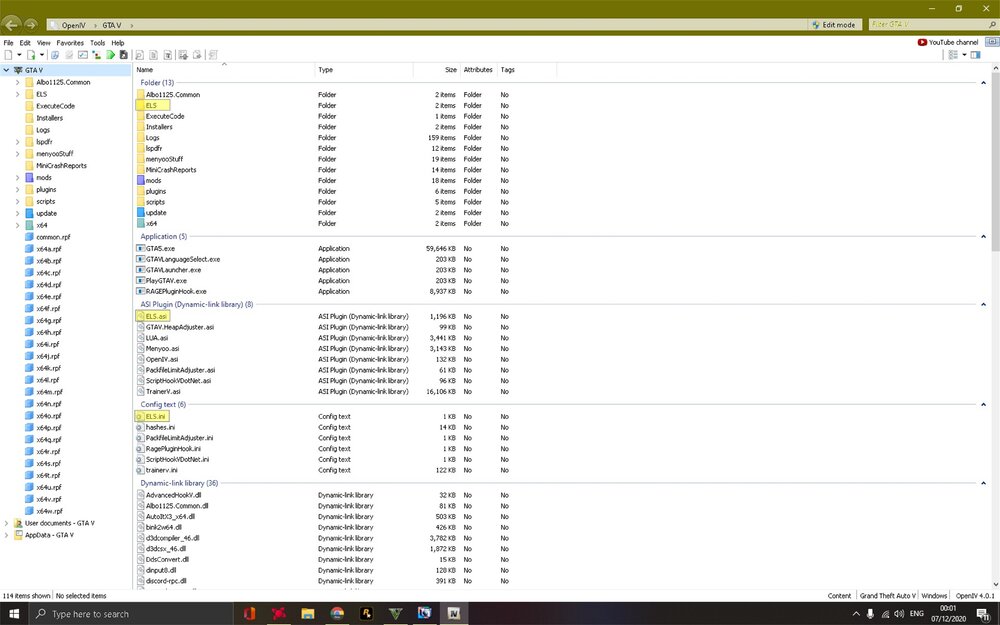
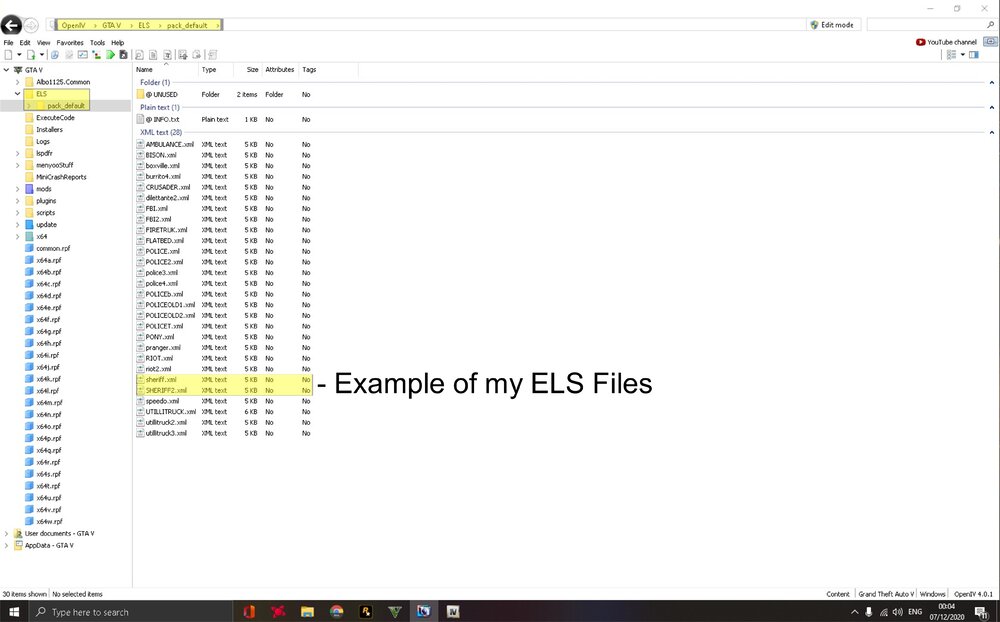
Put all ELS files that you download from the link I posted into the main directory of gta here is a screenshot of mine, then the car file ELS goes into ELS/Pack_Default
-
Also ive noticed the XML files you put in Patchday14 , you need to put them in (GTAV/ ELS/ Pack_default.. if you dont have els download this Delete the ones out of Patchday14ng and put them into Patchday22ng but only the YTD & YFT files only and that will work.
-
Looking back at you're screenshots you are using Patchday14. any vehicles you download if the author says put files into eg (Patchday8 or Patchday14) Don't! .. Put files into Patchday22. i did what you did and thanks to Charlie he's helped me with everything and couldn't ask more from him.. so put all vehicle into Patchday22 and you wont get errors
-
RagePluginHook.log
-
crashed again
-
i thought that to but wanted to double check... but its weird i play game and crashes then it generates crash report so i uploaded it on here will do mate is it rpf rile? sorry was thinking something else.. ill try find it Charlie, i updated grammar police the other day, and when i want to talk it makes the noises to talk (beep) etc but i talk nothing happens and dispatch doesn't come back to me..
-
Hello ive updated plugins and deleted a few i didnt want no more and now game crashes using rage and normal. RagePluginHook.log
-
atm its not crashing i mean it was bad crashes, my pc did freeze but i know why it does and it happens now and again. but game isn't crashing yet, I've got to sort something out personal stuff then ill play a bit more but if i get anymore problems ill let you know but thanks for the help.
-
ok ill give it ago
-
all files successfully validated
-
just waiting for it shouldnt be too long
-
ok will do that now
-
i used eup but didnt like it so deleted everything to do with it and then thats when it started crashing
-
i use rage and crashed so tried it on normal game and still crashed
-
Tried adding British outfits. but idk whats going on. RagePluginHook.log
-
tell me what crashed RagePluginHook.log