

Code Master
Members
-
Joined
-
Last visited
Everything posted by Code Master
-
Just reinstalled gta v again on new pc as old one blew up and i mean blew up, i know how to do everything but now and again textures like roads and buildings blur or disappear, i hardly have anything on the game, im slowly adding stuff from old harddrive. but my game crashed can someone help RagePluginHook.log
-
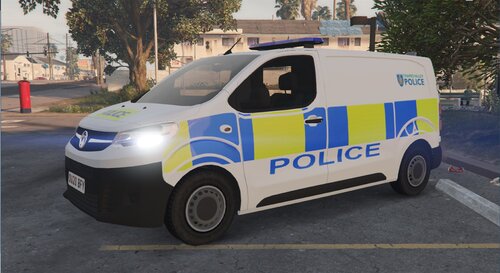 2020 Vauxhall Vivaro Thames Valley Police Skin Download Model: https://www.gta5-mods.com/vehicles/2019-vauxhall-vivaro-syp
 -
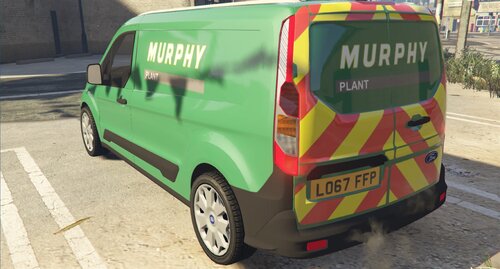 This skin, Murphy Plant Ford Connect Van 2017. This model is best for Boxville First Download (State Zero Mods) AA Pack https://www.gta5-mods.com/vehicles/aa-rescue-and-recovery-pack-els Model: James Radley Setup: Cian Pearfield Skin: KMODE Eco lightbar made and textured by: D.Pease Corner Modules made and textured by: D.Pease
 -
 This is a UK British Veolia Ford Connect Van Link for model https://www.gta5-mods.com/vehicles/royal-mail-ford-connect-van-replace-template Copy the YTD file to X64e.rpf > Levels > gta5 > vehicles.rpf Credit - NotchApple (https://www.gta5-mods.com/users/NotchApple) Any questions please feel free to comment or message me thx.
 -
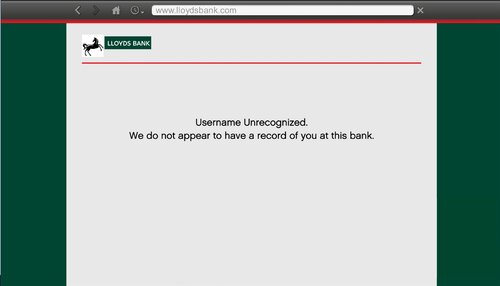 LLOYDS BANK WEBSITE PAGES I got really bored tonight and decided to do something different to my game, and wanted to share it with you guys. This changes the Maze Bank web pages Read Me in download. If possible I want to change the www.maze-bank.com in the last photo to Lloyds but I'm currently trying to research about that, if I can do it a new update will be out for you guys Really Hope you enjoy Feedback would be appreciated!
 -
As i do this most of the time i renamed my mods folder to _mods and still crashes, Urgent Help Please RagePluginHook.log
-
LSPDFR Crashed as soon as game launched but just kept saying Loading LSDPFR here is the log? was working beautiful yesterday and as soon as i went on PC today its not working. RagePluginHook.log
-
I started with 2GB of VRAM and glad I went to a 4GB and 22GB RAM next is a 4K monitor can’t wait, but I agree with Charlie etc you need to computer to run the game mint
-
UB Crashed again, i called for back up and non came, then 1 minute later police was in the air? then i fell through the groundRagePluginHook.log
-
I wonder if his diffuse tint isn’t clear can’t remember the code?
-
I found out UB and other stuff updated on Feb 6th so updated it and it worked thanks bro
-
Had a crash tonight this time its UB, had to be the best mod ever that crashed. i was on a pursuit and the officer arrested the offender then next minute about 20 Officers swamp matching the same stuff as the officer who arrested the offender, hope you get what i mean? RagePluginHook.log
-
 Hello, I installed this thinking its a good mod and it is but i had a problem when LSPDFR.DLL crashed and found out it was to do with Chill Callouts, and it said something about Traffic Policer which i do not have as it was last updated (June 24, 2019) sort this out
- 255 comments
- 16 reviews
-
I had the same problem yesterday and found out it was a Gameconfig.xml file, so i found one online, if im allowed which idk if i am, ill wait for @Cyan or @Charlie686 to comment if im allowed to post the link. but charlie know which one im on about.
-
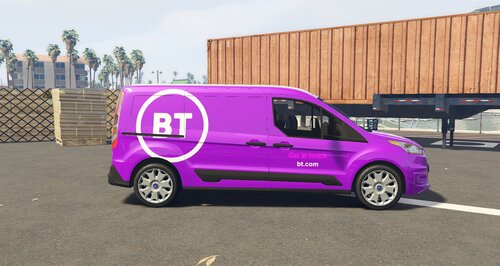 This a UK British BT Van. Link for model https://www.gta5-mods.com/vehicles/royal-mail-ford-connect-van-replace-template Copy the YTD file to X64e.rpf > Levels > gta5 > vehicles.rpf Credit - NotchApple (https://www.gta5-mods.com/users/NotchApple) -(BT Van New Logo) Folder - This is the 2019 New logo -(BT Van Old Logo) Folder - This is the original logo -Photo's inside both folders so you can see what van is what. So you can pick which van you like. Hope you enjoy this update, any issues let me know!
 -
@Charlie686 he's having the same problem as i just did i believe
-
all your doing is temporary disabling the mods folder by changing it to _mods, if the game then loads it means there is a problem in your mods folder. YOU WONT LOOSE ANY MODS
-
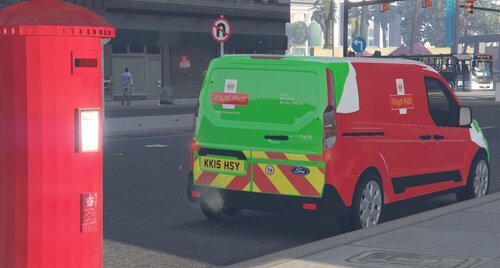 This is a skin of NotchApple's Royal Mail van to a Royal Mail Zero Emission Van First Download https://www.gta5-mods.com/vehicles/uk-london-british-dpd-ford-connect-van-wip-project-london-remastered In the download file there is 2 Folder Green - Green Van Red and Green - Red and Green Van Read Me in the installation file! Credits: Skin: KMODE Original Model: NotchApple Screenshots: KMODE let me know if there are any problems
 -
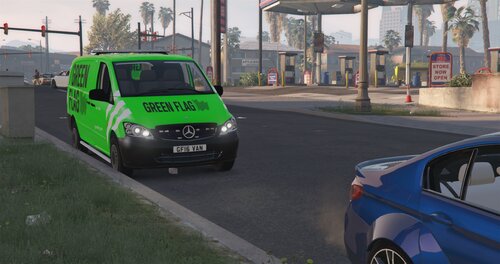 First Download https://www.gta5-mods.com/vehicles/mercedes-vito-convoi-exeptionnel-els Replace the YTD files Credits: Model: Unity Model converterd by TeamMOH, (Marco) Wheels: Britishgamer88 / TeamMOH (Dyverze and Samtoxie) Skin: KMODE Lightbar: GTAxB0SS LED's grill and back: Bueno / OfficerFive0 Placement lights and retextures: WorldMC (Marco) Screenshots: KMODE Enjoy this skin, let me know if there are any problems and ill fix them asap Thank You
 -
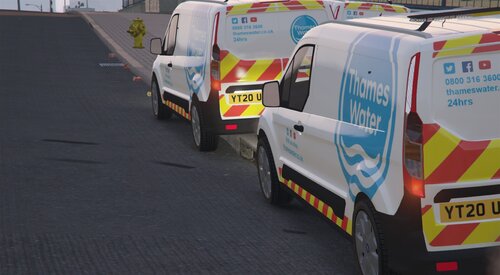 Thames Water 2020 Van SKIN This model is best for Boxville First Download (State Zero Mods) AA Pack https://www.gta5-mods.com/vehicles/aa-rescue-and-recovery-pack-els Model: James Radley Setup: Cian Pearfield Skin: KMODE Eco lightbar made and textured by: D.Pease Corner Modules made and textured by: D.Pease
 -
Have you tried verifying your game files?
-
ive havent played with game tonight but it wont load pass loading screen it just crashes RagePluginHook.log
-
RagePluginHook.log
-
I’ll send one later after I get back home.
-