




Lennyy
Community Team
-
Joined
-
Last visited
Everything posted by Lennyy
-
Why don’t you just try? Waiting for an answer definitely takes longer than removing the asi file, starting the game and finding out if it helped.
-
Attach your most recent RagePluginHook.log please.
-
Which problem is that?
-
Try removing it.
-
Could you please open your settings.XML in documents -> Rockstar Games -> GTA V and set a setting called something like DXversion from 0 (might also be 1) to 2 and retry.
-
Glad we’ve figured this out the correct way!
-
Do you have a trainer like SimpleTrainer, TrainerV or Menyoo etc. installed?
-
Doesn’t necessarily need to be outdated to make your game crash. There’s a variety of possible reasons.
-
Renaming your mods folder is just a diagnostic step to find out the core issue. Since your mods folder appears to be the reason your game crashes, something you installed seems to be faulty. Ensure you have both heap and packfile limit adjusters as well as an up-to-date gameconfig. If you still crash with those installed, you may need to restart your mods folder.
-
A couple of things: 1. Your GrammarPolice is missing the en-US language for its speech recognition. Install a language here, make sure to install the MSSpeech_SR file, not TTS: https://www.microsoft.com/en-us/download/details.aspx?id=27224 2. PolicingRedefined crashed due to an invalid weapon asset when trying to load Loadouts.xml. Maybe try renaming your mods folder to _mods and try again to see if it's a weapon model/attachment. 3. REALISTICTASER has an error while checking for updates which looks to end in a exception as well. Might be worth removing to see if the issue persists (after PR has started working again). Can you show me where in the RPH log that is? RageNativeUI doesn't belong in \Plugins\ at all. They don't have LML installed at all. Those are just logging lines stating there is no LML present in the game. In this log, LSPDFR crashes on load What kind of issue would "a callout with duplicate calls" look like?
-
Can you please try and swap to DX11 in the GTA V settings. You may need to restart afterwards. What’s your GPU?
-
Please install this RPH build. Overwrite files if asked to replace. If that works, please share your log again with me. RAGEPluginHook_1_128_1402_17663_Release.zip Are you running DX10 or 10.1 in your GTA V settings?
-
On Google. Heap Limit Adjuster GTA V Packfile Limti Adjuster GTAV GTA V gameconfig /LML Gameconfig
-
The pursuit crash fix has since been integrated into the normal build of RPH/LSPDFR. It is not a separate file anymore.
-
That's not a log. That's a screenshot. I need this file (bottom one):
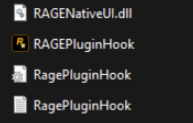
-
I meant the file name as in police.yft or whatevernameithas.ytd
-
Open your lspdfr.ini (found inside the lowercase lspdfr folder) and disable the DLC vehicle workaround.
-
This topic has been moved to the appropriate forum. Please post in the correct location in the future.
-
Can you disable LML by renaming the lml folder to lml and vfs.dll to vfs.dll and retry?
-
-
What are the file names of the vehicles you mentioned?
-
I'm pretty sure you can lower those values in the visualsettings.dat file inside openIV. I'm not sure which value you need to edit but that may help you find a solution.
-
J'ai besoin de ton fichier RagePluginHook.log pour aider sur la probleme. C'est un fichier dans le dans le répertoire principal de GTA V.

-
Ensure you have both a heap and packfile mit adjuster with increased values and an up to date gameconfig.
-
You cannot anything else that isn’t in the config file.



