




Lennyy
Community Team
-
Joined
-
Last visited
Everything posted by Lennyy
-
We are unable to give information on why you were banned from this Discord server. We are not affiliated with them. If you want to receive help with your Policing Redefined issue, please create a thread here. If you feel this topic has been closed in error, please report this post.
-
This topic has been moved to the appropriate forum. Please post in the correct location in the future.
-
Neither of those two are outdated. Open source means the original developer has made the code of the plugin publicly available for other devs to take inspiration, contribute to the mod or learn a thing or two. You can downgrade your game if you have the necessary files from a previous version stored on your PC. However, there's no reason to do that at the moment. Your topic has been moved to LSPDFR 0.4 Support. Please post in the correct location in the future.
-
Download this: https://github.com/alexguirre/ragenativeui/releases/tag/1.9.3 Drag the .dll into your main GTA V directory.
-
Hard to tell what exactly you're looking for since you linked the entire video, not a specific scene. The background player appears to be xscanner, the audio modification could be Blue Line Vibes' "BlueLineDispatch" mod.
-
Your topic has been moved to GTA V Support, this is not LSPDFR related. Please post in the correct location in the future.
-
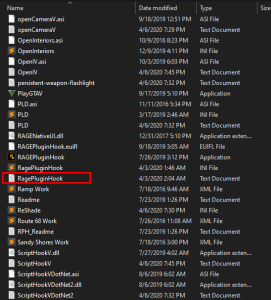
Reproduce your issue and attach your most recent RagePluginHook.log file found in your main game directory, not in your logs folder.
-
You could do this with viewpointv but I’m unsure whether the free version includes this.
-
Please refer to this thread: https://www.lcpdfr.com/forums/topic/154902-issues-downloading-files-in-russia/
-
Delete the faulty file and verify your game files via the platform you bought GTA V on.
-
Your topic has been moved to GTA V Support, this is not LSPDFR related. Please post in the correct location in the future.
-
You should be able to disable BattleEye in the Rockstar games launcher settings by unticking its option. If you want to play online at some point you’ll need to re-enable it. Your topic has been moved to GTA V Support, this is not LSPDFR related. Please post in the correct location in the future.
-
There’s some results when I search for simple compulite charges and citations on google. Just pick one you like.
-
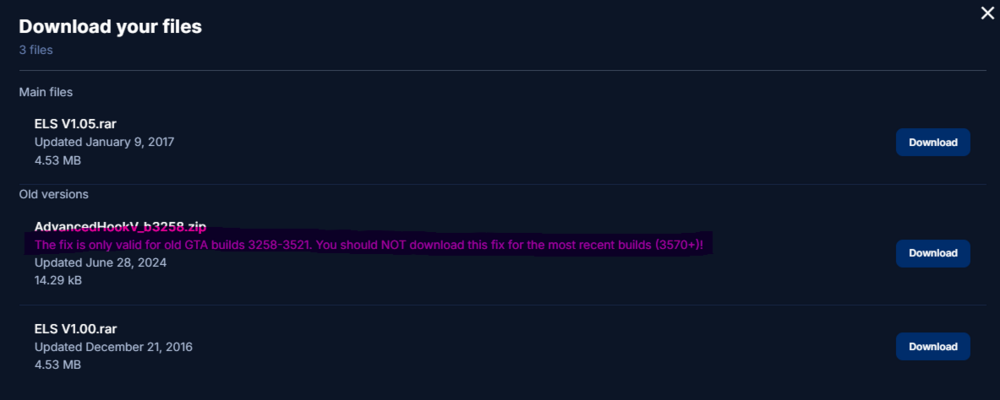
Reading the download archives' descriptions helps a lot :)
-
Not to my knowledge.
-
LSPDFR will not work with that mod due to missing path nodes.
-
I probably should've mentioned this, so it might be my fault, but please grab the latest RNUi from here: https://github.com/alexguirre/ragenativeui/releases/latest/ The RNUI inside Bejoijos plugins is heavily outdated.
-
Reinstall CompuLite.
-
Could you upload your latest RagePluginHook.log found in your main game directory, please?
-
Your topic has been moved to GTA V Support, this is not LSPDFR related. Please post in the correct location in the future.
-
I have no idea how the callouts code works but maybe the dev made usage of the ambiently spawned cops. Glad you figured it out!
-
Try renaming mods to _mods and play for a bit.
-
Agency.xml files will only affect ambiently spawned cops by LSPDFRs engine. Peds spawned in callouts are something you cannot edit unless the developer explicitly added support for customisation in their ini file.
-
Rename mods to _mods and retry.
-
Do you have the advancedhookv file from the ELS 1.05 download or the seperate one found on the ELS download page? Also, where is the ELS vcf file located?




