




Lennyy
Community Team
-
Joined
-
Last visited
Everything posted by Lennyy
-
This is not made for EUP. These are replacements for the default peds in game
-
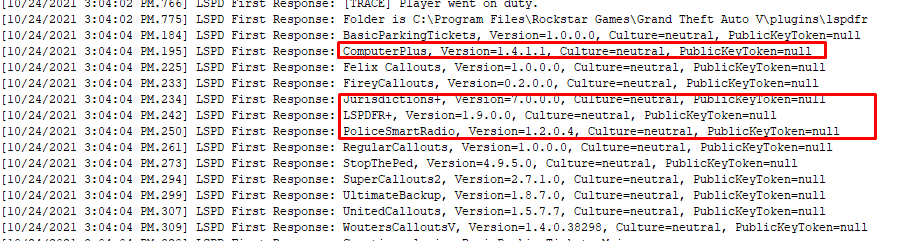
Please remove the following plugins as they are outdated Also you are missing the localization.ini in Grand Theft Auto V\Plugins\LSPDFR\StopThePed\Localization.ini'. You can aquire it with the latest StopThePed download. Just place the file there Remove AlboCommon.dll from your main directory as well
-
Please send your RagePluginHook.log found in your main directory.
-
UltimateBackup has a K9 integrated. You can download the plugin here.
-
You're welcome!
-
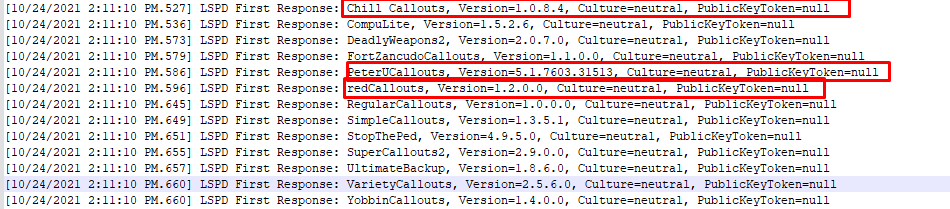
-Set your plugin timeout threshold to 60000. You can do so by clicking the ⚙️ icon when loading rage. The prompted window allows you to change said value Remove the highlighted plugins due to them being out of date and Update UltimateBackup:
-
Try adding your GTA V directory to your anvticirus exceptions. Here is a step by step guide for windows defender. If you have additional antivirus programs you need to use google and search on how to make exceptions there
-
Have you copied the patchday9ng folder from your update\x64\dlcpacks to mods\update\x64\dlcpacks already?
-
Check this thread for an answer by the LSPDFR main developer:
-
THis should be resolved by now
-
-Make an exception of the GTA V installation folder to your Antivirus. (If you just have Windows defender click here. If you have another antivirus programm use google to find out how to make an exception for your particular av. -Set your PluginTimeoutThreshold in your rph settings to 60000. You can do so by holding down shift when launching rage or clicking on the gear ⚙️ Icon. AFter chanign the value from 10000 to 60000 press save and launch
-
Upload your latest RagePluginHook.log after you did what Supreme leader cat suggested please.
-
Download a software called DS4 windows and go through the setup process. You do need a cable to connect the controller do your PC but everything works perfectly with the software for me If you know which plugin causes that you can edit it’s ini and change the controller keyboard to your likings and without interfering each other
-
Just delete all the .db files
-
Please install/update RageNativeUI. Installation: Drag and drop the .dll file into your main directory.
-
You posted your question twice, I've answered you here:
-
Try to restart your PC and make an exception of the game folder to your antivirus.
-
Computer+ tends to get very laggy. It's pretty old by now and hasn't received an update in quite a while. CompuLite is a more up to date PoliceComputer that works just fine. You can find it in Bejoijos website
-
You can just add the flag FLAG_LAW_ENFORCEMENT and FLAG_EMERGENCY_SERVICE to the riots <flags></flags> tag in the vehicles.meta. You should be able to pull cars over then
-
Can you launch GTA without Rage?
-
You're welcome!
-
They may/may not cause crashes. ChillCallouts and AssortedCallouts will crash. AirportCallouts I'm not sure about since it's a bit more "updated" than the other two but still considered out of date. Here is the fixed xml SpecialUnits.xml You had two </VehicleSet> tags missing
-
You're welcome!
-
You have an error in your SpecialUnits.xml file from UltimateBackup (Grand Theft Auto V\plugins\LSPDFR\UltimateBackup) in line 456 position 5. You can either use a xml validator to fix it or upload your CustomRegions file and I will take a look. Also I'd suggest removing the highlighted plugins due to them being out of date. Also update UltimateBackup to 1.8.7.0 (http://www.bejoijo.com/)

-
Please upload your RagePluginHook.log



