




Lennyy
Community Team
-
Joined
-
Last visited
Everything posted by Lennyy
-
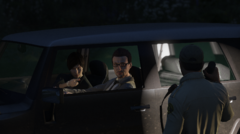
From the album: Lore Patrol
BCSO pulling over a driver due to illegal neon underglow -
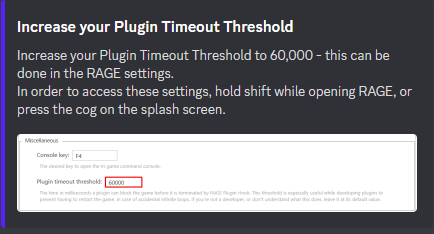
Please try this:
-
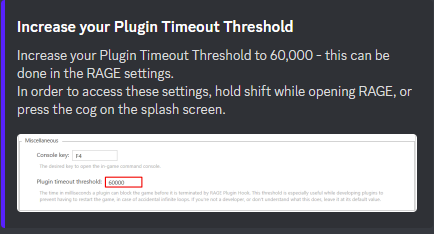
Please try this:
-
Please update your game by deleting GTAV.exe as well as PlayGTAV.exe and verify your game files. How to verify your game files:
-
Hi. Can you try to load GTA fully into story mode first. After you spawned in with either M, T or F, alt tab out of the game and launch Rage. Also attach your latest RagePluginHook.log found in your main directory.
-
Hi! Do you want to tell us how you solved your issue in case somebody comes across the same thing?
-
-
You're most welcome!
-
You'll have to edit weapons.meta and weaponsanmations.meta. Unfortunately I don't know which values you'd have to change but you can probably find out by just looking at the meta files. Otherwise take a look at a mod like the one linked below and see how they did it.
-
Hey there! It looks like you tried installing the LML package with openIV. You’ll have to re-download the openIV version of EUP since that one comes with an assembly.xml
-
Its looks like there is an error with xmls files you’ve edited recently: Exception message: The 'Vehicles' start tag on line 124 position 7 does not match the end tag of 'VehicleSet'. Line 172, position 7.I don’t see why you shouldn’t be able to, however for FiveM I’d always suggest a second installation of the game.Hi. Could you please upload your latest RagePluginHook.log from your main directory.If you have a replacement for the guns you can just throw them in your latest weapons.rpf in order to override them. Additionally, you could use the search function in OpenIV and enter the weapons name in order to find them.No, there is not. What do you need help with. Maybe I can assist you.I don’t think you need one but for safety I have a second installation.Please upload your RagePluginHook.log found in your main directory.I'd create a second installation of the game for FiveM. Don't think it's 100% needed but better be safe than sorry.Ah okay I see. Please remove the following plugins: ArrestManager PoliceSmartRadio TrafficPolicer VocalDispatch (Use GrammarPolice instead) Albo1125.Common (main directory) Addtionally update RageNativeUI here: Releases · alexguirre/RAGENativeUI (github.com).Okay do you have lml installed? If so, please try to temporarily remove vfs.dll. If you don't have LML, please temporarily remove dinput8.dll and see if that helps.Hello, please attach your RagePluginHook.log found in your main directory. Also, what is "the immersive pack"?They have been a thing for some time now. I guess you have just recently logged on which granted you the role. In my case my 1 year joined badge was assigned in September whereas I joined in August of '20. I also got "first post" in October although I posted before that a while ago. It's just because it was my latest post since badges were introduced.Nice to hear it's being liked and used! It must be something outside your LSPDFR-Plugins then. Unsure whether it would help but can you upload your latest log for me.Delete your GTAV.exe and verify your game files. Your game appears to be out of date.

