




Charlie686
Members
-
Joined
Everything posted by Charlie686
-
Hey there, Please attach your RagePluginHook log. This is a text document located in your main directory. Thanks. 🙂
-
No problem. I would trust VirusTotal on this one. 🙂
-
Hey there, If you have ScriptHookVDotNet in your GTAV directory, please remove it & retry. Let me know how this goes. 🙂
-
False positives can occur, and do occur for several modifications as you noted. Windows Defender is just being picky, here! If the clean VirusTotal result & the 190,000+ downloads still leave you with unease, then don't download it. 🙂
-
Please explain what 'not working' means. Are they not showing up? Are certain features not working as expected? As well as providing greater clarity, please attach your RagePluginHook log - this is a text document found in your main directory. Thanks. 🙂
-
Unfortunately not -- I will happily message on this thread when it does come back online, however.
-
Glad to hear, enjoy! 😄
-
Hey there, Please update LSPDFR by reinstalling it manually. You are quite a few builds behind the latest version. Let me know how you get on. 🙂
-
OpenIV is essential when modding GTAV. Your best option would be to wait for the website to come back online -- which I'm sure it will do, eventually. If you would like, you could take a look at Lenny's Mod Loader, however. You'll be able to install vehicles without OpenIV, but you will undoubtedly need OpenIV later down the line for something or other.
-
Hi there, Can you confirm that you've got ScriptHookV installed? It is a dependency for ELS, not included in the download. You can find it here, though note that the website at the time of writing this appears to be down. Hopefully it is up shortly. 🙂
-
 v1.6.0.0 is in the works! Pleased to say that a suggestion submitted on my Discord server has been accepted. A short & sweet teaser can be found here. As always, thank you for the constant support. I'm looking forward to the new release -- whenever that may be! 😄
- 311 comments
- 60 reviews
-
-

- 1
-
-
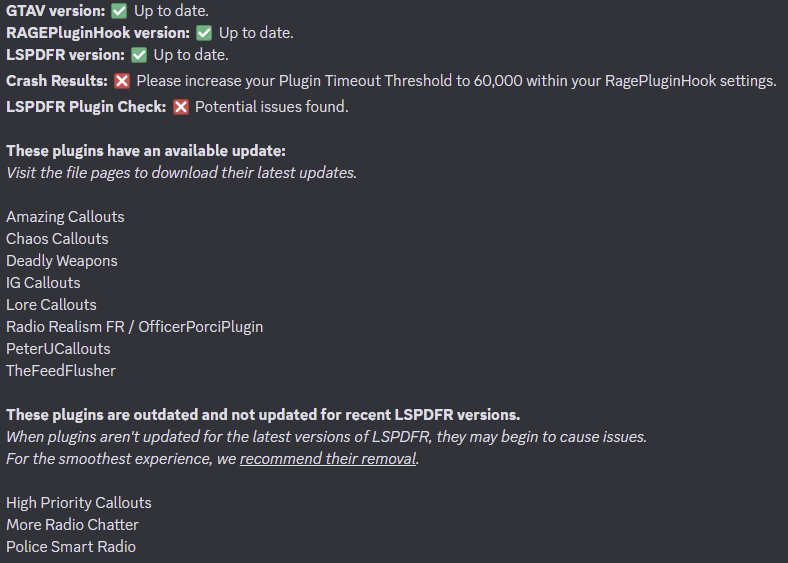
Glad I could be of help! This crash looks random, but please do check the log results below. You don't need to remove outdated plugins - but as plugins get older and not updated for newer LSPDFR versions, they might begin to cause problems. I would definitely recommending updating the plugins listed below, though.

-
Very kind of you, take care!
-
Glad to hear, enjoy!
-
It appears PRANGER.xml is faulty; please remove it & try again! 😄
-
Please try installing a custom gameconfig, then retrying.
-
Maybe even 100% sure. 😄 Best of luck!
-
-
Glad to hear, enjoy!
-
Please view your attached log reading results, found below. Your log has a range of problems with it. If you still experience issues, please try disabling your mods folder to _mods, and retrying. This is a diagnostic step & will temporarily disable your mods folder.
-
As Lenny said, it goes into your root directory i.e. your GTAV folder. Not the scripts folder. 🙂
-
You are encountering a problem related to SlimDX; it doesn't have a defined solution making it hard to solve. You could: 1. Make an antivirus exception for the GTAV folder. 2. Reinstall RAGEPluginHook. 3. Update / reinstall audio & graphic drivers. 4. Run the .NET Framework repair tool. https://www.microsoft.com/en-gb/download/details.aspx?id=30135 5. Complete pending Windows Updates.
-
Your SHERIFF2 model is invalid. You should revert your changes made in regards to it, specifically those in your vehicles.meta. For note, this hash can be cross-checked online. 🙂
-
While it looks like an issue not related to LSPDFR, such as your mods folder, you should attach your log in its entirety anyhow.
-
You can disable your mods folder by renaming it to _mods to diagnose whether the issue resides in there.



