




Charlie686
Members
-
Joined
Everything posted by Charlie686
-
Hey! The website is experiencing an outage. Please use this page temporarily. Hope this helps. 🙂
-
Hey there, Please use this download link instead. I hope this helps. 🙂
-
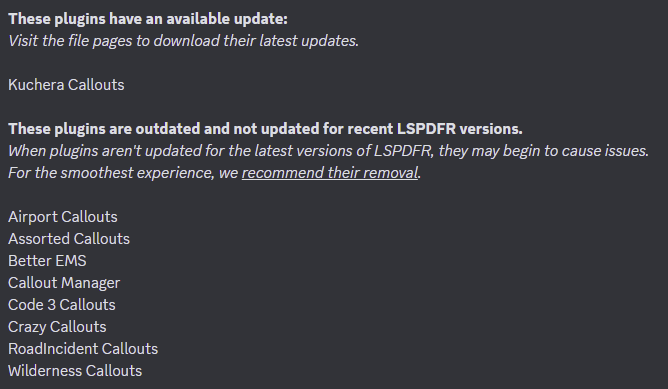
Hey there! Callout Interface is not running as you installed Code 3 Callouts & BetterEMS incorrectly. Please install Stealth.Common & ParksTools, respectively. You're using quite a few outdated plugins. These can cause issues & if you'd like to eliminate possible instability, follow the advice below.
-
Glad that was solved! 🙂 You should attach a log file - from your main directory, not your logs folder, when this issue occurs.
-
Hey there, I'd like you to change your EUP folder permissions. Please go to your EUP folder, right click & select Properties - Security. Give the following full control: • Users. • SYSTEM. • Administrator. For good measure, you should follow the above process for the GTAV folder as well. Let me know how you get on.
-
Hey there, Lidar Gun is crashing. Ensure you've installed it correctly, including the folder that is required to be in Plugins/LSPDFR & the latest version of IPT.Common. Hope this helps.
-
Delete 'D:\Program Files\Epic Games\GTAV\lspdfr\stats.dat' and retry. If the file is not present, remove the 'lspdfr' folder & get a fresh copy from the manual install. You may want to backup any affected files.
-
Hey there, Load GTAV without RAGEPluginHook. If you are able to enter story mode, launch RAGEPluginHook. If you are not able to enter story mode, rename your mods folder to _mods & retry. This will temporarily disable your mods folder.
-
Sounds like you tried using .NET 5.0. There is no .NET Framework 5.0. Remember, .NET is different to the .NET Framework. You want to be using 4.8 ideally, which can be found here.
-
Resolved in other thread.
-
Hey there, I imagine you have setup your Visual Studio Project incorrectly. Ensure the Class Library is for the .NET Framework, as I imagine you are trying to do. That should resolve this error.
-
Hey there, This means the problem is in your mods folder. You should try: 1. Installing a custom gameconfig, heap & packfile limit adjuster. 2. If that doesn't solve your problem, try reverting your recent changes to your mods folder. - This is why it's generally best to install things slowly, then test. It becomes much easier to pinpoint the problem. 3. If neither step works, you'll need to make a new mods folder from scratch.
-
Hey there, Please attach your RagePluginHook log. This is a text document found in your main directory. Thanks. 🙂
-
You can drag the log file into here in order to attach it. 🙂
-
It really was? Did you not trust me? Outrageous! Only joking -- glad you've got your game running smoothly again. Enjoy! 😄
-
Thanks! OfficerPorciPlugin / Radio Realism FR is causing this crash. You may want to consider temporarily removing it, and reporting the issue to the developer so it can be fixed. @Officerporci might be able to look at your log so they can investigate this further. 😄
-
Hey there, Please attach your RagePluginHook log. This is a text document located in your main directory. Thanks! 🙂
-
Pleased to hear your issue has been resolved.
-
-
You did not install Grammar Police correctly. You are missing the IPT.Common file, that is found within the download.
-
Texture Loss can be extremely frustrating. Here are 5 suggested steps to prevent it. Step 1 Go into GTAV/lspdfr/lspdfr.ini & set Main.PreloadAllModels to false. Step 2 Installing the Resource Adjuster. Step 3 Removing high polygon vehicles. Anything above 200,000 may cause issues. To check this, open the vehicle .yft file and check the top left of your screen. Step 4 Downgrade any 4K textures. Step 5 Lowering your texture quality within the GTAV settings.
-
The latest version of RPH is included in the LSPDFR install, found here. The latest version of ScriptHookV has been temporarily mirrored on GTA 5 Mods, found here.
-
Hey there, Rename your mods folder to _mods and retry. This is a diagnostic step that will temporarily disable your mods folder.
-
You are most welcome! And thanks for using 686 Callouts! 😄
-
Rename your mods folder to _mods and retry.


