


Creators: Due to background reprocessing of files, approvals and file security checks may be delayed. Thanks for your patience.

AlexLCPDFR
Members
-
Joined
-
Last visited
Everything posted by AlexLCPDFR
-
Well that fixed the OpenIV problem but it is still crashing. I'll try playing around with it but thank you for that! Btw By having the veshares in zmod, do you mean having them full mapped to the car?
-
That did not work for me :/ http://gyazo.com/bfc78c218f2adb3afc23fd0c9ed49b90
-
I believe so, they are placed where the wheels would be
-
Hello all. I have been trying to convert the Ford F-150 from Driver: San Francisco and I'm just about finished (excluding template) so I exported and imported to OpenIV then ran into a problem. Everything (for what I know of) is set up properly in the Zmodeler hierarchy (collisions, names, dummies, etc) but in OpenIV it doesn't look right (see pictures). Also when I attempt to spawn it in, it crashes.
-
Hope you like a Whelen Liberty ;) https://www.mediafire.com/?kndbucve6l151vh
-
Just some regular sized lightbars I converted to mini versions. Based of of an actual mini version, not made up.
-
From the album: Lightbar -> Mini Lightbar Showcase
Whelen Liberty Made by PFCBarefoot -
From the album: Lightbar -> Mini Lightbar Showcase
Whelen Liberty Made by PFCBarefoot -
From the album: Lightbar -> Mini Lightbar Showcase
Whelen Legacy made by TheHurk -
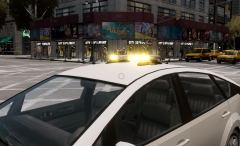
From the album: Lightbar -> Mini Lightbar Showcase
Whelen Legacy made by TheHurk -
Hello! This is my first released model. There aren't many utility vehicles out there so I made one myself. You may NOT reupload this without my permission! All credits go to the creators of the models used in the making of this car. Credits: 2010 Ford F350 by DSF Ripped by DMN, Converted to GTA IV by Lildunkboi, 3DS Template by IrionicRainbow Whelen Edge 9M by KevinDV, editted to a Whelen Mini Edge by UtilityGuy Whelen Ion by Lccop Whelen Avenger by EVI Better Built Toolbox by BxBugs123 Skin/Assembly by UtilityGuy DSF Radio by JewishBanana
- 4 comments
- 2 reviews
-
![Whiz Wireless Utility Van [WIP] - Main Body Color Suggestions?](//s3-gallery.int-cdn.lcpdfrusercontent.com/gallery/album_3675/sml_gallery_64826_3675_61888.jpg) Purple.
Purple. -
I don't know of any that are all blue but if you find one you like you can retexture the ELS. I suggest using pain.net or GIMP or Photoshop and just select the blue light diodes and paste them over the red ones.
-
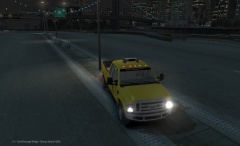 Most likely, but it's my first model I'd release so I wanna make sure all the bugs are out before releasing.
 -
-
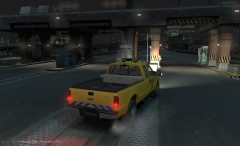
From the album: Ford F-350 Utility/NYSDOT
Parts used: Ford F-350 by dunkboi Whelen Edge 9M by KevinDV, converted to Whelen Edge Mini by me Whelen Ion by Lccop Whelen Avenger by EVI Better Built Tool Box by BxBugs123 -
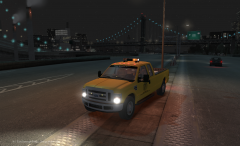
From the album: Ford F-350 Utility/NYSDOT
Parts used: Ford F-350 by dunkboi Whelen Edge 9M by KevinDV, converted to Whelen Edge Mini by me Whelen Ion by Lccop Whelen Avenger by EVI Better Built Tool Box by BxBugs123 -
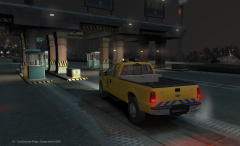
From the album: Ford F-350 Utility/NYSDOT
Parts used: Ford F-350 by dunkboi Whelen Edge 9M by KevinDV, converted to Whelen Edge Mini by me Whelen Ion by Lccop Whelen Avenger by EVI Better Built Tool Box by BxBugs123 -
From the album: Ford F-350 Utility/NYSDOT
Parts used: Ford F-350 by dunkboi Whelen Edge 9M by KevinDV, converted to Whelen Edge Mini by me Whelen Ion by Lccop Whelen Avenger by EVI Better Built Tool Box by BxBugs123 -
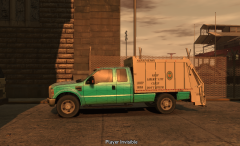 Well I kinda based it off of this: Also they're mainly for parks or for private gated communities. Obviously it needs some work, but eh.
 -
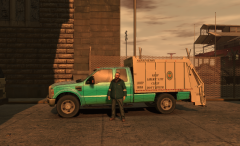 Yes I've tried that before but there weren't textures there so I just removed the walls of the bed.
 -
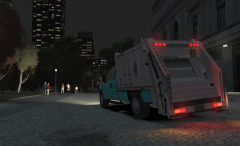
From the album: Ford F-350 Garbage
-
From the album: Ford F-350 Garbage
-
From the album: Ford F-350 Garbage
-
From the album: Ford F-350 Garbage


![Whiz Wireless Utility Van [WIP] - Main Body Color Suggestions?](http://s3-gallery.int-cdn.lcpdfrusercontent.com/gallery/album_3675/sml_gallery_64826_3675_61888.jpg)
