


JokerMods
Members
-
Joined
-
Last visited
Everything posted by JokerMods
-
-
ELS Light settings: Primary: E1-L Secondary: C-01 Credits: -------- CVPI-CHP - NAME: FORD CROWN VICTORIA CHP SLICKTOP - VERSION: V3 - TEMPLATE: BXBUGS123 - NAME: FEDERAL SIGNAL VISION - PART TYPE: Lightbar - VERSION: V1.0 - OPTIMIZED FOR: any - NAME: CHP Rambar - VERSION: 1.4 - PART TYPE: Rambar/Pushbar - OPTIMIZED FOR: CVPI - NAME: Decatur Genesis I Radar - VERSION: 1.1 - PART TYPE: Radar - OPTIMIZED FOR: Any Vehicle CREDITS - Ford Crown Victoria made by Ubisoft (Driver San Francisco), converted to GTA IV by f5544, edited by Sgt.Kanyo - 2003 steel rims, Decatur Genesis I Radar by Bxbugs123 - CHP Rambar by freakingmusket, grimm and reckless - CHP megaphone by Buttlamo - Whelen Raider lights by Truck Kid - Federal Signal Vision light bar made by Schaefft and modified to its current form by Lt.Caine, modified to CHP by JokerMods - Toughbook C19 by PFCBarefoot edited by Sgt.Kanyo - CHP paintjob by aznairsoftdude - Spotlight Modeled & converted for GTA IV by F5544 - Main textures made by Bxbugs123
- 17 comments
- 18 reviews
-
-
Do you mean the silver hubcaps from 2009?? That caps that the LAPD uses? I can do a version with this hubcaps ;)
- 12 comments
- 6 reviews
-
-
Credits: -------- CVPI-ST - NAME: FORD CROWN VICTORIA CHP SLICKTOP - VERSION: V3 - TEMPLATE: BXBUGS123 - NAME: WHELEN LIBERTY - PART TYPE: Lightbar - VERSION: V1.0 - OPTIMIZED FOR: any - NAME: Go Rhino Pushbar - VERSION: 1.4 - PART TYPE: Rambar/Pushbar - OPTIMIZED FOR: CVPI - NAME: Decatur Genesis I Radar - VERSION: 1.1 - PART TYPE: Radar - OPTIMIZED FOR: Any Vehicle CREDITS Whelen Liberty Modeled & converted for GTA IV by PFCBarefoot Go Rhino Pushbar made & converted by Bxbugs123 Spotlight Modeled & converted for GTA IV by F5544 Main textures made by Bxbugs123 Toughbook C19 by PFCBarefoot edited by Sgt.Kanyo Decatur Genesis I Radar Modeled & converted by Bxbugs123 Emerglights Texture by PCFBarefoot Textures By Bxbugs123 & DoTTGaMMa Ford Crown Victoria made by Ubisoft (Driver San Francisco), converted to GTA IV by f5544, edited by Sgt.Kanyo Rims By Bxbugs123, Textures By Lt.Caine Skin by JokerMods Main textures made by Bxbugs123
- 12 comments
- 6 reviews
-
-
you need OpenIV, and you need the skin 4times, named police_sign_1 til 4 and then import
- 25 comments
- 18 reviews
-
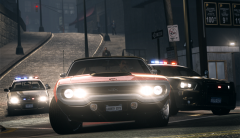 What ENB is that?? Could you send me your ENB+Settings in a PM or E-Mail?? Love your ENB JM
 -
I didn't get you, if you want a rambar, I'm trying to fix my rambar issue. PM me what you excatly mean.
- 15 comments
- 10 reviews
-
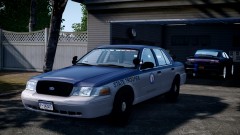 What ENB is that, looks amazing?! JM
 -
-
Credits: -------- CVPI-HT - NAME: FORD CROWN VICTORIA CHP SLICKTOP - VERSION: V3 - TEMPLATE: BXBUGS123 - NAME: Whelen TALON - VERSION: 1.0 - PART TYPE: Dash Light - OPTIMIZED FOR: Any Vehicle - NAME: HG2 Emergency Lighting Products - VERSION: DEV_HG2_V1.0 - OPTIMIZED FOR: any - CREDITS: EVI - MOD STATUS: Closed - NAME: WHELEN LIBERTY - PART TYPE: Lightbar - VERSION: V1.0 - OPTIMIZED FOR: any - NAME: Decatur Genesis I Radar - VERSION: 1.1 - PART TYPE: Radar - OPTIMIZED FOR: Any Vehicle CREDITS Whelen Liberty Modeled & converted for GTA IV by PFCBarefoot Whelen Talon Modeled & converted for GTA IV by Bxbugs123 Spotlight Modeled & converted for GTA IV by F5544 HG2 Grill Lights Modeled & converted to GTA IV by EVI Main textures made by Bxbugs123 Toughbook C19 by PFCBarefoot edited by Sgt.Kanyo Decatur Genesis I Radar Modeled & converted by Bxbugs123 Emerglights Texture by PCFBarefoot Textures By Bxbugs123 & DoTTGaMMa Ford Crown Victoria made by Ubisoft (Driver San Francisco), converted to GTA IV by f5544, edited by Sgt.Kanyo Rims By Bxbugs123, Textures By Lt.Caine Skin by Joey. Main textures made by Bxbugs123
- 15 comments
- 10 reviews
-
just import all sings. i just ipmorted one texture but when you import all textures you have multi livery ;)
- 25 comments
- 18 reviews
-
-
-
-
-
Hey I#m new in the modeler scene and that's my first car I uploaded, yet and yeah please are not so strict with me. If there are bugs or not accurate placed LED's message me and I will fix it. The lightningsetup of this CVPI is NOT based on the real Hellertown. Credits: -------- CVPI-HT - NAME: FORD CROWN VICTORIA CHP SLICKTOP - VERSION: V3 - TEMPLATE: BXBUGS123 - NAME: Whelen TALON - VERSION: 1.0 - PART TYPE: Dash Light - OPTIMIZED FOR: Any Vehicle - NAME: HG2 Emergency Lighting Products - VERSION: DEV_HG2_V1.0 - OPTIMIZED FOR: any - CREDITS: EVI - MOD STATUS: Closed - NAME: WHELEN EDGE 9000 - PART TYPE: Lightbar - VERSION: V2.0 - OPTIMIZED FOR: any - NAME: Decatur Genesis I Radar - VERSION: 1.1 - PART TYPE: Radar - OPTIMIZED FOR: Any Vehicle CREDITS Whelen Edge 9000 Modeled & converted for GTA IV by BxBugs123 Whelen Talon Modeled & converted for GTA IV by Bxbugs123 Spotlight Modeled & converted for GTA IV by F5544 HG2 Grill Lights Modeled & converted to GTA IV by EVI Main textures made by Bxbugs123 Toughbook C19 by PFCBarefoot edited by Sgt.Kanyo Decatur Genesis I Radar Modeled & converted by Bxbugs123 Emerglights Texture by PCFBarefoot Textures By Bxbugs123 & DoTTGaMMa Ford Crown Victoria made by Ubisoft (Driver San Francisco), converted to GTA IV by f5544, edited by Sgt.Kanyo Rims By Bxbugs123, Textures By Lt.Caine Skin JokerMods Main textures made by Bxbugs123
- 25 comments
- 18 reviews
-
-
-
-
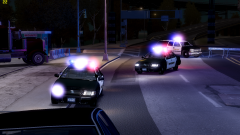 nice car dude ;) keep going
 -
Hi I'm new in the modeling world and edited Sgt. Kanyo's CHP slicktop, the car is pretty good, my first car, but the only problem is no skin fits, I tried a skin for D:SF models, BxBugs123 models and for EVI's model but no skin fits. Please help me or could someone explain me how to figure out which template would fit. Sorry for my bad english :( JM
-
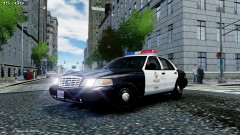 is it already released or is it still WIP??


