




ghost128
Members
-
Joined
-
Last visited
Everything posted by ghost128
-
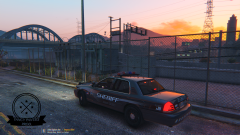
From the album: Fancy Panties Development
Various-Utility-Vehicle 1.0 by FancyPanties Development out for some beta-testing© FancyPanties Development ®
-
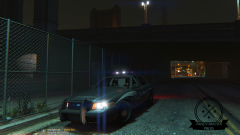
From the album: Fancy Panties Development
Various-Utility-Vehicle 1.0 by FancyPanties Development out for some beta-testing© FancyPanties Development ®
-
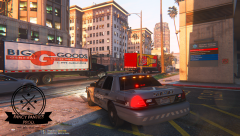
From the album: Fancy Panties Development
Various-Utility-Vehicle 1.0 by FancyPanties Development out for some beta-testing among others multiple interior lightbars included© FancyPanties Development ®
-
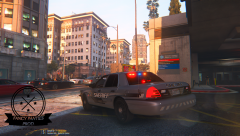
From the album: Fancy Panties Development
Various-Utility-Vehicle 1.0 by FancyPanties Development out for some beta-testing among others multiple interior lightbars included© FancyPanties Development ®
-
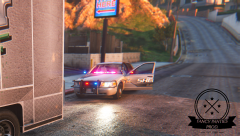
From the album: Fancy Panties Development
Various-Utility-Vehicle 1.0 by FancyPanties Development out for some beta-testing© FancyPanties Development ®
-
Well this will delete all coronas for all vehicles... I just want to delete it for my WIP project... setting it to 1 also will maintain taillight coronas.. I have to enter the vehicle ID of a gtaV vehicle which doesn't have taillight coronas scripted
-
hey guys, does anyone know what the lightsetting value in the carvariations.meta to get rid of the taillight coronas? some time ago it has been "<lightSettings value="1055" />" but nowadays this doubles the coronas per taillight.. :-/
-
I think you have to add this to flags-section in vehicles.meta : FLAG_LAW_ENFORCEMENT FLAG_EMERGENCY_SERVICE and furthermore define "VC_EMERGENCY" in vehicleClass section. but I'm not 100% sure about it
-
hey guys I got another weird thing going on. I've made a vehicle (Crown Victoria Policeunit) and it works just perfectly if I replace it with a original police2 car. But now I want to make tuning objects mountable. Therefore I've created a simple testbox with applied material from my basevehicle and exported it in a several .yft . I've downloaded a Subaru-car pack from gta5-mods which contains tuning parts and is an AddOn-Vehicle in its own dlc-pack tried to install it and the Subaru just works fine. Now I went to edit the subaru-dlcpack to work for my CrownVic as the basetuningmodel, renamed everything to my dlc version, replaced the .yft's , .ytd's... edited carcols.meta for my test tuning object and everything looks fine for me so far. GTA5 loads up normaly but when I try to spawn my car ingame it tooks several seconds and the text appears "policecvpi" spawned but nothing happens. what could be the reason for it? Or do I have to edit the tuning test part in a special way (use some special parameters)? I really hope you can help me with this. thanks!
-
might be plausible.. well therefore I think I'll have to make my car as addon. This should solve the problem. thx for the quick advice Loot :)
-
hey guys,does anyone know where the original carcols.meta for "police2" or even "police" vehicles are located?thanks!
-
I think lightpatterns has to be written/scripted and this fact won't make it easy so realise user defined patterns.. But I'm not 100% sure about it
-
keep calm buddy ;) there is a flashing light at the end of the tunnel :P
-
bxbugs123 recently realesed a new short video of his els cvpi cruiser: ELS preview on bxbugs123 CVPI
-
It's kind of ELS from three years back in time :) and unforrunately containes same bugs from that early stage of ELS
-
I'm about modeling/converting a 2014 chevy caprice which I bought from humster3d but right now I'm modeling the interior for it.. And I can tell you it's a bunch of work...
-
hey guys,has anyone of you faced the problem, that you can't access files you had received from another user in a private message? It says: The page you are trying to access is not availble for your account. Well I'm not banned or anything like that and I'm correctly signed in.. so I'm a bit confused what could be the problem. I've already contacted the support but didn't got any answers so far.I really hope someone of you guys can help me with it!thanksghost128
-
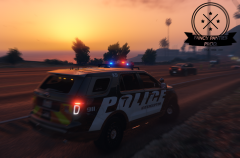 I'm facing some last problems I would like to fix prior release but I think it will be released within the next week
 -
yes there will be a trafficadvisor
-
yes it will be released but before that I'm gonna have to complete some fixes
-
From the album: Fancy Panties Development
brandnew K9 Explorer increasing the fleet and out for some technical testing© FancyPanties Development ®
-
hey guys, I'm about of developing a new fedsig lightbar for my Ford Explorer and I would like to add some takedown lights aus well. So I thought to take the extralights of trevors bodhi truck. In the bodhi model are two extralights (the two outer ones of the four rooflights). But if I put them in my car it only lights up one bulb not both like in the bodhi. So does anyone know where to define that the car uses two extralights and not just one? Maybe in carvariations.meta or vehicles.meta??
-
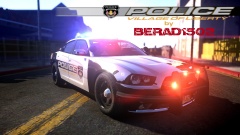 what kinda ENB do you use?! did you modified those enb settings?
 -
if you got it from bxbugs123.. could you send me them as well?! thx
-
Hey guys, I'm using cry enb v3 and noticed (even with other enb-mods) that small ELS lights like soundoff interceptor lights beneath the mirror doesn't get so intense like usual lightbars.. If you look closer with the scope you'll notice they get brighter... Is there any possibility to adjust visualsettings or any enb file to make them as bright as larger els lights are also from a bit more distance (6ft or so)...?? thanks nobody out there, who has experiences with this kind of enb modification?! Posts merged - Staff


