



Faya
Members
-
Joined
-
Last visited
Everything posted by Faya
-
-
 @zaiin7x , I will for sure add this, thanks for the suggestion. Right now you can't create it on your own, I'll add this feature in the next update. (I'm going to make it that it gets all files in the Seatbelt Audio folder and checks if the one in the setting is in the Seatbelt Audio folder.) I will be releasing an early access version for it today/tomorrow so if you want you can join the Discord server for the early access version, link is above on the page.
- 44 comments
- 68 reviews
-
I think many people would like this: Show the most recent comments and reviews first, it looks cleaner and makes more sense. If you got a notification on a page, you just visit the page if you press it and you have to go to the latest page to find the comment. There also is currently no sorting system for comments.
-
-
Use the discord server for support. Discord server: http://discord.gg/5uaHUEKS9t
- 44 comments
- 68 reviews
-
When you insert a link into a word it works fine, but if you were to double-click it afterwards and change something, it would look like this: TestTest Would link a video of it but it's not an accepted file type.
-
Seatbelt by Faya Discord Server / Installation / Progress Board Fasten your seatbelt to stay securely inside the vehicle, preventing ejection or being pulled out. If you forget to fasten it, a chime will play to remind you. You can choose from up to 16 different chimes and 2 different fastening and unfastening sound effects. Important information: Want to hold to fasten your seatbelt instead? Set HoldToFasten to true in the Seatbelt.ini Press Left CTRL on the keyboard or DPad Up on the controller to fasten or unfasten your seatbelt. You can customize these keys in the settings. Press F4 and enter "OpenSeatbeltSettings" to open the settings menu. Audio & Visual Cues: Once you step into a vehicle, you'll see a seatbelt indicator, meaning you do not have your seatbelt fastened. Once you start driving without your seatbelt on, the indicator will start blinking, and a chime will start playing. Customization: There are currently sixteen seatbelt chimes to choose from and four seatbelt sound effects to choose from. If you prefer a different keybind, you can change the keyboard key or the controller button in the settings file. Settings Menu: There is a settings menu you can use by opening the RAGEPluginHook console (F4) and entering "OpenSeatbeltSettings", this will open up a menu where you can change the settings in-game. Chime Linking: You can link different chimes to different vehicles, so as an example, you can link the Dodge chime to your Dodge Charger or your Chevrolet chime to your Silverado. Non-linked vehicles will use the value of the ChimeSound setting. Quick Exit Feature: You can quickly exit the vehicle by double-tapping the vehicle exit key. You will exit the vehicle, and the player won't close the door after exiting, although you can choose to have the player close it by setting "LeaveDoorOpenOnQuickExit" to false. Miscellaneous: When fastening or unfastening, your character will play an animation. If you're using a controller, it will vibrate when interacting. When fastened, you will not be able to leave the vehicle, nor will peds be able to pull you out of it. You can even add custom chimes if you'd like; just place the .wav file in "Plugins/Seatbelt Media/Chimes" and update the ChimeSound setting to that audio file name. Current chimes Aston Martin, Audi, BMW, BMW 2, Chevrolet, Chrysler, Dodge, Ford, Ford 2, Hyundai, Mazda, Mazda 2, Mercedes, Misc 1, Subaru, Tesla Asking for support in a review is not allowed. Please message me here instead.
- 44 comments
- 68 reviews
-
-

-

- 52
-
-
I didn't find out the circle issue, if you mean Gabz's MRPD, it used to be available for singleplayer, but he removed all singeplayer versions of his maps from the store, so few people have it.
-
That would be very nice, thanks.
-
-
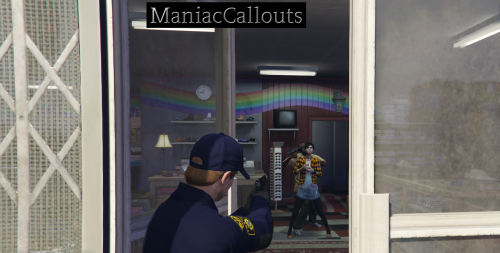 Ohhhhh, I am so sorry, I was going to see in game for myself, but my GTA keeps freezing in-game for a 1/2 days now. The reviewer probably got the random Suspicious Activity callout from my pack and then thought it was yours. Sorry again! Yes, nothing was used, was a mistake I saw in the review video.
 -
Removed comment
-
Yes.
-
This way developers are able to update a possible feature list and file details. And when you added a bunch of new features, you have to remember them all. If you can edit the file details on a new upload, you can take your time comparing your changelog with your file details.
-
DisableTrafficStopMenu DisableComputerSystem DisableComputerHelpMessage 1: 90% Uses StopThePed, also declutters the screen a bit since you get 1251 help messages by other plugins anyway 2: Disables the computer except for the SearchWarrant callout. 3: Most experienced users know the keybind and won't forget it, for me it can be kind of annoying since it clutters up the screen everytime you stop. Or some people use other computers.
-
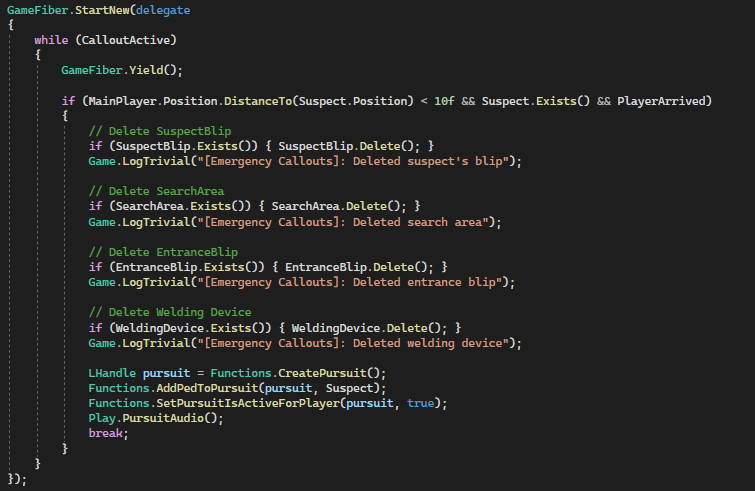
Doesn't do anything in-game, just logs it. I narrowed it down to 1 line, which is Functions.AddPedToPursuit I also use try and catch blocks I don't see why exceptions where thrown, if someone knows why that would help alot. Code in the method: Logs from callout creation to exception
-
Thanks👍
-
I'm trying to figure out how to get the player's name but I can't really find it anywhere, LSPDFR Uses it in logging but I'm not sure if it's available in the API, if someone knows how to get it that would be great. Persona.FromExistingPed just generates a random name. (With character I don't mean model name, I mean the actual name the user gave the character.)
-
hmm, I'm not 100% sure how to fix this, but I may have a few solutions. Is it a custom car? if yes, does it happen to other custom vehicles? in Grand Theft Auto V\lspdfr folder, edit lspdfr.ini and change Main.PreloadAllModels to false. Lowering "Graphic details" and the reflection quality in the in-game settings might also help. if that doesn't work I remember this mod from when I still had a low end PC. https://nl.gta5-mods.com/misc/lag-world-not-loading-fix-simple-easy
-
I remember seeing a improved AI plugin once, here it is if you want it: https://nl.gta5-mods.com/misc/realism-enhanced-traffic-and-driver-a-i
-
If you're still playing LSPDFR: Download "Keep Calm" it ensures that gang members won't attack you if there are shots fired, you can toggle it in the .ini file it also stops peds from freaking out when there's shots fired(so you don't get run over)
-
For people troubleshooting in 2021: The callout pack maker didn't set the PedRelationshipGroup, in English: He didn't tell the game the officer and player are supposed to be "friends".
-
 Looks nice! What helicopter is it?
 -
I have minimum modeling experience in Blender, but how long would it take for example to make a dodge charger in ZModeler?
-
I'm assuming you already have created a search area, but if you haven't yet, click the spoiler. Okay, so first you want to create a private bool to check if it needs any refreshing, I will explain why later. Don't forget to set it to true. private bool needsRefreshing = true; Second, we're making an if-statement, we don't need to add "== true" since we already set true by default, normally it's always false. if (Suspect.Position.DistanceTo(SpawnPoint) > 60f && needsRefreshing) It checks if the suspect's position is further then the search area size, and if it still needs to be refreshed(which it does). Now for the rest of the if-statement: the red parts describe what that line executes. if (Suspect.Position.DistanceTo(SpawnPoint) > 60f && needsRefreshing) { if (SearchArea.Exists()) { SearchArea.Delete(); } // Checks if SearchArea is still there, then it deletes it. SceneLocation = Suspect.Position.Around(10f, 30f); //Sets the SpawnPoint to a random position between 10 and 30, since the SpawnPoint is of no more use. SearchArea = new Blip(SpawnPoint, 60f); SearchArea.Alpha = 0.5f; // Sets the transparancy to half of the standard size. SearchArea.Color = Color.FromArgb(240, 200, 80); // Sets the color to yellow. } We're not done yet, We still have to make a second if-statement to check where the player is. if (Game.LocalPlayer.Character.Position.DistanceTo(Suspect.Position) < 10f && needsRefreshing) // Executes when the player is close to the suspect and if it needs refreshing. { while (true) // keeps executing while true { needsRefreshing = false; // Since the player found the Suspect, we don't need to refresh the SearchArea anymore, because that would be weird. if (SearchArea.Exists()) { SearchArea.Delete(); } // This is the old SearchArea, since the suspect is not in it anymore, it needs to be deleted. Game.LogTrivial("TutorialPlugin: Search Area doesn't need to be refreshed anymore."); // This is optional, but i do recommend you log things alot. break; // This stops the while loop from executing anymore, otherwise it is going to do this 1000x per second. } } If you need any support with coding, head over to "VincentsGM Modifications" Discord server, he helped me alot and there is alot of things you can learn in his #coding-help channel. Server: https://discord.gg/A7pJNY3HM5 Make sure to get the Developer role for you to see #coding-help.


