



HankVoight
Members
-
Joined
-
Last visited
Everything posted by HankVoight
-
I have no idea, it might be the fact I was using the "very low" settings but I didn't think that should change how the lights look :/
-
V3, vanilla game and all the files in order according to the read me file
-
I'm also using Cry ENB and my ELS lights look nothing like in that video.
-
So I'm completely new to ENB's and I've decided to try Cry ENB V3, I'm using the very low settings as my current computer can't handle much more than that. I seem to have two problems, one is that my game is extremely bright on all weather types and times and two is my ELS lights look like I'm playing with stock settings. I see all of these pictures of people using the same ENB and their lights and game look fantastic and then I look at mine and pretty much want to cry. | Does anybody have any tips or fixes for these hiccups? I'm planning on getting a new Alienware Alpha Desktop soon and hope to have the situation fixed by then. Cheers! Chris PS, I'll add photos of my game in the morning as it is currently pretty late in the land of OZ.
-
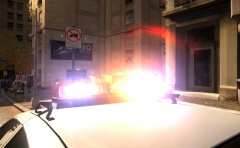 I'm using the "very low" settings and the game looks alright but my ELS lights look like I'm using stock settings :/
 -
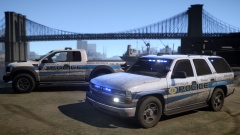 These actually look really damn good! Where can I get that Suburban though?
 -
Tell me about it, I live on the outskirts of a Capital City and I don't want to go anywhere near the CBD anymore.
-
A massive thank you to everyone who has helped out, you guys have been fantastic!
-
I didn't even realise they had been updated haha. Those CVPI's are perfect! I will be putting them straight in. Cheers mate! Yeah Cj's pack always crashes my game for some reason, it even happens with his LCPD pack Thanks for the suggestions!
-
So I have been trying a few different LAPD packs out (mainly just because I like the cars) but I haven't been able to find any that A, work well with ELS V8 and B, have any of the older CVPI's with the MX7000 Rotator lightbar. So if any modeller out there has an empty plate and would like something to do please have a look below. What I'm after are the following - Police - 2011 CVPI with a DROT Mx7000 lightbar. Police2 - 2013 Dodge Charger with the Federal Signal Arjent. FBI - Slicktop/Unmarked 2011 CVPI with one (1) red steady burn light in the front windscreen and a single blue/yellow light box I guess in the back window (driver side). And if you are feeling generous there is a special Tahoe I wouldn't mind seeing made (feel free to skip this if it's too much) It is a special response Tahoe used by the LAPD S.W.A.T. Teams. Picture below. It has one red steady burn light in the front windscreen, red/blue grill lights and a blue/yellow light box in the back window. I know it's a big list but LAPD vehicles are extremely simple having a console, body partition and lighting. So if you feel like you could help out please drop a comment below. Cheers and Merry Christmas!
-
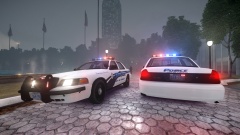 Sees fender wraps and sighs :'(
 -
In there video here the slicktop has blue/yellow lights in the back, I think that would be a nice touch.
-
Go into VisualSettings.dat, scroll down to car.defaultlight.emissive.on and see what number is next to it, mine is set to 145 and it's quite dim. Just change it to a higher number. It's really a case of trial and error.
-
You sir are a legend! If you could that would be fantastic!
-
I didn't exactly want to say the truth..
-
We would've already had one if Vertex didn't "disappear". He had just finished a replica of Det Lindsay's Chrysler.
-
Would someone be able to do up a 2012 Chrysler 300 like the one from the tv series Chicago PD. I have found what I believe is an unlocked Chrysler, I just need someone to put it together. If you feel like taking on the request drop a comment below or PM me and I'll send you all of the links. Ps - One of the photo's is Vertex's/ErinLindsay, I only used it to show the accurate lighting setup on the front.
-
This are great, just a few lighting tips/suggestions.. Instead of having the entire lightbar blue make at least two of the modules white like this (it just adds some diversity) '' target='_blank'>>. And with the bar in the back window, maybe make the two led modules on either end amber like the TA. But overall I'm in love with the fact someone finally made some DROT cars with the FedSig Vision. 4/5
- 18 comments
- 3 reviews
-
For the love of god please make a CVPI or SOMETHING else to match this beautiful creation!
- 14 comments
- 4 reviews
-
Okay so I'll list the game slots and the cars to fill those slots? Police - Washington - http://gta.wikia.com/Washington?file=Washington-GTA4-front.jpg Police2 - Presidente - http://gta.wikia.com/Presidente Polpatriot - Unmarked Patriot, like CSI Miami, - http://gta.wikia.com/Patriot Noose - Anything really FBI - Unmarked PMP-600 - http://gta.wikia.com/PMP_600(like the Chicago PD Chrysler 300c, )'>) If possible of course.
-
-
-
There are numerous tutorials on here, Google, YouTube and various other sites on how to do it. I understand he may only want to help but if someone wants to learn all they have to do is ask. For most authors, compiling their work with others into packs is forbidden and quite honestly frowned upon. It isn't that hard to collect a few (for example) NYPD cars into a pack for yourself and put it into the game.
-
http://lmgtfy.com/?q=GTA+IV+Police+Car+Packs
-
I love you!

