



dominikexe
Members
-
Joined
-
Last visited
Everything posted by dominikexe
-
Hey @gman124, Thank you for the fast answer. I would recommend installing both. I look forward to your response
-
Hey @Cyan, thanks for moving the topic! Hey @Kolton27LS1, how are you? Can you send please your `RagePluginHook.log`? You can find it in your main directory of GTA5. I look forward to your response
-
Hey @Jimmayy87, Thank you for the fast answer. No. You can *must install all mods in the mods folder. But if you install the vehicle as I described above, it must work... If you like, I can install the vehicle for you remotely. I look forward to your response
-
What? 😂 Unfortunately, I didn't understand what you will say... Does it now work with the inserted car? I look forward to your response
-
Hey @Drewster327, how are you? Two things are noticeable: 1) Go in your GTA 5 Homefolder Then delete the content of the `commandline.txt` file. (NOT the file, rather the content - and safe it clear) 2) Have you played with shade before? (Pixel Shader) I look forward to your response

-
Hey @beemy62, Thank you for the fast answer. Could you pls disable "StickyWheels.dll"? In an old Topic was this a problem... AND 1) what is "LPC Config Editor.exe" - (LPCallouts is not compatible with LSPDFR 0.4!)?! I look forward to your response
-
Hey @gman124, Thank you for the fast answer. Feel free to awsk. We are glad to help you.
-
Hey @Jimmayy87, Thank you for the fast answer. Okay. Do you know where you installed the "wrong" ambulance? If so, please delete it from there. THEN: Copy only the fils IN the "stream" folder of your download Go into OpenIV and go to -> mods\update\x64\dlcpacks\patchday22ng\dlc.rpf\x64\levels\gta5\vehicles.rpf then paste the copied files in there. now in openiv (in the vehicle.rpf) should be ambulance.yft, ambulance.ytd, ambulance_hi.yft. Then you can restart you LSPDFR. (But please don't forget to rename the mods folder back to "mods".) I look forward to your response
-
Hey @beemy62, Thank you for the fast answer. Could you disable the "Albo1125.Common.dll" and try it again? -> so you must rename the "Albo1125.Common.dll" in "Albo1225.Common.dll.DISABLE" I look forward to your response
-
Hey @Jimmayy87, Thank you for the fast answer. So that means, that your "ambulance" car was not installed correctly. You can rename the mods-folder back in "mods". (So you can delete the underscore.) Can you send me the ambulance car that you would like to install? If you like, i would install it right with you. I look forward to your response
-
Hey @beemy62, pls try also the last option that i've send you. Other Method: I do not suspect the error directly with LSPDFR. Please check GTA 5 game files. If you tell me which launcher you're using GTA 5 on, I can help you check the game files there. I look forward to your response
-
Hey @Jimmayy87, welcome. It can be two things: - first: The ambulance model is interrupted or - second: you did not install the vehicle correctly What could you do: 1. Check the Installation of your Car 2. pls try to start your lspdfr without yours mods folder.. -> rename your mods folder to "_mods" (underscore + mods) I look forward to your response
-
This issue has been resolved. For further questions you can look in the message above.

-
Hey @CGTReaper thank you for your question. But this is only an Support for "technical" issues or questions. Nevertheless I would like to help you. I would recommend the $16 version, because (yes, u cant play GTA5 Online if you have LSPDFR installed) BUT you could make your an "copy" so u could play GTA 5 Online. OR if you ever uninstall LSPDFR (i don't know for what reason) you can play then Online. In short, I'd suggest the $ 16 version https://store.steampowered.com/bundle/5699/Grand_Theft_Auto_V_Premium_Online_Edition/ Have fun, and if you have any issues - I'm here 😉 I am looking forward to your feedback and would like to know whether this ends the topic?
-
Hallo, @LenMagBen (du kannst mit mir auf Deutsch reden.) Bitte achte darauf, dass du (wie Charlie686 gesagt hatte) ScriptHookV auf dem neusten Stand halten musst. Die aktuellste Version von ScriptHookV findest du hier: Ebenfalls bitte ich dich hier deinen `RagePluginHook.log` zu senden. Diesen findest du in deinem GTA 5 Hauptverzeichnis. ~ Somit können wir besser sehen, was bei dir läd, bzw. nicht läd und/oder Probleme verursacht. Ich freue mich auf eine Rückmeldung von dir. Antworte einfach unter diese Nachricht oder mit dem Tippen auf `Quote`. Bei weiteren Fragen sind wir fast rund um die Uhr auf Discord oder unserem LiveChat verfügbar. LG Dominik P.
-
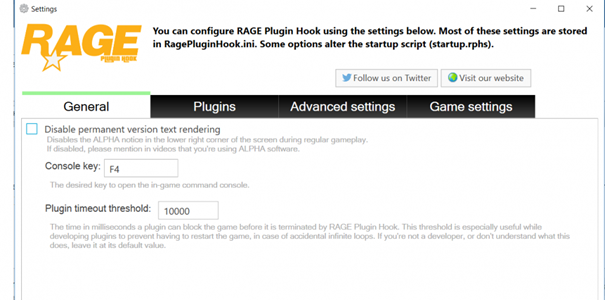
Hey @beemy62 RagePluginHook is creating an Log since you start the launcher. Even if you are not in the game, he creates a log... Please check your folder anyway. -> Also please try the second option that i post above. 😉 AND You can try this: Go in your Settings of RagePluginHook (start RPH -> click after start on the gear) then the settings will open on the first page you finde the option "plugin timeout threshold" set this value on "30000" I look forward to your response
-
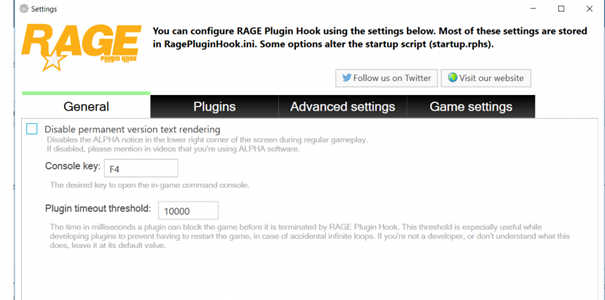
You can try this: Go in you Settings of RagePluginHook (start RPH -> click after start on the gear) then the settings will open on the first page you finde the option "plugin timeout threshold" set this value on "30000" I look forward to your response We can also be reached via our Livechat or Discord.
-
This issue has been resolved. For further questions you can look in the message above.

-
It could be, because the files of the last patchday (patchday23) are missing in the "modded" game instance Let me know if you have new results.
-
Okay 😉 Let me know if you have new results.
-
Make sure that you have activated EUP Menu in RagepluginHook If you want a suitable tutorial for the installation, you can watch our video *its in german, but you can see all steps! for the basic installation (with menu) you should see the video to minute 3:38
-
I'll stay until it works again. I look forward to your response
-
its okay 😉 i try to give my best in english .. so sorry for that ^^ you may have to klick on the right button to accept the rules of the livechat
-
Hey @Azffemt06 you have to remove the script `ForceACallout` then it should work.
-
we have an support site.. -snip- our livechat is on the buttom right. you will se an message. then you can write us. then you can write us/me your anydesk.com - ID -snip- and if your started (you need not to install it) you get an id I will explain to you how we will continue then in the LiveChat



