Skip to content
View in the app

A better way to browse. Learn more.

LCPDFR.com

A full-screen app on your home screen with push notifications, badges and more.

To install this app on iOS and iPadOS
  1. Tap the Share icon in Safari
  2. Scroll the menu and tap Add to Home Screen.
  3. Tap Add in the top-right corner.
To install this app on Android
  1. Tap the 3-dot menu (⋮) in the top-right corner of the browser.
  2. Tap Add to Home screen or Install app.
  3. Confirm by tapping Install.

BlckHrt

Members
  • Joined

  • Last visited

  1. BlckHrt changed their profile photo
  2. Scott Wells     Responded to a Stolen Police Vehicle in Harmony, Senora Rd
  3. Scott Wells     Finished responding to a Stolen Police Vehicle in Harmony, Senora Rd
  4. Scott Wells     Responded to a Stolen Police Vehicle in Gd. Senora Desert, Route 68
  5. Scott Wells     Responded to a Store Robbery in Sandy Shores, Joshua Rd
  6. Scott Wells     Finished responding to a Solicitation in Sandy Shores, Joshua Rd
  7. Scott Wells     Frisked Hans Brunhoj in Sandy Shores, Joshua Rd
  8. Scott Wells     Finished responding to a Organised Street Race in Sandy Shores, Joshua Rd
  9. Scott Wells     Arrested Hans Brunhoj in Sandy Shores, Joshua Rd
  10. Scott Wells     Responded to a Organised Street Race in Grapeseed, O'Neil Way
  11. Scott Wells     Finished responding to a OwnerWanted in Grapeseed, O'Neil Way
  12. Scott Wells     Arrested Mark Dyer in Grapeseed, O'Neil Way
  13. Scott Wells     Performed a traffic stop on a Black F620 with registration 62XHG800 in Grapeseed, Senora Fwy
  14. Scott Wells     Responded to a OwnerWanted in Mount Gordo, Senora Fwy
  15. Scott Wells     Finished responding to a Traffic Stop Backup in San Chianski Mountains, Senora Fwy
  16. Scott Wells     Arrested Jacob Howardz in San Chianski Mountains, Senora Fwy
  17. Scott Wells     Responded to a Traffic Stop Backup in Mirror Park, Mirror Park Blvd
  18. Scott Wells     Finished responding to a HotPursuit in Mirror Park, Mirror Park Blvd
  19. Scott Wells     Arrested Ivan Dzasokhov in Mirror Park, Mirror Park Blvd
  20. Scott Wells     Responded to a HotPursuit in Burton, Las Lagunas Blvd
  21. Scott Wells     Finished responding to a Solicitation in Burton, Las Lagunas Blvd
    • 94 downloads
    • Version 1.0.0
    Introduction: This pack was created for The New Order FiveM Roleplay community. They wanted me to skin all of their EMS vehicles. All vehicle textures were made with Photoshop CS6. Legenda: ✅ = Done & Tested ☑️ = Done ❌ = Cancelled Vehicles in Pack: -Ford e450 Ambulance ✅ -Hakuchou Motorcycle ✅ -Dodge Charger ✅ -2016 Ford Explorer ✅ -H145 Air Ambulance ✅ Models: Charger: https://www.gta5-mods.com/vehicles/dodge-charger-rt-ems-for-fivem-and-sp Explorer: https://www.gta5-mods.com/vehicles/2016-ford-explorer-fpiu-qrv-saems-els Helicopter: https://www.gta5-mods.com/vehicles/yorkshire-air-ambulance-h145-replica Installation: 1) Use OpenIV to navigate to your GrandTheftAutoV Files. 2) Navigate to /mods/update/x64/dlcpacks/patchday9ng/dlc.rpf/x64/levels/gta5/vehicles.rpf 3) Place the contents of each vehicle folder in the directory 4) Open each vehicles Texture directory (the .ytd files) and replace their respective texture livery file. 5) And you're done. If you have any issues, you can contact me on here via posting a comment and @ me.
  22. I enjoy using this bike, good work buddy ! 🤩
    • 296 downloads
    • Version 1.0.1 Final
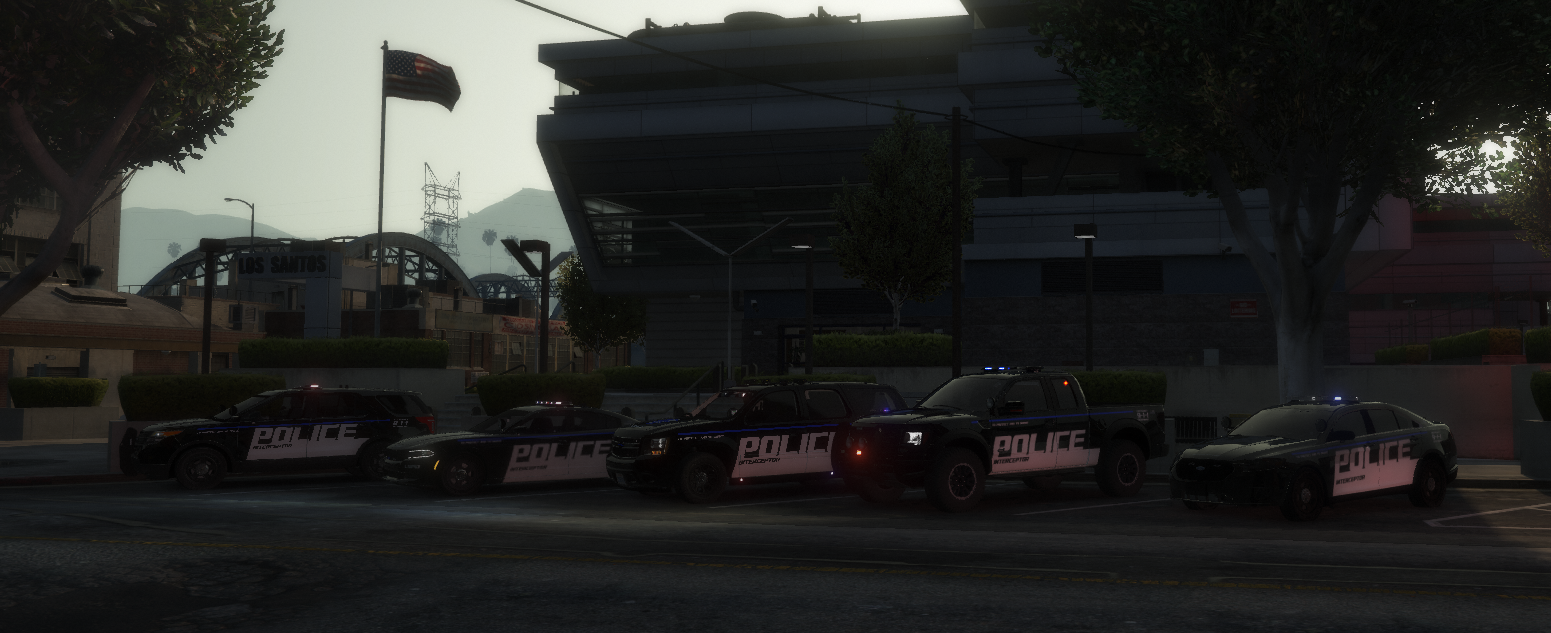
    Introduction: This pack was created for The New Order FiveM Roleplay community. They wanted me to skin all of their LSPD vehicles. All vehicle textures were made with Photoshop CS6. Legenda: ✅ = Done & Tested ☑️ = Done ❌ = Cancelled Vehicles in Pack: -Eurocopter EC-135 ✅ -2013 Ford Explorer ✅ -2016 Ford Explorer ✅ -2013 Ford Taurus ✅ -2015 Dodge Charger ✅ -2016 Chevrolet Impala ✅ -2014 Chevrolet Tahoe ✅ -2013 Ford F150 Raptor ✅ -2013 Harley Davidson Electraglide ✅ -Police Bicycle ✅ Models: Eurocopter EC-135: https://www.gta5-mods.com/vehicles/eurocopter-ec135-npas-replace Installation: 1) Use OpenIV to navigate to your GrandTheftAutoV Files. 2) Navigate to /mods/update/x64/dlcpacks/patchday9ng/dlc.rpf/x64/levels/gta5/vehicles.rpf 3) Place the contents of each vehicle folder in the directory 4) Make sure your vehicle files are named either (police, police2, police3 or sheriff, sheriff2) as these are the default vehicles GTA used as police vehicles. 5) Open each vehicles Texture directory (the .ytd files) and replace their respective texture livery file. 5) And you're done. If you have any issues, you can contact me on here via posting a comment and @ me.

Account

Navigation

Search

Search

Configure browser push notifications

Chrome (Android)
  1. Tap the lock icon next to the address bar.
  2. Tap Permissions → Notifications.
  3. Adjust your preference.
Chrome (Desktop)
  1. Click the padlock icon in the address bar.
  2. Select Site settings.
  3. Find Notifications and adjust your preference.