


ZeroHour
Members
-
Joined
-
Last visited
Everything posted by ZeroHour
-
Yeah, big problem can stem from one little thing sometimes. Glad you got it sorted out though!
-
When you uninstalled GTA, did you manually delete the folder to make sure EVERYTHING was deleted? If so, it might be time for the ol' format and reinstall of Windows.
-
Update: searched and found a post from another user here who had the same problem, and did enough digging to figure out the problem. I dunno if y'all are using EUP with the LSPDFR config for it like I am, but this user was and it comes from apparently a call to a BCSO badge texture for the GUI that isn't actually there. Somehow that one missing GUI texture brings the whole "going on duty" code to a halt. To fix, open agency_eup.txt in Grand Theft Auto V\LSPDFR\Data\Custom, find the Blaine County Sheriff's Office agency section, and replace these lines: <TextureDictionary>rde_bcso</TextureDictionary> <TextureName>rde_bcso</TextureName> with <TextureDictionary>dia_police</TextureDictionary> <TextureName>dia_police</TextureName> And voila, you can go on duty as BCSO again.
-
I think it is the only outfit available by default for LSPDFR. I had to install EUP 8.1 + the LSPDFR config files for it to select anything else.
-
Same problem here. Here is the most recent log, though I perused it and don't see anything obvious. RagePluginHook.log
-
 Not sure what you're saying here - that if you use Interaction+ you should only use Interaction+ for ID checks? Or are you saying all three should be the same? Because STP and default LSPDFR do seem to be the same, it's just Interaction+ that's different.
- 1,005 comments
- 68 reviews
-
I get the same thing. Seems like Interaction+ is getting its ped information somewhere else, or it makes its own entirely separate data? Ahh the joys of trying to get 12 different plugins to work together...
- 1,005 comments
- 68 reviews
-
 You should use one or the other. They basically perform the same functions.
- 1,915 comments
- 242 reviews
-
-
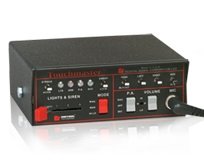 Good job with this siren, I'm really enjoying it! Instructions for install were clear and easy to follow. Thanks for your work on this!
- 23 comments
- 12 reviews
-
 Ahh yes, that would make sense, lol 🙂 It'd be easier if you could somehow send me the dialogue lines (so I can see all of them instead of just whatever I come across in callouts.)
 -
I really enjoy this callout pack. However, one thing I did notice is that grammar and to a lesser extent, spelling is extremely poor at times. Is there any way I could contribute as an "editor" of sorts to fix up subtitles, dialogue, etc? I'd love to help in any way I can. Thanks for the work you put into these unique and enjoyable callouts.
-
-
 Ok, re: my above post, I realized it's some sort of bug related to the car getting "dirty" textures applied. The car itself does not get dirty, instead the window become darker and darker until they can't be seen through at all. I love this pack and your LSPD one, I'd really like to see this one little issue fixed. Thanks a lot for the awesome packs!! 😎
- 131 comments
- 45 reviews
-
I love this pack! But I did have one small problem - the CVPI loads up with varying degrees of window tint. Not sure if that's intentional, but sometimes it loads with super dark limo tint you can't even see into. Is there a way we can tweak that? Still, excellent work on this.
- 131 comments
- 45 reviews
-
 The gas/petrol theft callout is really buggy for me (LSPDFR 0.4.2 7110.) When I catch up to the suspect's vehicle, they flee after I blip them, then immediately stop their car. But it's not like a normal traffic stop, they just stop and I can't interact with them at all. If I use stop the ped to make them come out, LSPDFR crashes.
- 1,081 comments
- 166 reviews
-

