Yard1
Friends of LSPDFR
-
Joined
-
Last visited
Everything posted by Yard1
-
The Beta is Back LSIA (ped and car textures by Shep)
-
New vest (textures by @Alex_Ashfold!) No clip radio!
-
 Nobody asked you. The beta belt will be optional
 -
-
When I get my monitor back (in 2 weeks time). Working on the backup one is a pain and I only want to wrap up some simple things.
-
For this model, both 2k and 4k: LSCoFD LSFD (2 variants)
-
You need to put the sheriff car models in bcso/dlc.RPF As for the hwaycar crashing, I have no idea why that happens.
-
 G R E S L E Y R E E L S S L E E R Y E L S E R G
 -
Updated the LSPD vests and belts and sheriffs vest file, https://drive.google.com/open?id=0B2u1WsVUYgZgUWRfSl94NDJ6S2c now the vest on s_m_y_cop_01 is accs_002 which means it's fully Cop Holster compatible, sadly same can't be done for the sheriff. [Ped:S_M_Y_COP_01] FuncHolster=True FuncIntim=True FuncIntimMesh=9:0,9:1,9:2,9:3 9:1=9:0 9:2=9:0
-
-
Yeah, you can.
-
Nobody is obliged to help anybody. Support is given on a strictly voluntary basis, meaning that if nobody responds to your posts you are shit out of luck.
-
And I hope Lt.Caine is working on a Buffalo S for Law Enforcement!
-
 Have you installed the gameconfig.xml found under the IMPORTANT section in description? It fixes that issue.
- 1,522 comments
- 85 reviews
-
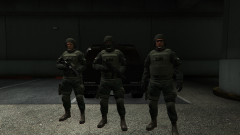 Yeah, those guys from the Observatory are s_m_y_swat_01 with a different decal that is only used there.
 -
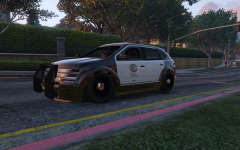 I don't feel spited at all!
 -
It's gameconfig related, replace your gameconfig.xml in update.rpf/common/data with this one: https://www.mediafire.com/?x8zgnjdjxm8y7gk
-
Well, we are working on it, but @dilapidated's GPU burned, which stops him from working on the script until he gets a new one.
- 1,522 comments
- 85 reviews
-
-
Shep just likes his patches big.
-
@AShadowbox @Romaine323 Zanesix made an update for the gameconfig and it seems to work fine: http://www.mediafire.com/download/x8zgnjdjxm8y7gk/gameconfig.xml I'll update the description shortly.
- 1,522 comments
- 85 reviews
-
-

- 1
-
-
Updated the FIB SWAT model, the link is the same :)
-
FIB SWAT: https://drive.google.com/open?id=0B2u1WsVUYgZgaWowUGNfdGhXcFk Textures by AlexVonShep, Alex_Ashfold and me. Cop Holster config: [Ped:S_M_Y_FIBSWAT_01] FuncHolster=True FuncIntim=True FuncIntimMesh=2:0,2:1,2:2,2:3 2:0=2:1 2:2=2:3
-
Anybody else getting some PAYDAY vibes? More stuff for RDE 3.0 :) I'll upload it separately later, but check my thread for a Google Drive link.
-
Don't install any update.rpf files aside from dlclist.xml, gameconfig.xml and vehicles.meta.
- 1,522 comments
- 85 reviews