WithLithum
Members
-
Joined
-
Last visited
Everything posted by WithLithum
-
You can't play GTA V without logging into RGSC. You can't unless you have backup - RPH can help you, but it is only meant for playing LSPDFR while waiting for an update. No one is smarter than Rockstar's lawyers.
-
We don't know it came from what XML. It is triggered from Functions.OnOnDutyStateChanged event, which is from the API. It could be GrammerPolice, it could be some other plug-in.
-
@9615DELTA It is your plugins. And, don't reloadallplugins; Just LoadPlugin "LSPD First Response.dll" So you get only LSPDFR loaded. Try to move all LSPDFR plugins from your plugins/LSPDFR folder to another folder which is away from the game folder. When editing XML files in the future, use VSCode (or any other code editor you like) with a XML extension that has verify feature.
-
Ok. Now, you will need to wait until you have verified, and then try to launch the game. Report any files got updated in verify. If you wish to reinstall, you will need to attempt to start the game immediately after reinstall. If you get infinite loading screen when you launch immediately after reinstalled, it's your system. Ignore this italic line if you don't wish to reinstall now.
-
Did you: Install any redistributables? Install anything outside the game (e.g. via an installer, directly to your computer, not your game)?
-
It will verify all files that cames with vanilla Grand Theft Auto V. If this won't work, (I am pretty sure you got the most vanilla), describe what you all did on installing Arrest Manager and such.
-
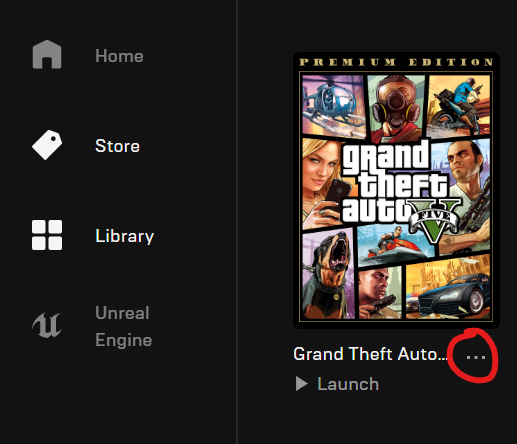
Yes, just delete command line (or empty it) To verify your game data: Head down to Library in Epic Games Launcher. Click on the "three dots" icon. Click verify. Here is images telling you what to do:

-
Now let's review what we have now: We have confirmed that RPH is not causing the issue. We have confirmed that removing SHV does not help. Something in your game is not working so well. You can try these: Remove commandline.txt if there is one. Verify game data (cache). Note that this might be the ultimate step, means if this doesn't work I can't help you very well after.
-
@CountOG Now, launch without RPH see what happens.
-
Yeah. Now, this is what happening: You disables your ASI loader. You disables ScriptHookV. Now, no ASI will be loaded. Try load with RPH now.
-
Uh huh.
-
Remove the .dll extension from file name.
-
@CountOG Remove the extension. Also, rename your dinput8.dll which is your ASI loader, to _ASILoader, also remove the extension.
-
@CountOG You don't have mods folder. Can you rename ScriptHookV.dll to _SHV and see what happens? EDIT: You might have to disable your ASI loader. To do that, rename dinput8.dll to _ASILoader.
-
In lspdfr/data, there is bunch of XML files. Here is a short list of: agency.xml backup.xml regions.xml stations.xml duty_selection.xml And, do you have anything in the custom folder? You can attempt to remove Tacco Highway Call-outs, and see what happens.
-
Sorry, I can't. I hate real time chat in general (means every single product exists). You can answer these questions for further assistance: Can you run vanilla game at all? Can you run without SHV, only RPH?
-
Ultimate Backup must be configured separately & correctly to use the correct clothes. If you can't do that, remove Ultimate Backup.
-
Remove FelonyStop. If fails, disable Rich Police Enhancement's ambient backup (or entirely remove Rich Police Enhancements). If fails again, moves all files from plugins\LSPDFR to a backup folder, then try again.
-
@Alexandro44 Will your game work with mods and without LSPDFR & RPH? It could be your mod.
-
Keep in mind that you'll have to remove all of Albo's plugins - Bejo's plugins potentially conflicts with Albo's plugins, and, you'll have to install Ultimate Backup if you haven't. Ignore this reply if you are happy with Bejo's plugins.
-
EUPFR is known for crashing like this (e.g. requesting NOOSE team). There is no currently way to solve this.
-
It is a common knowledge. You should not save (even quick save) if your player is not Michael, Franklin or Trevor. And you also shouldn't save with LSPDFR active.
-
@addamuss I think he wants the picture of the whole folder. If one fails to do so, capture two. If two fails, capture three photos, so on.
-
Download and install RageNativeUI at https://github.com/alexguirre/RAGENativeUI. Note that this will only solve the plugin crashing issue - to solve your mods folder issue, reinstall your mods one at a time to get the mod caused the mods folder issue.
-
Update your RAGENativeUI, it can be found at https://github.com/alexguirre/RAGENativeUI. If that fails, remove RegularCallouts to solve it.