UNSCRazorsEdge
Members
-
Joined
-
Last visited
Everything posted by UNSCRazorsEdge
-
+1 for this, same issue and steps taken producing the same result.
-
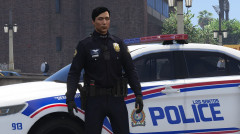 It is not the default EUP belt
 -
What duty belt is this?
-
Alright. Thanks everyone for the help
-
So what is the best and safest way to install addon vehicles?
-
Does this work for vehicles I rename to sheriff3 or sheriff4? So I can have LSSD use sheriff and sheriff2, Grapeseed use sheriff3, and BCSO use sheriff4?
-
-
-
 So I love this mod. Absolutely love it. However, I do not have it installed. Periodically when I click on a ped check or vehicle check, and double click the plate or name, LSPDFR crashes. I don't have a log at this time, but I can get one if that would help. I'm just curious if @FirstThirtyMinutes or anyone else found a way around this. Only tagging because he doesnt seem to crash much in his vids.
- 1,743 comments
- 172 reviews
-
-