


MattCC16
Members
-
Joined
-
Last visited
Everything posted by MattCC16
-
-
Ok, thanks! No 4K mods, but yeah its probably the textures.I have had a few of the textures/models on the police cars in my game pop in and out. Two cars are doing this and they are from different packs. Is this the car's fault or my game? Thanks! Video:
 This looks awesome!
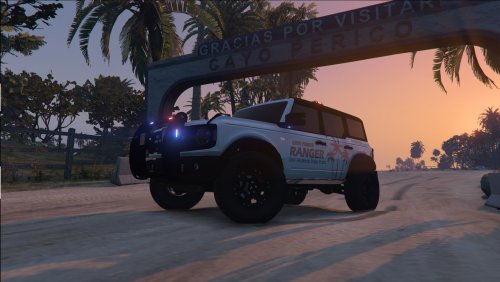 High quality, great looking texture!Is it up to date?What Rage plugins are you currently using? Is your RPH up to date?Tint and the wrong ELS VCF are the main causes of funky lights. Or the model is messed up.
 Works great! Love using this in SP.
 Awesome work on this plugin! There is one bug I found. When in a pursuit and an AI officer gets a call from the mod, the officer will join the pursuit instead of going to their call. They do not go to their call after the pursuit either, so you have to go to the scene and end it manually. I think it would be nice to disable the ambient callouts during pursuits, as they can conflict with dispatch audio from other mods. Also, pursuits usually close other radio channels so units can focus on the pursuit. Once again, amazing work!
- 346 comments
- 43 reviews
Amazing mod with great audio and overall immersion! For future updates a more detailed (and clear) .ini would be nice so we can customize timing and vehicles. Response: The ini functions are a little confusing to me, and I do not know exactly what some of them do, so making that more clear would be nice. Maybe being able to customize timings for AI response times too 🙂 Thanks @ziipzaaapM16A4- 346 comments
- 43 reviews
-
-

-

- 2
-
This should be in a different support section, this is the media section for sharing videos and photos for LSPDFR. If you use Stop The Ped you should have almost no trouble arresting and pulling people over. If you are using arrest manager, I would recommend getting rid of it since it is old.




Account
Navigation
Search
Configure browser push notifications
Chrome (Android)
- Tap the lock icon next to the address bar.
- Tap Permissions → Notifications.
- Adjust your preference.
Chrome (Desktop)
- Click the padlock icon in the address bar.
- Select Site settings.
- Find Notifications and adjust your preference.
Safari (iOS 16.4+)
- Ensure the site is installed via Add to Home Screen.
- Open Settings App → Notifications.
- Find your app name and adjust your preference.
Safari (macOS)
- Go to Safari → Preferences.
- Click the Websites tab.
- Select Notifications in the sidebar.
- Find this website and adjust your preference.
Edge (Android)
- Tap the lock icon next to the address bar.
- Tap Permissions.
- Find Notifications and adjust your preference.
Edge (Desktop)
- Click the padlock icon in the address bar.
- Click Permissions for this site.
- Find Notifications and adjust your preference.
Firefox (Android)
- Go to Settings → Site permissions.
- Tap Notifications.
- Find this site in the list and adjust your preference.
Firefox (Desktop)
- Open Firefox Settings.
- Search for Notifications.
- Find this site in the list and adjust your preference.