


Creators: Due to background reprocessing of files, approvals and file security checks may be delayed. Thanks for your patience.


MattCC16
Members
-
Joined
-
Last visited
Everything posted by MattCC16
-
Yeah. They are outdated but work alright
-
In the lspdfr.ini there is a multiplier for callout frequency. As for disabling, you can disable call outs if the developer of callout pack allows it in their ini file
-
Ultimate Backup has this feature as well as spike strips, so yes. Please visit Bejoijo’s website to download it: https://bejoijo256.wixsite.com/bejoijo/home/
-
I made another post similar to this topic, but I wanted to make another one. I remember in the early versions of LSPDFR dispatch would give out a location of suspects during pursuits with their direction of travel and street. I really wish it would be put back in, because I love the realism. So, if any developers of LSPDFR or any developers at all can make this happen once again, myself and many others would appreciate it!
-
 Yes, setting in the ini file Just wondering... has anyone taken on the task of updating it?
- 1,005 comments
- 68 reviews
-
-
Thank you for the response. You have made an amazing contribution to LSPDFR and community.
- 1,005 comments
- 68 reviews
-
Agreed, I prefer Interaction +. I wish he could make it public so other devs could update it.
- 1,005 comments
- 68 reviews
-
I've heard that it isn't. I have not updated LSPDFR yet, I was hoping for an update for this.
- 1,005 comments
- 68 reviews
-
 Hi, would it be possible to just make a version of Coastal Callouts with just the callouts themselves (just the .dll and .ini)? Thank you!!
- 496 comments
- 33 reviews
-
-
I installed Backup+ a few days ago and it was working great. Both LSPDFR backup units and Ultimate Backup Units had EUP uniforms. I must of messed something up, because now, no matter what I do, the LSPDFR backup units (local city ones) only wear "Pilot Police" uniforms. However, Ultimate Backup still has the EUP uniforms working fine. I replaced the default uniform files for LSPDFR backup in the "data" folder and deleted the Backup+ plus xml files in "Custom," but those same pilot uniforms show up on every single normal city unit. I think I might have to reinstall Law and Order and Serve and Rescue, but I want that to be a last resort. Help would be appreciated. Thanks! EDIT: I put in LSPDFR EUP Configurations along with the Ultimate Backup files from Backup Plus and everything is working
-
 Can this be a contributor to FPS loss? In other words, do EUP uniforms on AI contribute to performance loss? Thanks!
- 170 comments
- 11 reviews
-
-
Amazing, polished off plugin. Would love to have pursuit update audio from dispatch
- 1,005 comments
- 68 reviews
-
Something I would love to see would be pursuit updates in audio form from dispatch. That would be amazing
- 1,005 comments
- 68 reviews
-
-
I hope a mod or an addition to interaction+ includes this in the future
-
I would like a mod where pedestrians yield to sirens so they don’t walk in front of you
-
Yeah that would be cool!
-
 Is the .oiv required for the pack to work, or can I just install the .dll and ini? This looks really cool btw!
- 174 comments
- 13 reviews
-
-

- 1
-
-
 I really like the callouts in this pack. But it’s buggy (animal calls), crashes LSPDFR sometimes (stolen police car, gang), and pursuits don’t show up through LSPDFR. An INI for the future would be nice, too. But I appreciate the effort you put into these mods!
- 47 comments
- 11 reviews
-
-
- 1
-
-
I love connecting with dispatch in-game. Something I loved about LCPDFR was that Dispatch gave updates about where fleeing suspects were and their description. In LSPDFR I like how officers themselves give updates on the suspects location, but I feel that dispatch should also give updates or repeat what the officers are saying. I know Interaction+ does this but it’s only on the side of the screen and it’s just in words. I believe the officer status menu by Phaxol did something like this but you only were able to give descriptions and not hear them. it’s outdated and crashes LSPDFR. are there any mods that do this?
-
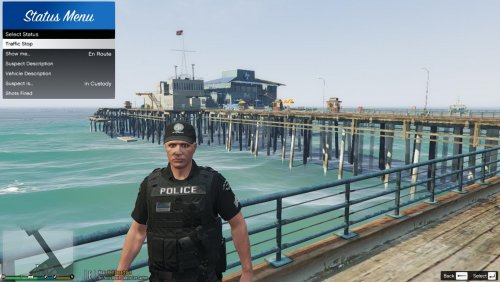 Are updates for this mod a thing of the past?... because I love it! It currently is outdated and crashes the LSPDFR.
- 64 comments
- 13 reviews
-
That fixed the problem! Thank you!


