




XBR410
Members
-
Joined
-
Last visited
Everything posted by XBR410
-
the only problem I have is you didn't choose the right models to skin.. there are plenty of models with the lightbars that Toronto uses
- 12 comments
- 6 reviews
-
-

- 1
-
-
ohhhhhhh snap! I didn't even notice it was you who made the Baltimore skins way back when.. oh man I love your work keep it up!
-
the word police is supposed to have a fade effect and are a different font.. but other than that good effort 3/5 keep working at it and you'll get there
- 4 comments
- 3 reviews
-
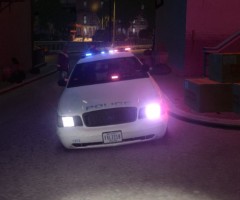
From the album: XBR410s WIP Gallery
Scratch Made Code 3 Defender. Whelen Slimlighter TIR6's. Improved Interior Including: Toughbook Custom Console Using Stalker Dual's Code 3 Arro-stick Module Motorolla Radio's Watch Guard 4RE Dual Spotlights ALPR Option Rambar Option Steelie Trim / Regular Hubcap Version aswell Might be A Christmas Tree Version and Regular Patrol Version (Car seen Here is Christmas tree Version) -
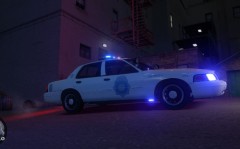
From the album: XBR410s WIP Gallery
Side View of LCPD's Newest CVPI -
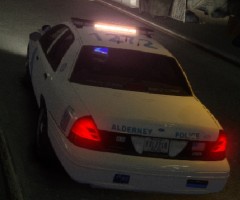
From the album: XBR410s WIP Gallery
Code 3 Defender Scratch made.. Directional bar version -
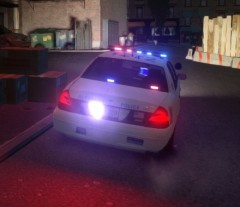
From the album: XBR410s WIP Gallery
Code 3 Defender scratch made in action.. slimlighter TIR6's aswell.. high quality interior and more realistic taillights -
DSF Model for me is way too scaled up.. but those lights are pretty cool man! those Apollo's are gonna have to grow on me though
-
No sometimes it does depends on what car you get and how the modeler works.. also how old the car is usually cars that Are for ELS V5 or before usually have their lights on the emerglights file.. the ones now use the emerglight_emis file.. also its usually pretty simple on the emerglight file there are different shaped lightbars on the emerglight file look for the one that looks like the one on the car and yes just color it
-
every car has a emerglights file and that dictates what the color of the glass is you have to mess with it using paint.net gimp or photoshop
-
ill add them to my Canadian pack or at least the ones that haven't already been made yet ('12 charger and Tahoe)
-
-
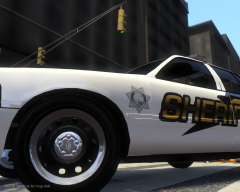 hey man i'd love to use that rim texture if you don't mind.. I love the silver trim look
 -
oh lmao!
-
you realize prosecution is in court not on the spot right? the video is dated back to just two days ago so I doubt they have gone to court yet it usually takes a month or so
-
i must have interpreted it wrong then Current users of the service will be able to play their Games for Windows Lives games indefinitely sounds a lot like those who have accounts now will still be able to use windows live but the store will go down and you cant buy anything but then i again im very tired at the moment since its almost 5 am here and also i posted that at the same time he did if you would look at the time stamps i was about 80% done when he posted that
-
guys.. gta4 mp will still be here.. its the store not the whole thing.. read every post before you reply..
-
im working on the Miami PD cvpi if you want you can help I have the lightbar for it.
-
do you mind PM'ing me on more info on those cars?? i'd love to make them haha
-
I really want to make that unmarked charger in the video it looked bad ass
-
I got a nice fat ass internal server error when I try that link.. to google I go!!
-
Not bad at all man. the back panel needs to be black though..
-
there's a gang across the street from where i live and the drug dealer drives a crown vic.. i doubt he's a wanna be cop just saying.. i for one agree with slimory, i would buy a crown vic because nothing beats the look of one.. personally my favorite ford even over the mustang.. on top of that they are extremely cheap (police auctions are cheapest) part of the reason actually why most people in the ghetto's and such drive crown vic's (if you've never been in one i assure you there are at least 1 or 2 in each hood)
-
Im surprised I haven't seen any "at least he actually owns the car he posted" replies because that picture hick posted was an obvious lie lol im pretty sure this thread is named "what kind of vehicle do you own"
-
-snip- oops

