




Yasd
Community Team
-
Joined
-
Last visited
Everything posted by Yasd
-
This topic has been moved to the appropriate forum. Please post in the correct location in the future. Hello, try to replace ScripthookVDotNet.asi with the nightly version from here.
-
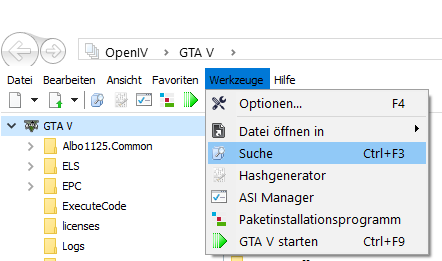
For searching files you can use the search in OpenIV -> Tools -> Search There are 2 locations: Grand Theft Auto V\update\x64\dlcpacks\patchday3ng\dlc.rpf\x64\models\cdimages\patchday3ng.rpf\s_m_y_fireman_01.ydd Grand Theft Auto V\x64e.rpf\models\cdimages\componentpeds_s_m_y.rpf\s_m_y_fireman_01.ydd
-
Give more detail on what and when its happening, also post the Ragepluginhook.log from the main gta folder.
-
I'm sorry, again, please post the Ragepluinghook.log from the main gta folder.
-
Hi! Good to see you here! I'd like to give you a little advice. I know you're propably a beginner in coding & you are just about to start. Most users find callouts, where you just have to do a simple pursuit, boring. Make sure to bring in a little bit of variation, like a conversation, or something to investigate. You could also reproduce issues from the real world, like a traffic accident etc. This will bring more attention to your pack & I'm pretty sure you'll find some loyal testers 🙂 Yasd
-
make sure to install a custom gameconfig, heap adjuster & packfile limit adjuster. Check out the FAQ from page 3 and further.
-
This topic has been moved to the appropriate forum. Please post in the correct location in the future. Have you installed new vehicles or changed settings?
-
Looks like an error in SuperCallouts, pls take a look @SuperPyroManiac
-
Hey, we only support the latest gta/lspdfr/rph version. Please update to the latest. In your log it seems like your UltimateBackup settings are invalid and cause the crash.
-
every gta police vehicle needs to have the attribute as a police vehicle, because this is missing, you cant pullover vehicles. atleast this is how you do it on a replacement vehicle:
-
Update SuperEvents, remove Keep Calm & Traffic Policer. Your was caused by an invalid weapon. If your crash still occurs after removing those, rename the mods folder to _mods, then try again. If the crash still occurs, rename the folder gtav/lspdfr to _lspdfr and replace it with the vanilla one from the lspdfr download.
-
Crash caused by lorecallouts due to an invalid gta 5 ped.
-
Crash caused by lorecallouts due to an invalid gta 5 ped.
-
This is a known bug on the asi, try installing the nightly instead: https://github.com/scripthookvdotnet/scripthookvdotnet-nightly/releases/download/v3.6.0-nightly.31/ScriptHookVDotNet-v3.6.0-nightly.31.zip
-
Remove scripthookvdotnet.asi
-
Stoptheped is loaded normally, it should work fine. By default you open the menu with G, Press E twice to stop a ped to interrogate
-
Pretty hard to find an error that occurs after 30 min. you can try to rename the mods folder Or try to rename the plugins in gtav/plugins/lspdfr
-
There is no crash in the log, you played for over 30min after going on duty… From what I can see it looks fine
-
This topic has been moved to the appropriate forum. Please post in the correct location in the future.
-
Ein paar Callout in 686Callouts & das HostageSituation Callout in MCCallouts geben kein Code 4 beim korrekten Abschließen des Callouts. Aber selbst bei den meisten Callouts kannst du danach noch die Szene untersuchen, warum also ist die Code 4 Meldung ein Problem?
-
Translate your problem to English please
-
Post the Ragepluginhook.log from the main gta folder
-
Post the Ragepluginhook.log from the main gta folder
-
Post the Ragepluginhook.log from the main gta folder
-
Post the ragepluginhook.log from the main gta folder

