




Yasd
Community Team
-
Joined
-
Last visited
Everything posted by Yasd
-
So you put all your installed stuff in "Grand Theft Auto V/plugins/LSPDFR"?
-
Try this one:
-
Try to delete/rename the LSPD Plugins Folder and the mods Folder. also try to reinstall RagePlugin hook
-
In the main Grand Theft Auto V Directory. C:/Progam Files/Rockstar Games/Grand Theft Auto V/Ragepluginhook.log
-
ok you did it right. but you can try it with the other method i told you. go to the door, hit "E" to open the door, hit "E" again to tell him to get in. I dont know any further. Wait for others to solve this.
-
I think you didnt understand how to put someone in the back. If you are using Stop the PED, you go to the door, do not open the door yourself by klicking any buttons, just choose in the upcoming menu to put him in the backseat. If you are not using stop the ped, the normal lspdfr fuction is to go to the door, hit "E" to open the door, hit "E" again to tell him to get in. Do you got that? 😄
-
I see you have Arrest Manager & Stop The Ped installed. You should try to remove Arrest Manager, because Stop The Ped has the same, but more features.
-
Please post your Ragepluginhook.log It looks like you have something wrong installed. In the video he shows installing the lspdfr 0.4.0. theres already 0.4.1 out and soon 0.4.2... also try to disable your antivirus and firewall.
-
Please post your Ragepluginhook.log Is that problem only for 1 vehicle and have you tried other vehicles? Have you tried to put the cuffed person in the front seat?
-
Failed to find file:lspdfr/data/outfits.xml Post your Ragepluginhook.log
-
D3D11CreateDeviceAndSwapChain at 0x7FFAC06C6B00 [6/7/2019 10:59:52 PM.902] Creating Direct3D 11 device and swap chain [6/7/2019 10:59:52 PM.919] Swap Chain is NULL. Trying again... For me it looks like you have to reinstall Direct3D 11.
-
Pls post your Ragepluginhook.log Maybe an unstable Plugin causes this or you have too many plugins loaded.
-
Zum einen bleiben sie manchmal an Ort und Stelle stehen, mit Sirene und Blaulicht. Zum anderen fahren sie ganz normal während einer Verfolgungsjagd,steigen aber nicht aus dem Fahrzeug aus. Oder sie bleiben stecken oder fahren totale Umwege. Ja das probier ich mal in der INI.
-
Code 3 natürlich😁 Code 2 ist ohne Sirene 😉
-
Stürzen andere Spiele auch ab? -> evtl. Hardwaredefekt? in wiefern äußert sich der grafikfehler ausser das das Spiel crasht? Poste mal deinen Ragepluginhook.log
-
Funktioniert es @Desmontar?
-
Probiere mal Firewall und Virenscanner auszuschalten
-
Einmal den Mods Ordner umbenennen in z.b. MMods sodass er nicht lädt, um herauszufinden, ob es der Mods folder ist der das Problem auslöst. das gleiche mit den Plugins Ordner. Wenn immer noch Crash, beide, also Mods und Plugins Ordner umbenennen. Wenn es immer noch Crasht: Einmal alle nicht Orginal GTA 5 Dateien löschen, so dass nur noch die Dateien da sind, wie in dem angehängten Bild. Dann einfach wie in diesem Video LSPDFR und RPH installieren. Wenn es danach immer noch Crasht, GTA 5 neu installieren.

-
Hab es installiert. Läuft eigentlich gut soweit. Bloss die Backup Unitsbei Ultimate Backup brauchen ewig bis sie bei mir sind
-
Dieses Problem hatte ich auch. Ich musste nur mein AVG deaktivieren. Allerdings gibt's noch zu beachten: GTA starten und sobald du Story Modus angeklickt hast, mit Alt + Tab auf den Desktop wechseln, RagePluginHook.exe starten, wieder mit Alt + Tab in GTA wechseln, kurz Geduld haben und dann lädt RagePluginHook.exe. Trotzdem kommt bei mir noch eine Error Meldung, obwohl es funktioniert. Zusätzlich habe ich noch den kompletten GTA Ordner bei meinem AVG gewhitelistet, ebenso die RagePluginHook.exe und GTAlauncher.exe
-
Probiere mal das Spiel einmal ohne Mods-Ordner, einmal ohne Plugins-Ordner usw. -> Ausschlussverfahren, an was es liegt. Um z.B. den Mods Ordner auszuschliessen, kannst du den Ordner einfach umbenennen, z.B. "Testmods". Dann wird der Mods Ordner nicht als dieser erkannt und das Spiel startet ohne ihn. Wenn du ihn wieder haben willst, einfach wieder in "mods" umbenennen. Ich schätze aus Erfahrung, es wird an einem oder mehreren Plugins liegen 😋
-
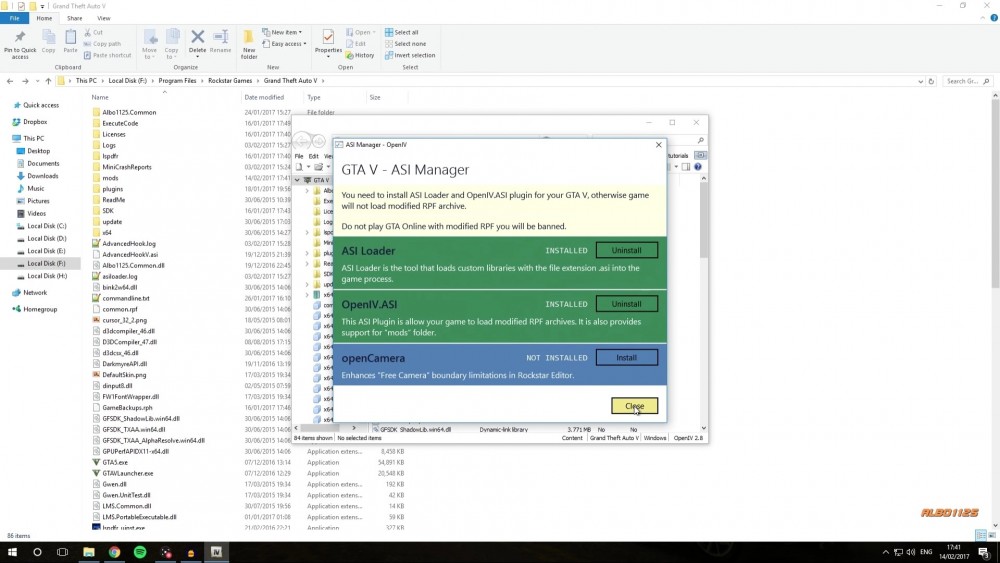
1. Schau ob du die nötigen Dateien unter ASI-Manager installiert hast, sodass OpenIV funktioniert (siehe Anhang) 2. In welchen exakten Dateipfad hast du police3 installiert? Hast du auch 4 Dateien für police3?
-
VisualV feier ich persönlich. NaturalVision gibt's auch. Google einfach GTA Grafik Mod oder such in YouTube 😂
-
ne ist des empfehlenswert?
-
agency_eup.xml



