




Yasd
Community Team
-
Joined
-
Last visited
Everything posted by Yasd
-
In deinem Log ist kein Crash vorhanden?
-
Poste deine Ragepluginhook.log
-
Poste ein Bild der Fehlermeldung.
-
Es kann natürlich ein Bug sein, das der jeweilige Ersteller dies nicht berücksichtigt hat. Oder du hast etwas vergessen, zu installieren.
-
War schon gut 😄 -> Albo1125 updatet Arrest Manager nicht mehr. StopThePed wird noch geupdatet: https://bejoijo256.wixsite.com/bejoijo/post/stop-the-ped
-
google gta spieldaten verifizieren erstes ergebnis: steam: Rechtsklicken Sie im Reiter Bibliothek auf das entsprechende Spiel und klicken Sie dort auf Eigenschaften. Wählen Sie den Reiter Lokale Dateien und klicken Sie auf die Schaltfläche Spieldateien auf Fehler überprüfen. Steam wird nun die Spieldateien verifizieren – dieser Vorgang kann einige Minuten in Anspruch nehmen.
-
Ich weiß, dass Assorted Callouts funktioniert. Installier das Plugin, und wenn LSPDFR/ GTA crasht, dann hast du höchstwarscheinlich einen Fehler bei der Installation. Kannst ja mal die Ragepluginhook.log im Hauptverzeichnis von GTA posten.
-
Jo, hast du versucht die Spieldaten zu verifizieren?😂 Bitte poste deine Ragepluginhook.log, die ist im Hauptverzeichnis von GTA. Alternativ kannst du versuchen, GTA manuell zu starten, und danach RPH
-
Hi. Ja, es gibt die Möglichkeit per ELS die Art jedes blinkenden Lichts zu ändern. Dazu musst du ingame sein, Strg + P drücken, und durch öfteres Drücken mit Alt + 1, Alt + 2, bis ALt + 6 die Lichter ändern. Diese Einstellung verfällt aber nach einem Game-Neustart. Du kannst in der .ini File die Einstellung dauerhaft ändern. WEiß ich aber nicht auswendig, wo und wie, aber google mal selbst.
-
[SOLVED] by going back to normal gameconifg
-
yes? i used this one: https://de.gta5-mods.com/misc/gameconfig-xml-dilapidated
-
Try starting gta 5 with rph without loading lspdfr. then it must be rph.
-
Hast du versucht die DirectX Version zu ändern?
-
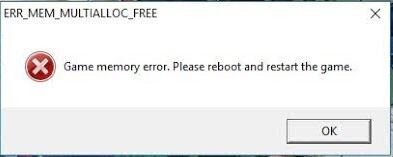
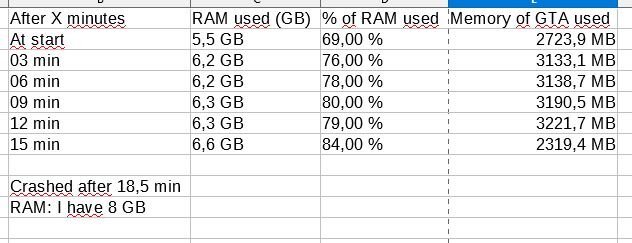
[SOLVED] Hello, i have recent game crashes after some time about 20 min. The error, documentation at which time how many memory and RagePluginHook.logare down as pictures. I also have a custom gamesconfig, now im back to the default. lets see if it is the problem [SOLVED]
-
Bitte poste deine Ragepluginhook.log in dem Hauptverzeichnis von GTA
-
Ja, wenn du das nicht installiert hast funktioniert der mods Ordner nicht
-
Dann hast du es falsch/ nicht installiert. Hier eine deutsche Anleitung:
-
Seit deinem letzten Mal gibt es ein Update für LSPDFR (0.4.4) und RPH 1.69. Für das Update wird ein sauberes GTA 5 benötigt.
-
Antivirus deaktivieren, evtl. GTA 5 starten, warten bis die Polizei Sirenen im Ladebildschirm kommen, raus taben mit Tab + Alt, und Ragepluginhook (normalerweise ohne Admin) starten
-
Scripthhook Update ist draußen: http://www.dev-c.com/gtav/scripthookv/
-
Das neue Update ist draußen. http://www.dev-c.com/gtav/scripthookv/
-
bitte poste deine ragepluginhook.log, ist im hauptverzeichnis von gta 5. versuche auch die scripthookv zu installieren. http://www.dev-c.com/gtav/scripthookv/
-
You can post the .bat file for other users, who have the same problem. GJ for solving the problem yourself! 🙂
-
"Command line option "high" is specified twice. Please remove one." 1. Pls post your commandline.txt in your main directory. 2. It looks like the antivirus still block some files. You said you disabled everything? Hm... 3. Maybe give it a try: something with DirectX. Under RPH settings, I checked “Disable DirectX Hook,” booted RPH, and unchecked it.
-
Command line option -nodx is specified. DirectX will not be initialized. Try to disable that option.


