Yasd
Community Team
-
Joined
-
Last visited
Everything posted by Yasd
-
So there is no crash log in the .log file.
-
Einmal (falls vorhanden) den mods Ordner in _mods umbenennen, und den Ordner unter Plugins -> LSPDFR in _LSPDFR umbenennen. Somit ausschließen, ob es an Plugins oder Mods liegt.
-
At this point i recommended to delete all RPH and LSPDFR files. So that you only have the files in this video: https://www.youtube.com/watch?v=Xms_84clyg8 Then you install LSPDFR manual. And then Ragepluginhook. Then start the game.
-
I dont have a log from you or a screenshot of the main folder. ELS: https://www.lcpdfr.com/downloads/gta5mods/scripts/13865-emergency-lighting-system/ ScripthookV: http://www.dev-c.com/gtav/scripthookv/ By the way, you could have find that out by just google it...
-
Antivirus deaktivieren neues Log posten
-
So where did you know/see that?
-
Ja, LSPDFR und RPH lol
-
Pls post a screenshot of your main gta folder. Which versions did you install from?: LSPDFR RPH ScripthookV
-
What blocked the folder? Antivirus?
-
Hi guys, I found a bug. I arrested a ped. After that, i stand behind him and search him, and the animation comes that he turns around, and a red mark on the minimap blinks. This looks like the "resting function". The suspect is not running away, he just stands there, but has no longer handcuffs. Now trying to arrest the suspect via gunpoint is not possible. He is still in "arrest" mode. After that, i can search him sucessfully.
-
Yes I know what you mean, but I didnt see this that often. So nothing you can change there.
-
Try to enable RPH to load the plugin so that you dont have to do it manually. Also set the loading timeout from 50000 to 60000 (maximum).
-
the speed they are driving is different. Truck f. e. are driving slower in pursuits. Sport cars are driving faster, it's that simple.
-
Try to disable your antivirus and firewall!
-
Give it a try: something with DirectX. Under RPH settings, check “Disable DirectX Hook,” boot RPH, and uncheck it.
-
pls post a screenshot of your main gta folder!
-
Hallo und hi! You installed sth. wrong. STP has a coroner and tow truck! What exactly is your problem? Is the coroner and tow truck option not showing in the smart radio? Or do you need help installing STP or Arrest Manager?
-
>>Is it possible that the user simply does not have .NET Framework 4.0 installed on the machine? Do you have .NET Framework 4.0 installed?
-
Exception message: Access to the path 'C:\Program Files (x86)\Steam\steamapps\common\Grand Theft Auto V\lspdfr\patterns.tmp' is denied. Try disable your antivirus and firewall. Also update your RPH to newest version.
-
The new scripthook (SHV) was updated today. Install it!
-
This is not the italian forum? WHy do you always answer in italian?
-
-
Installier RageNativeUI. Aktualisier dein Ragepluginhook.
-
New scripthook update is available: http://www.dev-c.com/gtav/scripthookv/
-
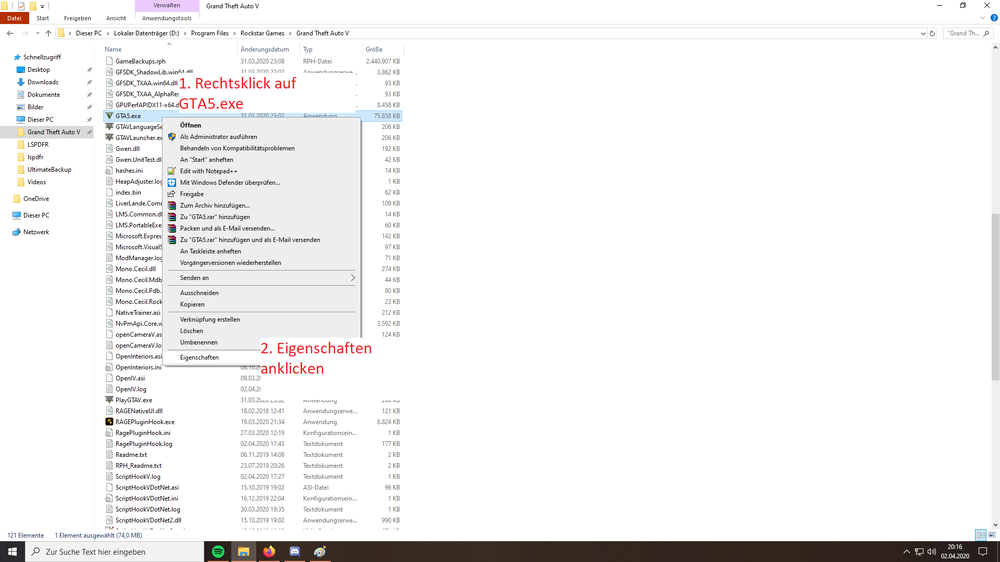
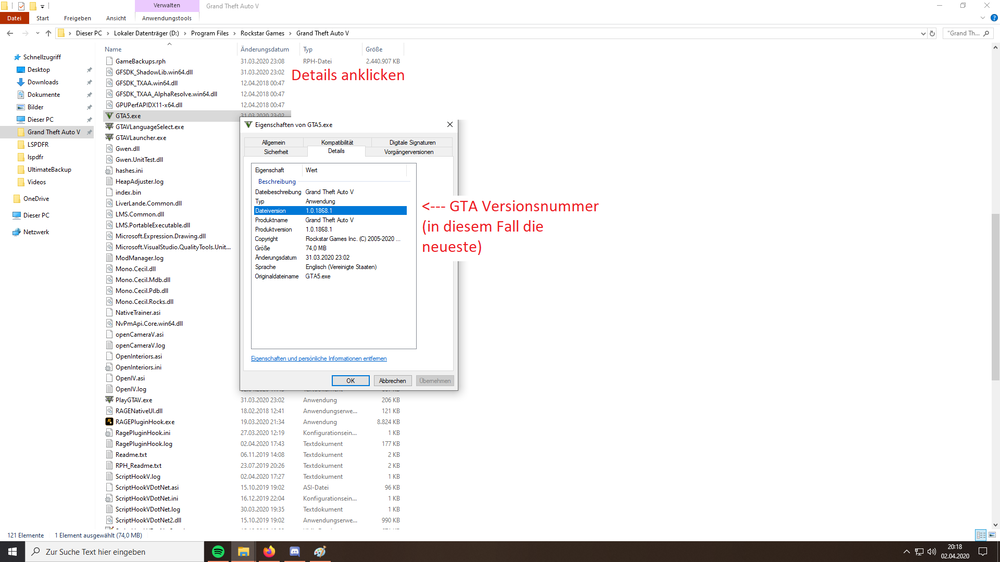
The easierst solution would be solving the problem which causes the lags and not trying to installing old versions, which might be or not working. So with the newest game version you may possible not able to play an old version of LSPDFR. Which version of the game you have, this is how to find it out: 1. RIght klick on GTA5.exe 2. Properties 3. Details 4. GTA Versions number (in this case/ i have the newest one)