




Yasd
Community Team
-
Joined
-
Last visited
Everything posted by Yasd
-
Ja das ist logisch ^^ Crasht dein Game beim Plate check immernoch?
-
I sometimes noticed that, too. The suspect fled on foot, driver gets out, vehicle with lights still playing the siren. When i get in to turn that off, lights can be turned off, but siren not.
-
Deinen mods Ordner zu _mods umbenennen
-
RoadIncident Callouts is for LSPDFR 0.3, also löschen Update dein Ultimatebackup, stoptheped, compulite https://bejoijo256.wixsite.com/bejoijo/ außerdem arrestmanager löschen, das ist in stoptheped dabei
-
Sry, the stolen car mission is not showing up after 30 min playing... sry
-
Looks like a bug, Im gonna try to do the "mission" with the red dot, which is the stolen car callout by LSPDFR default. And arrest him at gunpoint.
-
https://youtu.be/1Jk7XEq4IW0
-
An PoliceSmartRadio kanns nicht liegen, das läuft trotz fehlender Updates noch.
-
You have to hold the key "B" to start the pursuit. After that you can call backup if you want. Arresting via gunpoint and holding E or hold E to stop him and hold E again to detain him.
-
im hauptverzeichnis von gta
-
You have to drive behind a vehicle to make a traffic stop. Then you press shift and turn on your siren (default by "E"). A text will appear in the upper left corner. The vehicle then pulls over. Right, you can#t pull them over because he is fleeing. Holding "B" you can call in a pursuit. Sometimes they surrender, sometimes they run away. Because you didnt call in the pursuit. At gunpoint holding "E" they will get on the ground. Then you can cuff them Holding "E" again.
-
Ragepluginhook.log posten
-
Kenn ich das Problem. Lösung: den Schwerpunkt des Fahrzeuges ändern z. B. vom Baller oder Baller2.
-
Dann hast du Uniformen falsch installiert 🙂
-
Yeah, but you can also do what I wrote earlier.
-
Dann hast du warscheinlich keinen. Mit dem Programm OpenIV kann man in diesem Ordner z.B. Fahrzeuge installieren, ist aber nicht notwendig. Hast du Callouts oder Plugins installiert? Ja/nein? unter GTA/Plugins/LSPDFR den Ordner zu _LSPDFR unbenennen.
-
On certain systems, LSPDFR can take too long to load. If you're seeing this issue, LSPDFR will hang with a perpetual black screen and there will be an error message on the bottom left of the screen. Your log may also mention something along the lines of 'Warning! Plugin "LSPDFR First Response" was terminated because it caused the game to freeze' Fix Open the RAGEPluginHook settings menu (hold down SHIFT immediately after clicking RPH) Increase 'Plugin timeout threshold' to a higher value (e.g. 60000) Save and Launch Leave a like if it has helped.
-
mods ordner zu _mods umbenennen.
-
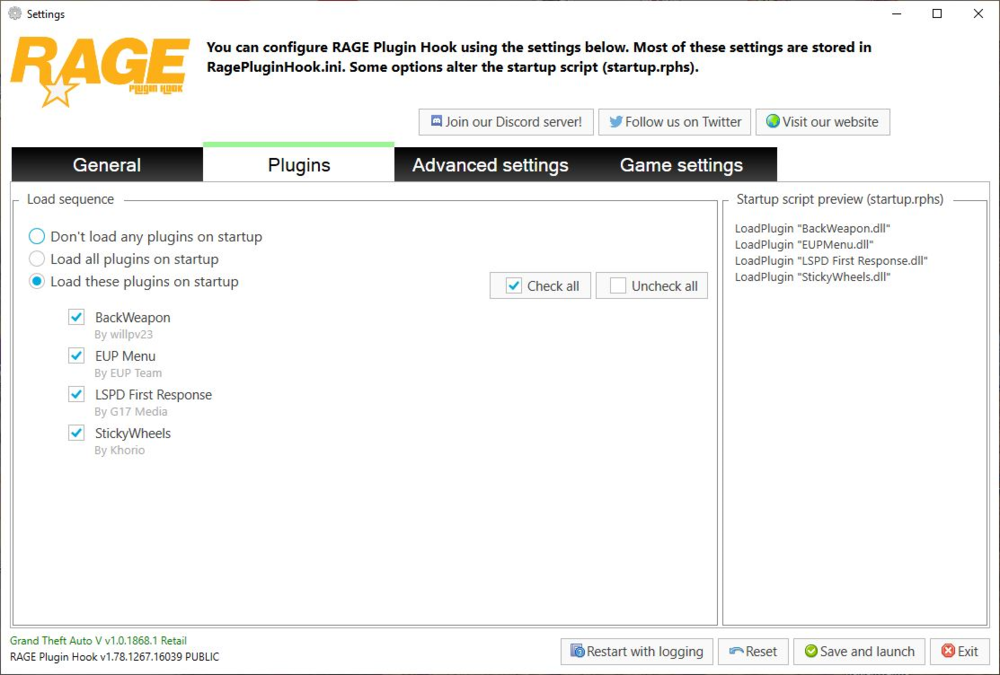
Probier mal in RPH Einstellungen LSPDFR automatisch zu laden.
-
Post your Ragepluginhook.log
-
post your new ragepluginhook.log after you updated albo common
-
1st screenshot is a critical error messag. Have you updated albo.common? 2nd screen is uncritical. There are no more updates on albos mod, so you get this message (everyone) under "notification"
-
Albo1125.Common.dll is out of date. This mod requires Albo1125.Common 6.6.4.0
-
Post your Ragepluginhook.log in the main gta folder
-
https://github.com/alexguirre/RAGENativeUI/releases Download the newest one and put it in your gta main folder.


