




Yasd
Community Team
-
Joined
-
Last visited
Everything posted by Yasd
-
Update RageNativeUI, download it: https://github.com/alexguirre/RAGENativeUI/releases open it with 7zip or winrar and drag and drop the files in the main directory, click replace if asked. The Following Plugins Need To Be Removed (3): Arrest Manager, (Replaced by StopThePed) LSPDFR+, (Stop The Ped, CompuLite Replaced This) Traffic Policer, (Replaced by StopThePed & Custom Pullover) PoliceSmartRadio, (Replaced By GrammarPolice's Radio)
-
Post your ragepluginhook.log from the main gta folder 😁 do you have a desktop crash or just lspdfr which means your still in the gta game
-
start with the correct version of rph and lspdfr 🙂 rph 1.100 and lspdfr 0.4.9 compiled on October 2022
-
try to finish the story mission or switch to another character. the simplest solution would be to install a 100% savegame: https://de.gta5-mods.com/misc/100-save-game
-
post your ragepluginhook.log from the main gta folder and the file gtav/plugins/lspdfr/stoptheped.ini
-
you only have one gta installed, right? try to verify the game files, maybe sth is missing https://www.epicgames.com/help/en-US/technical-support-c5719357686683/general-support-c5719341627163/how-do-i-verify-game-files-in-the-epic-games-launcher-a5720337301659 otherwise reinstalling gta may force the newest update.
-
https://www.sportskeeda.com/gta/how-download-gta-online-los-santos-tuners-update-after-its-release-today go to How to update GTA Online on Epic Games Launcher
-
Can you post a screenshot of that error popup which says current game version is not supported?
-
Still the same
-
Post ragepluginhook.log from the main gta folder
-
Post your ragepluginhook.log from the main gta folder 😃
-
Do you have a desktop crash or what is the issue? A little more detail would be helpful 😁 post your ragepluginhook.log from the main gta folder in addition
-
so why havent you renamed the mods folder yourself? 😅 dont worry, 4 eyes see better than just 2
-
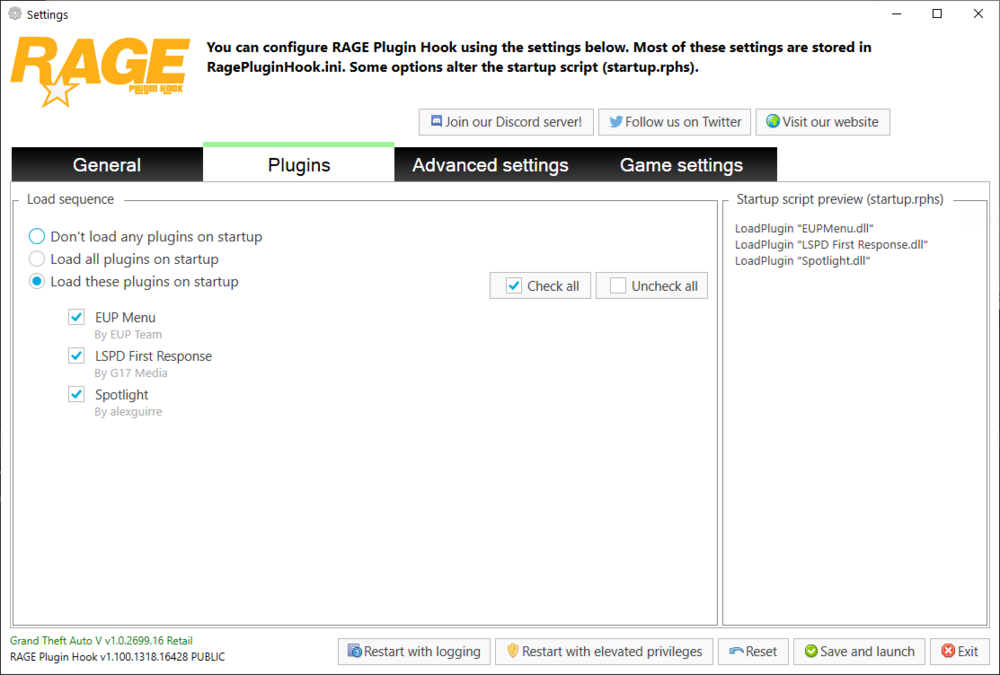
Maybe upload it on youtube, because i cannot view this video, because it was not rated yet.nope, read carefully. you have to differenciate between: gtav/plugins and gtav/plugins/lspdfr please move the 2 files LSPD First Response into gtav/plugins and then make sure, that lspd first response is marked as loaded in the rph plugins tab.
 have you installed those files? 😉lspd first response.dll is missing, make sure in gtav/plugins is a file called lspd first response.dll pls post a screenshot of that path to make sure👍🏽basically, you need the following: - custom gameconfig - HeapAdjuster (gives you more memory) - PackFileLimitAdjuster here is a tutorial:Try to remove half of the folders, if it doesn’t crash, then try the other half. it’s hard to find I know because you have that many vehicles/ foldersCan u?Log looks good. try via rph console to go on duty via command: ForceDuty probably won’t work the first time you go on duty.Simply update gta😄If you remove all folders out of it does it still crash?


