




Yasd
Community Team
-
Joined
-
Last visited
Everything posted by Yasd
-
Bonjour, the ragepluginhook is included in the latest lspdfr download.🇫🇷Close this topic you have 2 topic s for the same problem, thanksSo what ? How should anybody help you with the information you posted?😁 give us info when it crashed and lspdfr crash or desktop crash and what you recently installed before it crashed post your ragepluginhook.log from the main gta folderPls update lspdfr. You’re one version behind.For Calloutinterface you re missing ipt.common. Install that in the main folder install scripthookvdotnet in the main directory. Download: https://www.gta5-mods.com/tools/scripthookv-net open and drag and drop all files in the main gta folderYou can change the console key f.e. By starting rph and holding shift there you see it. I trust you to fin a way how to get the f keys to work 😄 can u post a picture of that keyboard?1. the ragepluginhook.log is in the main gta folder. You post it by clicking on choose files… 2. you need to update ragenativeui, download it, open it and drag and drop it in the main gta folder, click replace if asked. https://github.com/alexguirre/RAGENativeUI/releases 3. A requirement for interactions is TrafficPolicer. Download a patched version, I don’t have the link maybe @UnknownBastion do you have the link from ashtar TrafficPolicer?You forgot to install some files. Error: Could not find a part of the path 'D:\SteamLibrary\steamapps\common\Grand Theft Auto V\Plugins\LSPDFR\UltimateBackup\DefaultRegions.xml'.This is a general error and the message itself does not say much. What have you installed or changed lately since the crash occurre? post your ragepluginhook.log from the main gta folder.👍🏽Since you dont have much installed, i recommend to make a clean gta folder, so that you only have the default files. if so, start gta to make sure its working. then install rph and lspdfr and see if its working.👍🏽
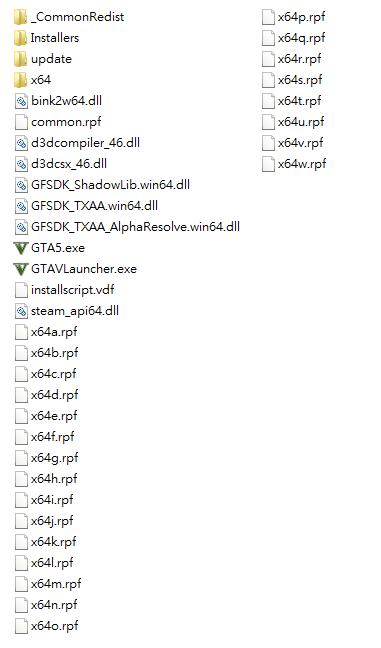 Is that your error message or what? can you post a screenshot of the gta folder where I can see your files?LML is Lenny’s mod loader, only there if you install itDo you have a mods folder? Rename it to _modsyou mind checking out these files:1. update LSPDFR. You are one version behind. 2. Update RageNativeUI. download here: https://github.com/alexguirre/RAGENativeUI/releases Open it and drag and drop it in the main gta folder, click replace if asked.The Following Plugins Need To Be Removed (1): BetterEMSat PoliceLifeS: System.Xml.XmlException: 'doctype' is an unexpected token. The expected token is 'DOCTYPE'. Line 1, position 3. Have you changed anything in the files there? Known Issues In Log: - You Might Have An Out Of Date RageNativeUI; Try Updating It and install it in the main gta directory. click replace if asked. https://github.com/alexguirre/RAGENativeUI/releases The Following Plugins Need To Be Updated (10): AutomaticRoadblocks, Installed: 0.5.5.0 - Latest: 0.5.8 DeadlyWeapons, Installed: 2.1.0.0 - Latest: 2.2.0.0 GrammarPolice, Installed: 1.5.2.1 - Latest: 1.6 ManiacCallouts, Installed: 1.2.1.0 - Latest: 1.2.6.0 redCallouts, Installed: 1.1.0.0 - Latest: 1.2 SpeedyPursuit, Installed: 1.9.1.0 - Latest: 2.0 StopAimingAtCops, Installed: 2.0.0.0 - Latest: 2.1.0 SuperCallouts, Installed: 3.0.0.0 - Latest: 3.2.0.0 UnitedCallouts, Installed: 1.5.7.8 - Latest: 1.5.8.0 UnsafeCallouts, Installed: 1.3.1.0 - Latest: 1.4.1 ---------- The Following Plugins Need To Be Removed (14): Arrest Manager, (Replaced by StopThePed) AssortedCallouts BetterEMS CalloutManager, (Replaced by ForceACallout or Callout Interface) CalloutsV ComputerPlus, (Replaced by CompuLite) FederalCallouts HighWay Callouts, (Terrible Requirements & Deprecated) Interaction+, (Stop The Ped, CompuLite Replaced This) LSPDFR+, (Stop The Ped, CompuLite Replaced This) Megaphone UI OP_Immersive_Dispatch, (Features included in GrammarPolice) PoliceSmartRadio, (Replaced By GrammarPolice's Radio) Traffic Policer, (Replaced by StopThePed & Custom Pullover) ---------- The Following Plugins Were Incorrectly Installed (2): EUPMenu, Current Folder: GTAV/plugins/LSPDFR - Correct Folder: GTAV/plugins RAGENativeUI, Current Folder: GTAV/plugins/LSPDFR - Correct Folder: GTAV Root thx to @DarkVypr, imagine doing the research on every file...pls create a new topic and post your ragepluginhook.log in there.revert the latest changes or start with a new one, nothing i can do hereCommand line option -nodx is specified. DirectX will not be initialized. why do you have this activated? otherwise rename mods folder to _modsMove RageNativeUI in the main directory.Is it installed in the main directory?Download RageNativeUI: https://github.com/alexguirre/RAGENativeUI/releases open it and drag and drop it in the main gta folder, click replace if asked.



