




Yasd
Community Team
-
Joined
-
Last visited
Everything posted by Yasd
-
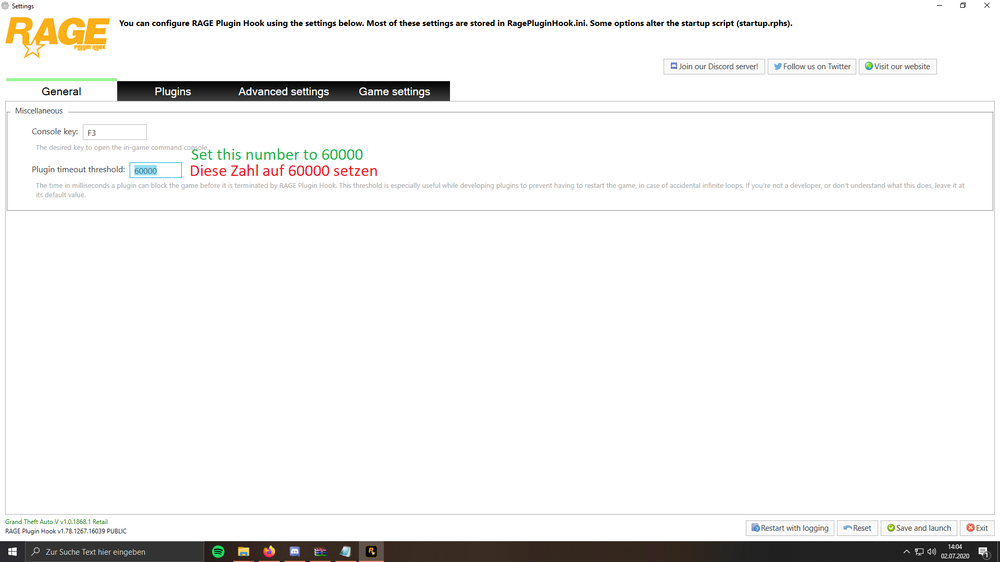
Post your ragepluginhook.log from the main gta folder. set your rph loading time to 60000.
-
Please update RageNativeUI: https://github.com/alexguirre/RAGENativeUI/releases Open it and drag it in the main gta directory, click replace if asked. I recommend to remove LSPDFR+ & TrafficPolicer cause it’s outdated and may cause problems.
-
https://youtu.be/Kx2M5VLgxRg
-
Post your ragepluginhook.log from the main gta folder😃
-
you installed plugins wrong, some belong in gtav/plugins and some in gtav/plugins/lspdfr you can check in the downloaded files where the files should belong
-
Lspdfr+ is outdated, you cannot install it. Pls also remove arrestmanager and saferchasesrph
-
You choose dx11 in the rph settings, maybe remove that chose
-
Post your ragepluginhook.log from the main gta folder 😀
-
You installed the files in gtav/plugins/lspdfr THATS THE WRONG LOCATION right location would be gtav/plugins greetings Chris😁
-
post ragepluginhook.log
-
Pretty sure you installed the cars wrong. have you installed addon vehicles or replace vehicles?
-
You installed all plugins wrong. some plugins need to go to gtav/plugins and some to gtav/plugins/lspdfr you can check that on every plugin by opening the download and following the path or next time just drag and drop all files in the main directory
-
Because of stoptheped realisticweaponsystem. you can disable it in the stoptheped.ini or ingame when standing at the trunk
-
Try to verify your game files: https://www.drivereasy.com/knowledge/how-to-fix-unable-to-launch-game-please-verify-your-game-data/#fix1 search under 1. verify
-
No crash in your log, pls post the log again right after it crashes. do you have a complete game crash to desktop or do you have just a lspdfr crash?
-
Pls update the LSPD First Response.dll inside of gtav/plugins with the latest lspdfr download. Click replace if asked
-
1. post your full rph log pls 2. Install ragenativeui from the link and drag and drop the file in the main directory: https://github.com/alexguirre/RAGENativeUI/releases 3. you installed some plugins. For policemenuv you need: ScriptHook V ScriptHook V Dot Net
-
You crossed the following in the rph Settings: Command line option -nodx is specified. DirectX will not be initialized. this was the issue
-
Ok, do you have the Mods Folder renamed back to Mods? Because you Wrote the Mods Folder is causing this.
-
We cannot tell from the logs what you have in your mods folder. can you play gta on its own?
-
Open commandline.txt from the main gta directory and delete everything in there
-
Pls post your ragepluginhook.log from the main gta folder here
-
Pls update gta
-
The latest rph and lspdfr version are compatible…
-
english forum compagnion



