


Dingleberry
Members
-
Joined
-
Last visited
Everything posted by Dingleberry
-
Federal Signal Smart Siren Platinum
-
.png.9abf0af602e7df2a41864a4ef8923ced.png) What map mod is that?
What map mod is that? -
RAGEPluginHook doesn't show when the game is set to Fullscreen. Be sure to to set it to either Windowed or Windowed Borderless then it should work fine.
-
I am unsure about the lighting but I do know the CHP and that CVPI uses a unique siren made by Whelen specifically made for the CHP. If you would like to find that specific siren you could easily find some samples by searching "CHP siren" in the audio downloads section.
-
I believe many people have uploaded the same siren mod to the site but this one just so happens to be the one I found first when searching on the site so if you want you could search for the same siren and see which one you like best.
-
Whelen Cencom Sapphire Alternative Siren
-
Federal Signal Touchmaster
-
Code 3 Z3
-
San Diego: Federal Signal Smart Siren Platinum 3000B & Federal Signal Unitrol 80k El Cajon: Federal Signal Smart Siren Platinum 3000B
-
Well I'm presuming that he has a carvariations.meta that he uses but I could very well be wrong. I'm not sure where you would put that without a carvariations.meta inside a custom DLC pack but you could try something like mpchristmas2. Also I'm not sure how it would crash your game if you pasted it in the same spot like the other carvariation data for the other vehicles but I do see why it crash if you did it wrong.You can install my vehicles.awc into your game files and then replace my siren files with the siren you want to replace it with. Sorry to make you download it but I don't have my vehicles.awc anymore.Copy and paste this into your carvariations.meta and tell me if it fixes it.Seems like you didn't install one of the vehicle model files of the vehicle. Be sure that you put both of the .yft files (ex. police.yft & police_hi.yft) and the .ytd files (ex. police.ytd and police+hi.ytd). If the car doesn't have a +hi.ytd provided then you are fine and should be good.RAGEPluginHook doesn't show when the game is set to Fullscreen. Be sure to to set it to either Windowed or Windowed Borderless then it should work fine.If the license plate textures are inside the livery files, you want to do the following: 1. Extract the texture file containing the license plate texture inside it (ex. cvpi_sign_1) to an easily accessible location. 2. Open the file you've just extracted using any photo editing of your choice. (ex. paint.net, GIMP, Photoshop, etc.) 3. Replace the license plate image with whatever texture you want. Here's a set of SA Exempt Plates: https://www.lcpdfr.com/files/file/17085-lore-friendly-sa-exempt-vehicle-plates/ 4. Save the file. 5. Drag the file you just edited into the .ytd that it came from and save.I believe it's the Federal Signal Unitrol Omega, which is in the Modern Siren Pack by gravelroadcop. There are other versions of this sirens on this site but you could search for those on your own time.Have you ever tried this one? https://www.gta5-mods.com/tools/add-on-replace-base-folder I have always used this and it works flawlessly for me. Hopefully it should also resolve the issue your having. Also I think this file is the one you're talking about: https://www.gta5-mods.com/tools/carcols-ymt-converted-into-xml-formatSorry to ask this but I've been searching for a while now and still haven't found a LSPD skin pack that doesn't support all the vehicles in the pack. Anyone know of a LSPD skin pack that has support for all of the vehicles in the ELS CHP pack?
 You might have reached the file limit for the vehicles.awc, which mutes all the sirens inside the file when reaching a certain size. I'll update it so it comes with my vehicles.awc.
- 9 comments
- 1 review
-
-

- 1
-
I replaced all my other sirens that aren't used in ELS with blank audio 1 second audio clips. If you'd like I can PM you my vehicles.awc file.- 9 comments
- 1 review
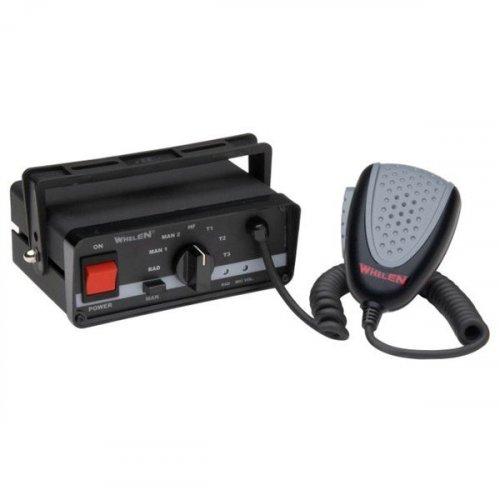
File Name: Whelen Epsilon Siren by Dingleberry Description: This isn't really my first siren but it is the first one I think is ready to upload. Here's a Whelen Epsilon I have made several months back so yeah. What's Inside: -Readme.txt -Siren Audio Files Folder -File Folder Installation: (Basic Installation: Replaces everything inside vehicles.awc. If you have other things in their that don't have any significance then do this. Otherwise, do one of the other steps below.) Drag the contents inside the "File" folder and using OpenIV drag that file into mods/x64/audio/sfx/RESIDENT.rpf. (If you don't already have a .oac) Go into OpenIV and go to mods/x64/audio/sfx/RESIDENT.rpf then right click "vehicles.awc". Then click "Export to OpenFormats (.oac)" and export that to where ever you'd like. Once you've done that you want to follow the steps below. (If you already have a .oac outside of OpenIV) Copy all the contents inside the "Siren Audio Files" folder and copy them into your vehicles.oac. Then drag the vehicles.oac file into mods/x64/audio/sfx/RESIDENT.rpf Video Showcase:- 9 comments
- 1 review
-
-
- 3
-
Previously I was using this account: https://www.lcpdfr.com/profile/303110-frisky/ But ever since my last login on that account, I wasn't able to access/login to it and also my email for that account as well and still to this point cannot access any of those. So is it possible that a moderator/admin can permanently delete that account?

.png.9abf0af602e7df2a41864a4ef8923ced.png)
