


Jetty Bot
Members
-
Joined
-
Last visited
Everything posted by Jetty Bot
-
Upload the file in the screenshot please.

-
I think the problem you're having is that "s_m_y_cop01" isn't a component that can be added to EUP. "s_m_y_cop01" is a ped model so it replaces the default cop model and you have to use a trainer to switch to the model. To replace it in OpenIV go through this path: "mods/x64e/models/climages/components_s_m_y.rpf" Then in game use something like "Enhanced Native Trainer Update 42" (This is what I use and it works great) and look for the cop model when changing your player model. Edit: Oh and to answer your other question EUP allows you to modify any GTA online player model. If you install "LSPDFR EUP Configurations" it will change the AI to use EUP outfits.I assume you are trying to replace it in the "x64e". Try instead going to "mods/update/x64/dlcpacks/patchday(highest #)ng/dlc.rpf/x64/levels/gta5/vehicles.rpf" and replace the vehicles here. Side note: "police4" is actually the unmarked cruiser (Vic). The police van is "policeb".Unfortunately there is no current Sindh police officer models, at least that I can find, your best bet would be to look up haw to make/model and EUP outfit. I also tried looking for other Pakistani police ped/vehicles and there was really only one Punjab province police truck.Stop the ped works perfectly fine and even still receives updates but the author decided to put all of his modifications on his own website that's all.Can you send an updated log.When you are in the car does the siren activate when you press down on the left stick? If yes then you either don't have the xml or the xml is broken. If no then does pressing left on the dpad do anything? Do just the wig-wags or tail lights come on? If yes it can be solved with a simple restart of your computer. Like Stranger said take a screenshot of your pack_default folder and post it.Do you have ScriptHookV?Make your PluginTimeoutThreshold 60,000 instead of 10,000 You can do this in the file named "RagePluginHook" it is directly under the file you use to launch the game I would also recommend loading the plugin while the game is loadingPlease send your Rage crash log found here:
 You also have two mods folders. Things you add to "_mods" won't do anything they will only initialize if they are in "mods". When you see on the forums someone saying "rename mods to _mods" that's because if that fixes your problem it means something is wrong in your mods folder. Renaming your mods folder simply deactivates it. It's not a permanent fix. And make sure your you are going through the right path when replacing vehicles it should be: "mods / update / dlcpacks / patchday(highest #) / dlc.rpf / x64 / levels / gt5 / vehicles.rpf Tell me if anything I said doesn't make sense and I'll try to explain it more to the best of my ability. 😄Please also send your Rage crash log. You can find it here:
 Please sent your Rage crash log located here:
 Make sure if you are using a trainer that the "Police Ignore Player" options aren't on.Try reinstalling the plugin. It could be as simple as you accidentally didn't get one of the files into your game directory. Also make sure that you are dragging and dropping in the main game directory cause correct me if I'm wrong but I think the audio files go in the "lspdfr" folder.
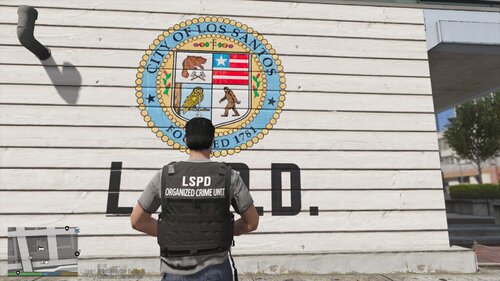 Personally haven't seen a negotiator vest for EUP before. Love the variety this adds. Can't wait to see what else you're gonna do.I think in the process of replacing ped models you did something wrong. Try naming you mods folder to "_mods". This will disable your mods folder. If everything goes back to being normal then it's being caused by something you replaced. I suggest you try installing EUP and EUP config. Those two mods should replace the outfits being worn by your peds so they are actually wearing proper modeled outfits. Tell me if you need clearer step by step instructions 😄Yes. If the file is say "fbi.ytd" or "fbi.xml" just change it to "police2.ytd" or "police2.xml" or whatever car you want it to be under. Just remember that if you make a charger "sheriff2" it will handle like a SUV unless you change the vehicle meta.








Account
Navigation
Search
Configure browser push notifications
Chrome (Android)
- Tap the lock icon next to the address bar.
- Tap Permissions → Notifications.
- Adjust your preference.
Chrome (Desktop)
- Click the padlock icon in the address bar.
- Select Site settings.
- Find Notifications and adjust your preference.
Safari (iOS 16.4+)
- Ensure the site is installed via Add to Home Screen.
- Open Settings App → Notifications.
- Find your app name and adjust your preference.
Safari (macOS)
- Go to Safari → Preferences.
- Click the Websites tab.
- Select Notifications in the sidebar.
- Find this website and adjust your preference.
Edge (Android)
- Tap the lock icon next to the address bar.
- Tap Permissions.
- Find Notifications and adjust your preference.
Edge (Desktop)
- Click the padlock icon in the address bar.
- Click Permissions for this site.
- Find Notifications and adjust your preference.
Firefox (Android)
- Go to Settings → Site permissions.
- Tap Notifications.
- Find this site in the list and adjust your preference.
Firefox (Desktop)
- Open Firefox Settings.
- Search for Notifications.
- Find this site in the list and adjust your preference.