Creators: Due to background reprocessing of files, approvals and file security checks may be delayed. Thanks for your patience.


Jetty Bot
Members
-
Joined
-
Last visited
Everything posted by Jetty Bot
-
There's really nothing I can recommend because I do not know of all the changes you might have made to your mods folder. Like I said before you will just have to remove things until it works. If you can't find what's causing the issue you will just need to make a new mods folder.
-
You have to go through the mods folder and remove any files you may have added or revert any changes you've made in meta files. If you don't remember what you've added or changed then you will need to make a new mods folder.
-
So unfortunately if adding the config and adjusters doesn't fix your issue you will need to revert the last changes you've made to your mods folder until it works again. If you can't find which exact file in your mods folder is causing the game to crash then you will need to restart your mods folder from scratch.
-
If you are unable to launch your game even when you don't launch with RagePluginHook that usually indicates there is an issue in your mods folder. Rename your mods folder to _mods, this will disable the mods folder, and then attempt to launch the game again without RagePluginHook. Let me know if you are able to launch or if the game still crashes.
-
Well the only real crash I'm seeing in your log is an issue with Los Santos RED. It seems to be missing a dependency. I would make sure you have both of the NAudio files that come with Los Santos RED in the main directory. As far as the rest of your log you do have some plugins that I would recommend removing because they are outdated and could be causing issues . AirportCallouts, FBI Callouts, Traffic Control are some of the ones that jump out at me that I would definitely get rid of. At the end of your log I see it ambiently spawns a car before the log ends If it's crashing to desktop in that case you could try setting AmbientSpawn.DisableRandomUnits = true in the lspdfr.ini
-
From what I can tell from the log is that it looks like a random crash so I would just reload and keep playing. Crashing is almost inevitable when playing with modified lspdfr but it looks like you go almost a good 45 minutes of game play which is pretty good There is a couple of plugins you have that I would recommend removing. UK Callouts and Immersive dispatch These plugins are outdated and could cause unseen issues in your game so it is best to remove them
-
I agree I think XScanner is one of those plugins that really improves LSPDFR. I would recommend joining the authors discord he has a ticketing system and will be able to take a look at your debug log and the rage log for XScanner and find a fix. Or if it's an issue with XScanner itself he can work a fix into the next update.
-
No worries I'm always here to help Glad you could figure out it was a pack specific issue Once you get some new cars in your game let me know if you run into anymore issues 😁
-
Hmm Can you screenshot your entire main directory? (multiple screeshots is okay I just want to see all the files)
-
Hmm okay are the lights just static or when you activate the lights with J do only the tail lights seem to function? And I have to ask, do you have ScriptHookV?
-
Texture loss is just something that happens with gta no matter how good your specs are A couple things you can do to prevent it Use less vehicles with super high textures - you can usually replace all the police cars in the game without issue but I would recommend against using replacement cars for peds There's some settings in the lspdfr.ini that could help as well PoliceStation.DisableAmbientSpawn = true and AmbientSpawn.DisableRandomUnits = true Lastly you could look into installing the Resource Adjuster. Keep in mind you will need ScriptHookV and I believe it's 8 gb of VRAM on your GPU for it to work as intended
-
According to your logs it looks like ELS is loading up correctly and there doesn't appear to be any xml files crashing. Are you still getting the same popup message or are the lights just not functioning correctly?
-
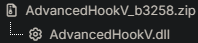
Make sure you're using the newest version of AdvancedHookV It comes as a separate download on the ELS download page If updating that does not fix your issue will you please upload your asiloader.log and els.log both can be found in the main directory
-
Well it depends on the behavior of the peds when you're pulling them over If when you pull someone over they just slam into the guard rail or take hard turns to the right, then I would say that's just GTA peds doing GTA ped things 😅 If when you try to pull someone over they have a tendency to just drive straight forward until they crash then the fix I recommended should fix that 100%
-
Do you have a mods folder? If yes rename it to _mods, this will disable the mods folder, then attempt to load in again
-
Not to step on Lenny's toes but I would recommend setting ElsTrafCtrlOn = false in your els.ini regardless to avoid issues in the future.
-
A couple of questions for you: Are the xml files for the car(s) you installed in els/pack_default? When you're in game are you using J to turn the lights on? If you sit in an els car and press control+p does the ELS control panel appear? If you are using J to turn the lights on, is it just the tail lights that seem to work? Finally can you please upload your asiloader.log and els.log? Both are located in the main directory
-
Well looking through your log I don't see anything that jumps out that would suggest an issue with Grammar Police. I would make sure the mic you're trying to use is set as the default input device I would also make sure you're speaking loud enough and as clear as you can in the mic while holding down the push to talk One thing that has helped me is hold down the push to talk button just a second after you finish speaking before you let go The crash in your log seems to be caused by XScanner but I wouldn't remove it unless the crashing becomes consistent If you continue to have issues with Grammar Police I would recommend joining the authors discord as obviously he is the expert on his own plugin. I apologize I don't have a better solution.
-
It looks like you placed RageNativeUI in plugins/lspdfr RageNativeUI should go in your main directory
-
It looks like it's crashing when loading the duty selection.xml because of an invalid weapon asset. Have you edited that xml or installed any custom weapons? If yes then I would try reverting those changes/removing any weapons you installed and then try going on duty again.
-
Issues with the mods folder can be super frustrating because sometimes it can be hard to find exactly what the root cause of the issue is but I'll give you a couple of steps to try: First I would make sure you have a modified game config, heap limit adjuster, and pack file limit adjuster https://www.gta5-mods.com/misc/gta-5-gameconfig-300-cars https://www.gta5-mods.com/tools/heapadjuster https://www.gta5-mods.com/tools/packfile-limit-adjuster These will help prevent crashing when you're using addons. If those don't solve your issue you may have to start reverting changes you've made in your mods folder until it works This can be uninstalling the last things you added or reverting any changes you made to meta files Unfortunately if you can't find the issue you will have to just start from scratch and make a new mods folder because there is no way for someone to tell you what it is in your mods folder that is causing the game to crash.
-
Are you able to load into the game without RagePluginHook? If yes then once you load into Single Player Alt+Tab out of the game and then try launching Rage If no, do you still have a mods folder in your game? If yes try renaming it to _mods, this will disable the entire mods folder, and then see if you're able to load into the game without RagePluginHook
-
Can you please upload a RagePluginHook.log so I can get some more insight into your issue?

-
Hmm that would be strange for a vehicle to mess with your plugins Can you upload a RagePluginHook.log so I can take a look at it?

-
I'm seeing a couple of things looking through your log All the files that are in the screenshots I attached should be in the main directory and not in plugins/lspdfr The game seems to have crashed because of an issue with XScanner I would keep XScanner in the game and try loading up another session. If/when the game crashes can you send another log? If the game continues to crash due to XScanner it could be an issue with the plugin itself and should be reported to the Author