




boxvader
Members
-
Joined
-
Last visited
Everything posted by boxvader
-
Are you using map editor? A lot of people are mentioning in the comments section for that mod that the latest patch broke the modification. I suggest you remove that and see if it fixes some of your issues. For the trainer error this occurs when your trainer is out of date, try updating to the latest versions to see if that solves the issue.
-
Does ELS load into the game properlly? Can you pull up the control pannel? Do only the headlights and tail lights flash on vehichles?
-
Go to open IV and select ASI manager Next uninstall ASI loader and Open ASI and then re-install both. That's it, load your game back up and your ELS should be working now.
-
If a vehicle has ELS enabled then you must have the ELS modification for the lights to function properly. If you read through the thread I provided a solution to OPs ELS problem. If you are having the same issue it should work for you as well.
-
How very strange, what happens when the game crashes? Is there any error message or does the game simply freeze and force quit?
-
Sound like your ASI loader (dinput8.dl) may be corrupted or broken. I suggest you try re-installing it with a fresh download version, the latest version of script hook always includes it.
-
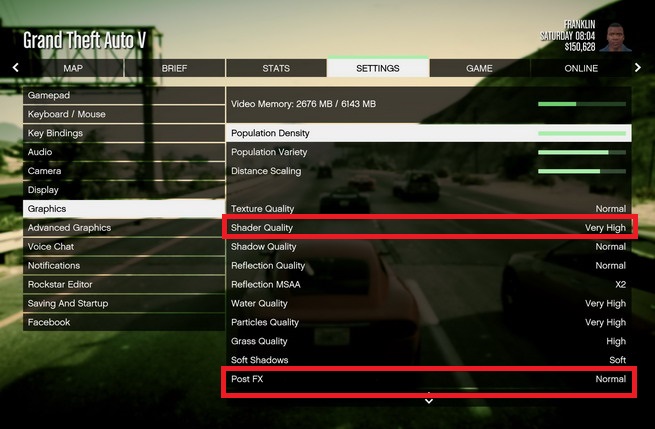
Do you have a visual mod installed like Radiance V? If not then go ahead and put one in that should fix the light problem. If you do or the lights are still dim after installing one check your graphics settings. Make sure Post FX and Shader Quality are both set to at least high. Anything below that and lights will appear dull I highlighted the settings you need to check in this image.
.jpg.adcccad441ede3430a03baa01263f05b.jpg)
-
Most likely this is due to where you are editing the car files at. For police you can edit this in x64e>levels>gta5>vehichles.rpf. For the rest of the police cars you will need to edit them in update>x64>dlcpacks>patchday9 in order to see any type of change. GTA 5 has a built in patch system where the developers can add a simple patch folder which will override the other files in the base game. This can lead to the issue where a new update is pushed for GTA V in which they update a car you modded and it no longer will appear in the game. To circumven this I suggest you upload all the modded car files you wish to use in the latest patchday folder (Currently patchday17). If you do this all the cars should show up in game utilizing the correct vehichles.meta file.
-
Are you using ELS? By defualt ELS toggles sirens with the G,1,2,3,4, and 5 keys. I am curious as why you would want the E key to activate sirens considering it already is used for the police computer.
-
So based on your crash log it looks like Dash Cam V, EUP Menu, LSPDFR, and Spotlight all load in fine. Whatever the game attempts to load after spotlight may be the cause of your crash. It may be PLD, Clear The Way, or Trainer V. I suggest you remove those 3 scripts and attempt to load up your game, if everything loads fine then you know it is one of those three. You can then narrow it down by adding one at a time and trying to load up the game.
-
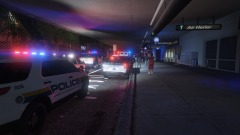
From the album: LSPDFR
WEASEL NEWS REPORTS: At around 10:15 P.M., officers from the LSIA police department responded to the "San Fierre Air" terminal for a report of a suspicious package. Officers located the unattended package inside the terminal in the baggage claim area. An LSIAPD K9, trained in bomb detection, alerted on the package promoting a response from the Los International Airport Police along with the Los Santos Police department. Several units responded to the area including the LSPD Bomb Squad. An immediate evacuation was performed around the area where the package was located, however the entire terminal was not vacated. All flights were grounded while police handled the situation. Details are scarce as to what was inside the package but technicians with the bomb squad claim the package contained no explosive materials. The package was safely discarded and regular operations resumed at the terminal. Being one of the busiest travel days of the year the 3 hour long ordeal created quite the headache for many travelers. The incident caused delays across the airport resulting in many passengers unable to fly out till tomorrow, Christmas Eve. -
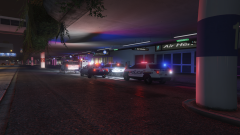
From the album: LSPDFR
WEASEL NEWS REPORTS: At around 10:15 P.M., officers from the LSIA police department responded to the "San Fierre Air" terminal for a report of a suspicious package. Officers located the unattended package inside the terminal in the baggage claim area. An LSIAPD K9, trained in bomb detection, alerted on the package promoting a response from the Los International Airport Police along with the Los Santos Police department. Several units responded to the area including the LSPD Bomb Squad. An immediate evacuation was performed around the area where the package was located, however the entire terminal was not vacated. All flights were grounded while police handled the situation. Details are scarce as to what was inside the package but technicians with the bomb squad claim the package contained no explosive materials. The package was safely discarded and regular operations resumed at the terminal. Being one of the busiest travel days of the year the 3 hour long ordeal created quite the headache for many travelers. The incident caused delays across the airport resulting in many passengers unable to fly out till tomorrow, Christmas Eve. -
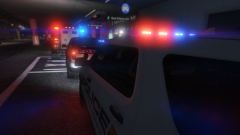
From the album: LSPDFR
WEASEL NEWS REPORTS: At around 10:15 P.M., officers from the LSIA police department responded to the "San Fierre Air" terminal for a report of a suspicious package. Officers located the unattended package inside the terminal in the baggage claim area. An LSIAPD K9, trained in bomb detection, alerted on the package promoting a response from the Los International Airport Police along with the Los Santos Police department. Several units responded to the area including the LSPD Bomb Squad. An immediate evacuation was performed around the area where the package was located, however the entire terminal was not vacated. All flights were grounded while police handled the situation. Details are scarce as to what was inside the package but technicians with the bomb squad claim the package contained no explosive materials. The package was safely discarded and regular operations resumed at the terminal. Being one of the busiest travel days of the year the 3 hour long ordeal created quite the headache for many travelers. The incident caused delays across the airport resulting in many passengers unable to fly out till tomorrow, Christmas Eve. -
Can you provide a crash log (inside a spoiler tag please), along with list of all plugins and scripts you are using.
-
So an update to this post, I am still receiving this error but it is a bit strange. Things I have tried to fix this issue but did not work Re-installation of Scripthook V Removal of All scripts and added back 1 by 1 Updated to Latest Native Trainer I was previously receiving a similar error as script hook but it instead of ScriptHookVDotNet.asi it said NativeTrainerV.asi After the update the error for the trainer no longer shows up Verified Integrity of Game Re-installation of Rageplugin The error does not seem to effect me from playing the game. I can press the okay button on the message and the game will boot up without a problem. In a session where the error pops up on loading, everything works in game perfectly fine. I can start LSPDFR, Trainer V works, ELS works, All LSPDFR plugins work, and the game will run like normal without any sudden crashes. Interestingly this error also does not pop up every time I load up the game. Without making any changes between play sessions there are times where the error will not appear. This is really baffling me so I appreciate any insight any can provide.
-
Works fine for me and I am using the latest ragehook and game patch. I would suggest re-installing EUP to see if that changes anything.
-
This issue has plagued me in the past but luckily there is a simple fix. Go to open IV and select ASI manager Next uninstall ASI loader and Open ASI and then re-install both. That's it, load your game back up and your ELS should be working now.
-
Sometimes the update can screw up things. When you launch GTA V go into your graphics settings and look for Post FX and Shader Quality. If they are set to anything below High the lights will appear dull. The picture below shows you what the graphics menu should look like and I highlighted the two settings you need to check.
-
I would verify the integrity of your game files. Do you have the steam version or Rockstar Client?
-
For the light issue, is your Post FX and shader quality set to high?
-
I keep receiving an error from script hook while the game is loading. Rage starts up just fine and the game goes into the typical loading screen. However after a few minutes an error (displayed below) will pop up and cause me to force stop GTAV.exe through task manager. Anyone have any ideas as to what is causing this along with a possible solution? Thank you in advance! The error message displayed:
-
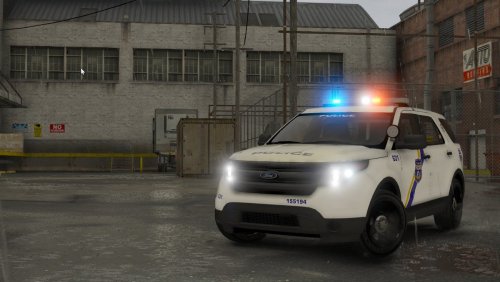 Very well done pack offering a large variety of vehicles to choose from. @Vegas725 does a fantastic job of replicating the Philadelphia police livery and maintains the realism by sticking to only vehicles within their fleet. The lighting on the vehicles is done very well it feels realistic and looks amazing. One downside to this pack is that there are no ELS take downs which is a bit surprising. One of the best features of this pack is the inclusion of multiple extras such as ALPR cameras and additional antennas. This adds some variety to the vehichles and helps your patrol fleets look more unique.
- 47 comments
- 13 reviews
-
-

- 4
-
-
This is a fantastic looking pack and looks spot on to the real thing. Great job! I am curious though in the last picture with all the cars lined up you can see that one of them is a ford police interceptor utility. Any chance you will be releasing that in a future update or is that something that will not be released?
- 47 comments
- 13 reviews
-
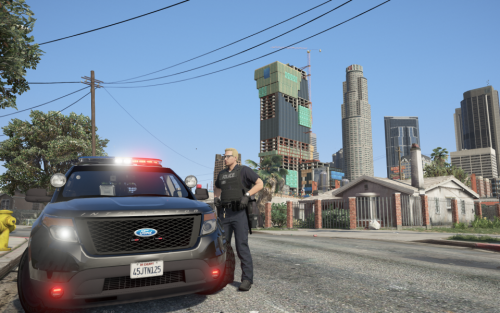 This is a really great looking pack, unfortunately the lights are a really big turn off for me. The colors for the red and blue are way too dark, I prefer a much lighter color which makes it feel more realistic. The traffic advisor is an obnoxiously bright yellow, it would look much better with amber like the police transport van has on the back. I would really like to use this pack in my game but the lights just don't look good. However I do appreciate the time and effort you put into this pack the cars look fantastic.
- 78 comments
- 12 reviews
-
.thumb.png.171ceb3fac9ed766e15269b655550a7a.png) Skins seem pretty cool but without knowing what vehicles these are for it makes it really hard to use them. Could you please update the description with links to the vehicles the textures are designed for.
Skins seem pretty cool but without knowing what vehicles these are for it makes it really hard to use them. Could you please update the description with links to the vehicles the textures are designed for.- 6 comments
- 2 reviews
-
-
- 1
-

.jpg.adcccad441ede3430a03baa01263f05b.jpg)
.thumb.png.171ceb3fac9ed766e15269b655550a7a.png)