


ZZ13
Members
-
Joined
-
Last visited
Everything posted by ZZ13
-
Sounds awesome, can't wait!
-
 Here is a full crash log from a session today. There were two crashes here - the first one crashed just LSPD:FR when searching for a ped manually. The second one crashed the game. The crashes seem spotty though, manual searches don't always seem to trigger one. RagePluginHook.log
- 1,743 comments
- 172 reviews
-
Update worked somewhat I think, I am able to complete some searches but did have another crash when looking up a ped just now.
- 1,743 comments
- 172 reviews
-
 So the first gameconfig crashed at the "populating world" stage w/ RPH. This one allows me to enter the game for around 30sec-1m and then crashes. Launching w/o RPH, no crashes at all. Only running LSPDFR and EUP at the moment for RPH, but I do have 40ish addon cars too. edit: Also running RDE w/ the LSSD and BCSO addons too.
- 1,521 comments
- 85 reviews
-
 Getting the same crashes as above. Using the RageNativeUI.dll supplied in the download.
- 635 comments
- 72 reviews
-
-

- 1
-
-
.gif.ef71e5660a9974a47d7678c5aa25d9ea.thumb.gif.e29002164b287fddeca8c59836e258bc.gif) RPH asking to unblock a DLL in the plugins folder is pretty normal for a first run, no? Here is the virustotal report for the file.
RPH asking to unblock a DLL in the plugins folder is pretty normal for a first run, no? Here is the virustotal report for the file.- 42 comments
- 13 reviews
-
 Better EMS was the last thing to load before a crash after upgrading to RPH 40 for me as well. But it wasn't Better EMS - it was CleartheWay. Removing that allowed LSPDFR to load and the rest of my plugins, including this one, worked fine.
- 783 comments
- 86 reviews
-
-
- 1
-
-
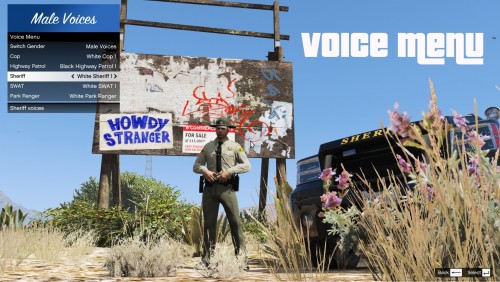 Simple and works perfectly. Much better than the method I was using; scrolling through Simple Trainer's voice menu.
 -
 Awesome mod, thanks! No footprints/car tracks seemed to only occur when loading the plugin at startup rather than manually. After using the console command to toggle snow off and then back on it worked perfectly.
- 85 comments
- 33 reviews

.gif.ef71e5660a9974a47d7678c5aa25d9ea.thumb.gif.e29002164b287fddeca8c59836e258bc.gif)
