




waynieoaks
Members
-
Joined
-
Last visited
Everything posted by waynieoaks
-
...If only I had some friends... :-)
-
 It is probably just me trying to use the callout manager, but I always get these calls as code 4 - disregard as soon as I accept them.
- 21 comments
- 1 review
-
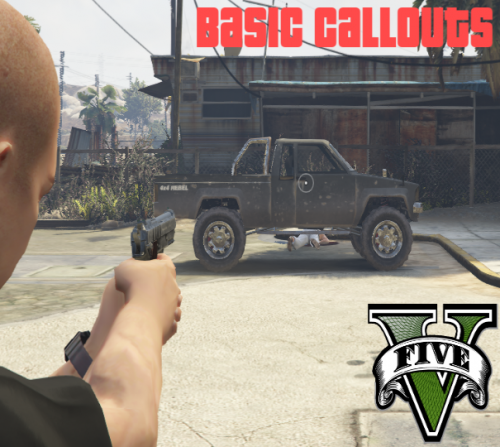 I am using this pack on 0.4.8 and have not noticed any problems... Well, one problem - if I arrest the suspect, the plugin announces "Code 4 - suspect is dead" - But other than that, no problems. Well, one other problem - on the ammo callout the guy outside always picks a fight with me - but that could just be my c****y driving, so other than that, I have not seen any problem with these callouts in 0.4.8
- 58 comments
- 12 reviews
-
Hi Did you remove the old plugins? Arrest Manager, interaction + and Speed Radar. Did you update the Stop the Ped / Compulite plugins? Can you try removing all the plugins and just having LSPDFR - do you still have glitches and lag? What spec is your PC?
-
.thumb.png.31a1a0f7456f4ec57f4c85ba155ee3b7.png) Hi, Personally, I would ForceDuty first, as after may undo something you recovered - e.g. the uniform, weapon loadout. While this was going to be LSPDFR dependant, we removed that half way through so you didn't have to be in LSPDFR to use it.
Hi, Personally, I would ForceDuty first, as after may undo something you recovered - e.g. the uniform, weapon loadout. While this was going to be LSPDFR dependant, we removed that half way through so you didn't have to be in LSPDFR to use it. -
Hi Pretty much the same way you installed them, just with the latest versions off the website.
-
Hi Have you updated to the latest version of Stop the Ped? (4.9.3.1) Are you on the latest version of LSPDFR (0.4.8)? Arrest Manager, interaction + and Speed Radar are rather old plugins that can cause problems. Stop The Ped should give you most, if not all the features from Arrest manager. I would remove Arrest Manager, interaction + and Speed Radar. I would look at Speed Radar Lite by the same author as Stop the Ped (also available on his website) to replace Speed Radar. I cannot find Road Incident Callouts, is that also an older plugin? Charges and citations are usually just xml files for Compulite. What issues are you having there? Have you tried either pressing the fn key to turn it off or holding the fn key when you press F4? It sounds like that fn key is active, making the F4 key control screen brightness.
-
Hi - I usually use https://www.xmlvalidation.com/ but it appears to be down with a 503 error. I have used this one as well: you just copy the XML code and paste and it will say something like error on line 427, with a description of the problem. https://www.liquid-technologies.com/online-xml-validator
-
Hi 1. Can you explain what you mean by "glitches", I am afraid I do not understand 2. Unfortunately some do work and some do not (especially older ones). Which ones are you having problems with? 3. Do you have a "fn" key on your keyboard? https://www.computerhope.com/jargon/f/fn.htm as this may be making F4 do something else instead of F4.
-
Hi There are a few add-ons that people have done for Stop the Ped. I use this one but there are others on the downloads section of the site.
-
I think it is possible to host yourself but a lot of hassle, things not working, etc. $x a month, you don't have to worry about bandwidth, port forwarding, firewall rules, etc.
-
Hi When you installed Stop the Ped, did you put the RageNativeUI files in the root of your install? As these are the files (used by Rage plugins) to show the menus.
-
Judging by the message you have a rogue < in your XML. So where you added the coroner van just check that the tags are OK and you don't have any missing or extra < or > in there. I have this issue sometimes with my fat fingers, so when I have an issue run it through an online xml validator to show me the exact line I messed up. There are several online if you have a google.
-
No worries - but from what you have shown me only the chance seemed off but I tested that and it didn't make a difference. All I can suggest is double check all the bcso bits in all the xmls in the custom folder, comparing them with lssd (for example). I am happy to send you all of my xml files, although I am getting a game crash occasionally at beaver bush which I am sure is because something is wrong in my xml - but I cannot for the life of me work out what. Also happy to look through yours if it will help but I may not spot anything
-
What mods have you installed through the mods folder? Can you try renaming mods to something like _mods and try again as it sounds like it could be something in that folder.
-
Hi So I only have 2 vehicles set, but here is how it is in my xml. I tried making my numbers not add up and go over 100 and still was able to see a couple driving around. <Agency> <Name>Blaine County Sheriff Office</Name> <ShortName>BCSO</ShortName> <ScriptName>bcso_juri</ScriptName> <Inventory>patrol_eup</Inventory> <TextureDictionary>dia_police</TextureDictionary> <TextureName>dia_police</TextureName> <Loadout chance="85"> <Name>County Patrol</Name> <Vehicles> <Vehicle chance="80">bcso</Vehicle> <Vehicle chance="20">bcso2</Vehicle> </Vehicles> <Peds> <!-- 70% chance of male peds --> <Ped chance="15" outfit="bcso_class_a.m_base">mp_m_freemode_01</Ped> <!-- Class A outfit (Base) --> <Ped chance="5" outfit="bcso_class_a">mp_m_freemode_01</Ped> <!-- Class A outfit (Any variation) --> <Ped chance="20" outfit="bcso_class_b.m_base">mp_m_freemode_01</Ped> <!-- Class B outfit (Base) --> <Ped chance="5" outfit="bcso_class_b">mp_m_freemode_01</Ped> <!-- Class B outfit (Any variation) --> <Ped chance="20" outfit="bcso_class_c.m_base">mp_m_freemode_01</Ped> <!-- Class C outfit (Base) --> <Ped chance="5" outfit="bcso_class_c">mp_m_freemode_01</Ped> <!-- Class C outfit (Any variation) --> <!-- 30% chance of female peds --> <Ped chance="5" outfit="bcso_class_a.f_base">mp_f_freemode_01</Ped> <!-- Class A outfit (Base) --> <Ped chance="1" outfit="bcso_class_a">mp_f_freemode_01</Ped> <!-- Class A outfit (Any variation) --> <Ped chance="9" outfit="bcso_class_b.f_base">mp_f_freemode_01</Ped> <!-- Class B outfit (Base) --> <Ped chance="2" outfit="bcso_class_b">mp_f_freemode_01</Ped> <!-- Class B outfit (Any variation) --> <Ped chance="10" outfit="bcso_class_c.f_base">mp_f_freemode_01</Ped> <!-- Class C outfit (Base) --> <Ped chance="3" outfit="bcso_class_c">mp_f_freemode_01</Ped> <!-- Class C outfit (Any Variation) --> <!-- for outfits selection --> <Ped chance="0" outfit="bcso_raincoat">mp_m_freemode_01</Ped> <Ped chance="0" outfit="bcso_raincoat">mp_f_freemode_01</Ped> </Peds> <NumPeds min="1" max="2" /> <Flags> <Flag>RespondsAsBackup</Flag> <Flag>SpawnsAmbiently</Flag> </Flags> </Loadout> <Loadout chance="15"> <Name>Motorcycle Unit</Name> <Vehicles> <Vehicle>sheriffb</Vehicle> </Vehicles> <Peds> <!-- 70% chance of male peds --> <Ped chance="15" inventory="motor_eup" outfit="bcso_motor_a.m_base">mp_m_freemode_01</Ped> <!-- Class A outfit (Base) --> <Ped chance="5" inventory="motor_eup" outfit="bcso_motor_a">mp_m_freemode_01</Ped> <!-- Class A outfit (Any variation) --> <Ped chance="20" inventory="motor_eup" outfit="bcso_motor_b.m_base">mp_m_freemode_01</Ped> <!-- Class B outfit (Base) --> <Ped chance="5" inventory="motor_eup" outfit="bcso_motor_b">mp_m_freemode_01</Ped> <!-- Class B outfit (Any variation) --> <Ped chance="20" inventory="motor_eup" outfit="bcso_motor_c.m_base">mp_m_freemode_01</Ped> <!-- Class C outfit (Base) --> <Ped chance="5" inventory="motor_eup" outfit="bcso_motor_c">mp_m_freemode_01</Ped> <!-- Class C outfit (Any variation) --> <!-- 30% chance of female peds --> <Ped chance="5" inventory="motor_eup" outfit="bcso_motor_a.f_base">mp_f_freemode_01</Ped> <!-- Class A outfit (Base) --> <Ped chance="1" inventory="motor_eup" outfit="bcso_motor_a">mp_f_freemode_01</Ped> <!-- Class A outfit (Any variation) --> <Ped chance="9" inventory="motor_eup" outfit="bcso_motor_b.f_base">mp_f_freemode_01</Ped> <!-- Class B outfit (Base) --> <Ped chance="2" inventory="motor_eup" outfit="bcso_motor_b">mp_f_freemode_01</Ped> <!-- Class B outfit (Any variation) --> <Ped chance="10" inventory="motor_eup" outfit="bcso_motor_c.f_base">mp_f_freemode_01</Ped> <!-- Class C outfit (Base) --> <Ped chance="3" inventory="motor_eup" outfit="bcso_motor_c">mp_f_freemode_01</Ped> <!-- Class C outfit (Any Variation) --> </Peds> <NumPeds min="1" max="1" /> <Flags> <Flag>RespondsAsBackup</Flag> <Flag>SpawnsAmbiently</Flag> </Flags> </Loadout> <Loadout> <Name>Transport Unit</Name> <Vehicles> <Vehicle chance="80">sherifft</Vehicle> <Vehicle chance="5">saspacar</Vehicle> <Vehicle chance="5">saspacar2</Vehicle> <Vehicle chance="5">saspacar3</Vehicle> <Vehicle chance="5">saspacar4</Vehicle> </Vehicles> <Peds> <Ped chance="10" outfit="bcso_class_a.m_base">mp_m_freemode_01</Ped> <!-- Class A outfit (Base) --> <Ped chance="20" outfit="bcso_class_b.m_base">mp_m_freemode_01</Ped> <!-- Class B outfit (Base) --> <Ped chance="40" outfit="bcso_class_c.m_base">mp_m_freemode_01</Ped> <!-- Class C outfit (Base) --> <Ped chance="6" outfit="bcso_class_a.f_base">mp_f_freemode_01</Ped> <!-- Class A outfit (Base) --> <Ped chance="9" outfit="bcso_class_b.f_base">mp_f_freemode_01</Ped> <!-- Class B outfit (Base) --> <Ped chance="15" outfit="bcso_class_c.f_base">mp_f_freemode_01</Ped> <!-- Class C outfit (Base) --> </Peds> <NumPeds min="1" max="2" /> <Flags> <Flag>RespondsAsTransport</Flag> </Flags> </Loadout> </Agency> Do the correct vehicles spawn in the other areas (city / LSSD)?
-
Kool - I finish work in 45 mins, so when I get back online I can share how mine is set up for you to compare when I get home as they are spawning for me in BCSO.
-
Hi - it could be the chance numbers. I believe these have to add up to 100% in total, so if you change the bcsostanier from 50 to 10, that should then add up to 100 and (I believe) they will then start spawning. I too have been for weeks building up custom vehicles for this jurisdictions 🙂
-
Hi, So you are trying to get the add on cars to show up for BCSO in the garage when you go on duty and to spawn around the area as "on patrol". I believe you need to add them to the right part of the agency_police_summer.xml file
-
Ah - OK - I will send you a private message as I use Simple Trainer and may have a couple of suggestions that may help and if not, the people over on the support forums may be able to help you better. https://www.lcpdfr.com/forums/forum/909-gta-v-support/
-
Hi @Officer K Slimm, Disable key bindings? Do you mean the ones used in this script? Or which key bindings are a nightmare for you?
-
Hi If you take the file and drag it across into the reply message box it should attach to your message. Alternatively, you can click "Or choose files" option at the bottom of the text box and navigate to find it and attach.
-
Hi, Stop the ped is not compatible with 0.4.8 (yet) so keep an eye out on the authors site and there should be an update available when he can.
-
I second this, and love using my G29 on patrol and pursuits. Still need to tweak my oversteer a little though. I also have the "Farming side panel" that I use to control lights, sirens, searchlight (with the joystick) so would recommend that too but it is a little pricy (I got mine second hand of eBay).
-
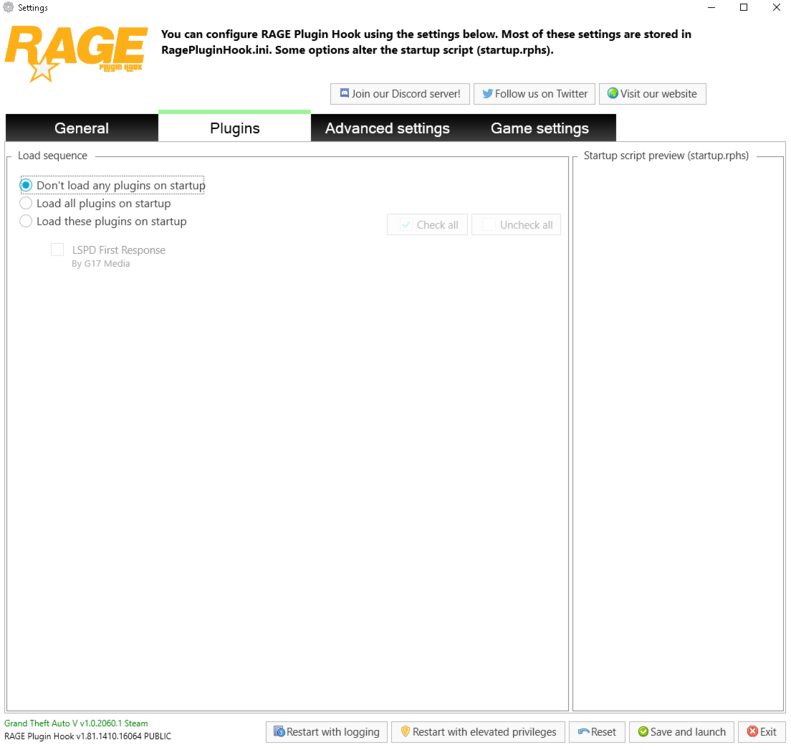
Hi I cannot see LSPDFR being loaded by Rage Plugin Hook. If you start Rage Plugin Hook holding down the shift key as it starts you should get to the settings pages again, where on the plugins tab you can select "Load all plugins" or "Load these plugins" Then click Save and Launch. Alternatively, you can load LSPDFR once in by pressing F4 and in the console typing "LoadPlugin LSPD First Response"

.thumb.png.31a1a0f7456f4ec57f4c85ba155ee3b7.png)

