


twc779
Members
-
Joined
-
Last visited
Everything posted by twc779
-
Thanks for the tip! I'll try it out once I figure out how to use zmodeler again after 4 years lol.
-
The first guy told me to update already up to date plugins lol and do you really think "well like he said its not. remove them you get prop less crashes." is helpful? I'd probably have more problems if I listened to your advice.
-
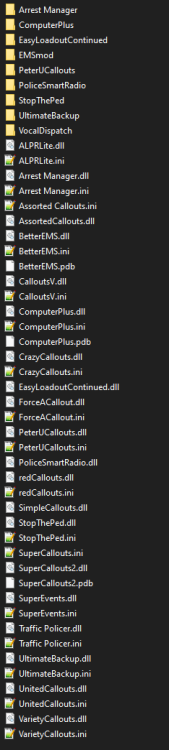
Those plugins are up all up to date according to my log and each mod's download page. Where are you looking that tells you they are out of date? Assorted Callouts Log: [6/6/2020 8:41:03 PM.068] LSPD First Response: AssortedCallouts, Version=1.2.0.0, Culture=neutral, PublicKeyToken=null Download page: Assorted Callouts (Bank Heist, Store Robbery & More) 1.2.0.0 Arrest Manager Log: [6/6/2020 8:41:03 PM.028] LSPD First Response: Arrest Manager, Version=7.11.0.0, Culture=neutral, PublicKeyToken=null Download page: Arrest Manager (Grab Peds, More Jail Points, Prisoner Transport & more) 7.11.0.0 Traffic Policer Log: [6/6/2020 8:41:03 PM.152] LSPD First Response: Traffic Policer, Version=6.16.0.0, Culture=neutral, PublicKeyToken=null Download page: Traffic Policer (Breathalyzer, Traffic Offences, Speed Detection & more) 6.16.0.0
-
Those plugins are all up to date according to their respective download pages and my rage log. Are there newer versions located elsewhere?
-
Hi all, So i recently got back into playing LSPDFR but for some reason my game (not LSPDFR) but the game itself will crash every 10 minutes or so after going on duty. Nothing in my rage log seems to point at anything in particular. Possible related, I've experienced odd issues here and there like police vehicle models missing some components like wheels and every now and then there are moments where game textures will start flickering or disappearing. Help would be appreciated!

-
 I just found this post on their forum, perhaps an updated version of their SDK? http://forum.corsair.com/v3/showthread.php?t=179027
- 114 comments
- 13 reviews
-
Plugin crashes with message "No supported SDK available" with a corsair keyboard. Am I missing something?
- 114 comments
- 13 reviews
-
Take a look in here: http://www.lcpdfr.com/downloads/dev-resources/lightbars/ I'm currently using this one:
-
Cool, PC version 2024 release date.
-
I'm saying that the trainer is letting me switch through all the default plates, which is weird because I deleted those textures.
-
So I made sure the textures were named something other than what is in vehshare, I deleted all other plates from the ytd, and I changed the material to interior2 but it still looks like this: And I can still go through my trainer and cycle through the default plates
-
The plate textures are already named something other than what's in vehshare. I also don't want to change the ones in vehshare because I want to release this model at some point with the correct plates.
-
What you mean? I put them in the .ytd file after mapping them in zmodeler.
-
Here is what I'm looking at in Zmodeler...textures and materials related to the license plate: As you can see all looks fine in zmodeler. In game is a different story. I tried naming the textures after their original counterparts (plate01 and plate01_n) with no success. I also tried changing the material for the LP from vehicle_licenseplate to anything else..like interior, paint, etc.
-
Is there a way to remove the default license plate in zmodeler? I tried remapping it to a custom one of my choice but it still shows as SA EXEMPT in game with my custom one popping in and out every few seconds...this also happens when I change the material to something else other than vehicle_licenseplate. The model looks how I want it to in zmod3 but not in game. I have tried adding a carvariations meta file to the patch folder as well where the model is located with no success. I just want to be able to replace the SA license plate and keep the existing plate holder model. I also tried adding my own bumpmap. Thanks!
-
Hi all, trying to put together a FPIU with a liberty bar. However, I am having some trouble with it as some of the lights on the bar burn steady while others work just fine. Here are some pics: I am still fairly new to the modeling scene, especially when it comes to ELS. I tried just randomly attaching random lights together which fixed some but caused others to have the same issue. Help would be greatly appreciated!
-
Still no luck :/ I think I might just start over, I didn't do too much to the model anyway. Thanks for the help! :D
-
This what you looking for?
-
I just unlinked them to take the screenshot, they were linked when I tried it in game
-
Tried what you suggested but unfortunately the wheels are still messed up.
-
Hi all, So after a long time of skinning vehicles for GTA IV/V I decided to teach myself to do some basic modeling in zmodeler3. I am currently working on a 2016 FPIU, however when I put it in game the wheels are sideways, at a 90 deg. angle to the car's body. Here's a pic: Oddly enough, the vehicle drives just fine and all the textures are there. In both Zmod and OpenIV the model looks just fine in preview but obviously in-game it's a different story. Help would be greatly appreciated!
-
Hi there, I was just wondering if there is an ENB or some sort of mod that improves emergency lighting reflection off of walls and objects. All I see right now is the reflection of my headlights but there is neither a blue nor red reflection coming off of any walls or objects which kind of takes away from the realism. Help is greatly appreciated :D
-
 So, this mod always seems to crash on me. I am looking at the RAGE log and it looks like it crashes as the mod is trying to give me a flashlight. Have you seen this issue before? [3/12/2016 9:15:02 PM.534] LSPD First Response: ============================== [3/12/2016 9:15:02 PM.534] LSPD First Response: UNHANDLED EXCEPTION DURING GAME THREAD TICK [3/12/2016 9:15:02 PM.534] LSPD First Response: ------------------------------ [3/12/2016 9:15:02 PM.534] LSPD First Response: Origin: Game fiber "<UNNAMED THREAD>". [3/12/2016 9:15:02 PM.534] LSPD First Response: ------------------------------ [3/12/2016 9:15:02 PM.535] LSPD First Response: Exception type: System.InvalidOperationException [3/12/2016 9:15:02 PM.535] LSPD First Response: Exception message: Cannot load an invalid weapon asset. [3/12/2016 9:15:02 PM.535] LSPD First Response: ------------------------------ [3/12/2016 9:15:02 PM.535] LSPD First Response: Inner exceptions: [3/12/2016 9:15:02 PM.535] LSPD First Response: ------------------------------ [3/12/2016 9:15:02 PM.535] LSPD First Response: Stack trace: [3/12/2016 9:15:02 PM.535] LSPD First Response: at Rage.WeaponAsset.LoadAndWait() [3/12/2016 9:15:02 PM.535] at Rage.PedInventory.GiveFlashlight() [3/12/2016 9:15:02 PM.535] at HEROCOP.Main.<HeroCopUpdate>b__41_0() [3/12/2016 9:15:02 PM.535] at Rage.GameFiber.Main() [3/12/2016 9:15:02 PM.535] LSPD First Response: ============================== [3/12/2016 9:15:02 PM.536] LSPD First Response: [3/12/2016 9:15:02 PM.670] ForceDuty: Thread was being aborted.
- 542 comments
- 98 reviews
-
-
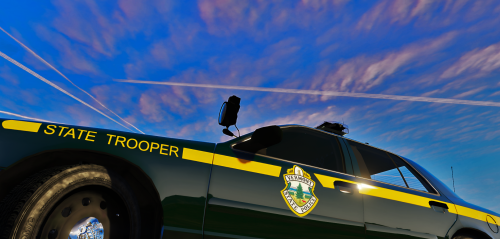 Hey all, Hopefully you have seen my Vermont State Police pack for GTA 4, released in 2013. The primary skin comes directly from that pack, while the rest (K9, DUI Patrol, and Traffic Ops.) are based on it. I recommend you use Gump's FHP CVPI (Police4): Instructions for installation are located in the README file. I will be working on the entire fleet in the future. Though I do not have an an exact ETA. Thanks and I appreciate feedback!
- 5 comments
- 2 reviews
-
-

- 2
-


