




GrandTheftPD
-
Joined
-
Last visited
Everything posted by GrandTheftPD
-
.png.7e0e742cdcf270071fe6df2dca07991a.png)
From the album: Custom Textures / Works In Progress
Cranston uniform and charger. They still use 1 or 2 all black chargers exactly like this. Simple blacked out texture with RI plates.© GrandTheftPD
-
.png.1fc9119f271851a8764df2946d40f140.png)
From the album: Custom Textures / Works In Progress
Cranston skin for the FPIS to match the trucks.© GrandTheftPD
-
 This model by BufordT + the taser sound by thisisntmyname + the x26 weapon wheel icon by straitdill = PURE GOLD.
- 86 comments
- 33 reviews
-
5 Stars great model and lots of options to set it up however you like. Nicely done.
- 86 comments
- 33 reviews
-
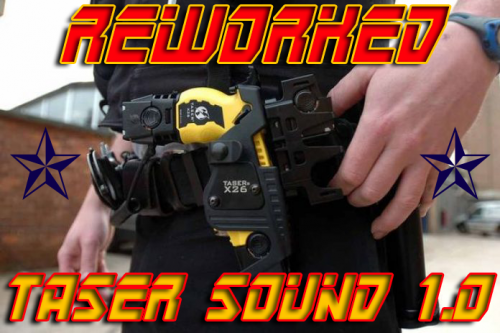 This should be listed on the essential mods page LOL 5/5 Great work Must have for anyone who uses the taser nice job👍
- 20 comments
- 6 reviews
-
I had the same problem @EliteOnThePC In this download are 2 .wav files Charge and 0x1178999f. After you extract them from the download change the name of 0x1178999f to GTA5_GUN_STUN1 and then follow the directions in the download just as you normally would have. That fixed it for me hopefully it works for you.
- 20 comments
- 6 reviews
-
-

- 1
-
-
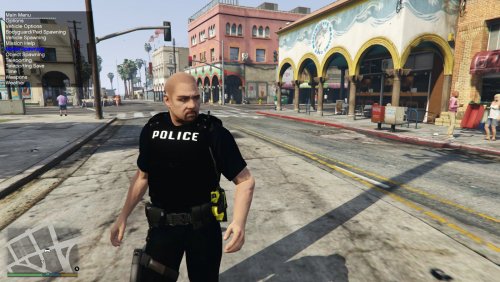 Lol i tend not to PM people because most dont answer and I know it can be annoying to spend all that time modeling something only to have people ask you to change it and tailor it to their preferences (not to mention i can only imagine how many messages you've dealt with about this belt lol). Also I assumed since your release of LE Redated and lack of updates on these that you had moved on from these models. That being said i did just decide to use these leg holster or not because ive been wanting to install them for the longest time. I was just working on tweaking my uniform textures to work with them so if you are willing to help me out with the leg holster thing that would be amazing. Feel free to pm me or whatever and thanks for your time on all this ✌️@majorpaine2015
- 28 comments
- 15 reviews
-
So the only thing thats kept me from using these ped models is that leg holster. The only time i ever see it used is on k9 handlers and i dont like the look of my NPC units showing up and some of them randomly have leg holsters on for no reason. I would assume i would need the unlocked model to change that unless there is some way to control which accessories are selected by NPCs through the custom backup plugin or something? (not sure if that would affect all npcs or just called in backup units) So my question is this: Is there any way I can use these peds without the leg holster randomly spawning on NPCs? Obviously i love that belt just like everyone else since its release and would really prefer to use these models over the vanilla lspd but i know they havent been updated in a few years and probably wont be any time soon so if theres any way to accomplish this other than editing the unlocked model please let me know @majorpaine2015
- 28 comments
- 15 reviews
-
.png.c75246d6ef21e9dff21cf40b06dad559.png)
-
.png.baa55493bf6aeb7421e923b6d97bccb9.png)
-
.png.78665bfbc566e8ad473dfea584c7c075.png)
From the album: Custom Textures / Works In Progress
Another shot of the longsleeve cranston uniform and FPIU© GrandTheftPD
-
.png.9317d15f6b5e3ca2205dbea431550d9f.png)
From the album: Custom Textures / Works In Progress
EMS skins in progress to use with the police units and uniforms. Working on a ladder truck as well all based off the vehicles they actually use.© GrandTheftPD
-
.png.f840d870384b41dfb42339064fd7dfd1.png)
-
.png.47f5f6ea2fa3e517718380003e7226d3.png)
-
.png.82586e09d189c3902927ff4b752f174e.png)
From the album: Custom Textures / Works In Progress
Remade the RI State skin to fit the newer model FPIUs as well. Also adjusted the lights to get the all red setup they use.© GrandTheftPD
-
.png.92d4f941999e14ebaca21d9901990d61.png)
From the album: Custom Textures / Works In Progress
Adjusted the Cranston skin to fit the 2016 FPIU. Should fit any model that uses thehurks template.© GrandTheftPD
-
.png.8792e3f670882769e565e6479fd78daa.png)
From the album: Custom Textures / Works In Progress
Cranston Police Windbreaker, Hat, and Necklace Badge© GrandTheftPD
-
.png.557d5409a55999b29da1514231624f58.png)
From the album: Custom Textures / Works In Progress
Rhode Island State Police Necklace ID Badge. Reskinned the sahp badge from EUP.© GrandTheftPD
-
.png.ac352b19cbfcfaf8591e42188298a4ba.png)
-
.png.2678f6e78f0359f590581c776e97f681.png)
From the album: Custom Textures / Works In Progress
RI State Police Windbreaker, Hat, and Unmarked Vehicle Skin CVPI vehicle model from vespucci beach pack by @t0y© GrandTheftPD
-
.png.ed13fc9e1e3fb99aa69f6e20b0928f0d.png)
From the album: Custom Textures / Works In Progress
Black State Police Windbreaker / RI State Police Vehicle Skin CVPI model from vespucci beach pack by @t0y© GrandTheftPD
-
.png.d91ad38833a1f1b0b8f1f9896748b48a.png)
From the album: Custom Textures / Works In Progress
made a longsleeve version of the cranston uniform© GrandTheftPD
-
-
.png.648f93c8c9b5d1838765a183c1217eac.png)
From the album: Custom Textures / Works In Progress
Just messing around with some radio textures -
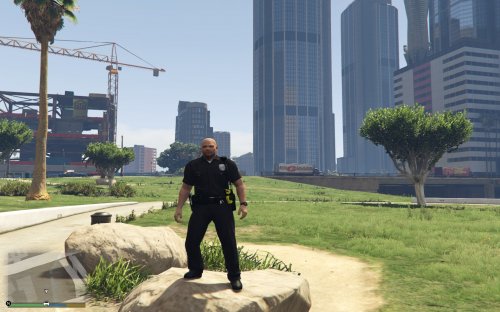 How do you use the belt with EUP? If anyone knows let me know thanks. @majorpaine2015
- 16 comments
- 5 reviews

.png.7e0e742cdcf270071fe6df2dca07991a.png)
.png.1fc9119f271851a8764df2946d40f140.png)
.png.c75246d6ef21e9dff21cf40b06dad559.png)
.png.baa55493bf6aeb7421e923b6d97bccb9.png)
.png.78665bfbc566e8ad473dfea584c7c075.png)
.png.9317d15f6b5e3ca2205dbea431550d9f.png)
.png.f840d870384b41dfb42339064fd7dfd1.png)
.png.47f5f6ea2fa3e517718380003e7226d3.png)
.png.82586e09d189c3902927ff4b752f174e.png)
.png.92d4f941999e14ebaca21d9901990d61.png)
.png.8792e3f670882769e565e6479fd78daa.png)
.png.557d5409a55999b29da1514231624f58.png)
.png.ac352b19cbfcfaf8591e42188298a4ba.png)
.png.2678f6e78f0359f590581c776e97f681.png)
.png.ed13fc9e1e3fb99aa69f6e20b0928f0d.png)
.png.d91ad38833a1f1b0b8f1f9896748b48a.png)
.png.648f93c8c9b5d1838765a183c1217eac.png)
